Microsoft excel
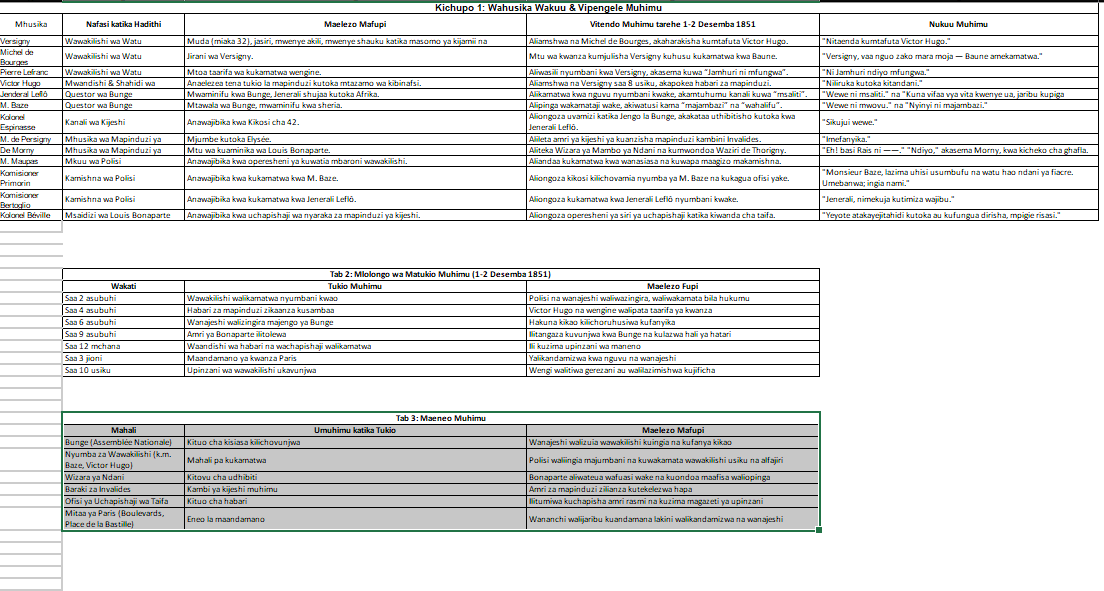
1. Data Extraction and Analysis
The first step is to read the novel carefully to identify and extract key plot points and events. This involves a meticulous analysis of the narrative to determine significant moments, such as a major character's decision, a crucial conversation, or a change in setting. Each event is isolated and its core details are noted, including the chapter it occurs in, the characters involved, and a brief description of the event itself.
2. Structuring Data in an Excel Spreadsheet
Next, a structured Excel sheet is created to organize the extracted information. The spreadsheet is set up with specific columns to categorize the data efficiently. Typical column headers would include:
Event ID: A unique identifier for each event.
Chapter: The chapter number where the event takes place.
Event Description: A concise summary of the event in the original language.
Characters Involved: A list of the main characters participating in or affected by the event.
Setting: The location where the event occurs.
Timeline: The approximate time or date within the novel's narrative.
This structured approach ensures that all relevant data points are captured and easy to reference.
3. Translation to Swahili
Finally, the completed data, specifically the text in columns like Event Description and Characters Involved, is translated into Swahili. This can be done using a reliable translation tool or by a professional translator to ensure accuracy. The translated content is then entered into new columns, such as Tukio la Kiswahili (Swahili Event) and Wahusika Wanaohusika (Characters Involved in Swahili), creating a bilingual dataset that documents the novel's entire plot in two languages.
The first step is to read the novel carefully to identify and extract key plot points and events. This involves a meticulous analysis of the narrative to determine significant moments, such as a major character's decision, a crucial conversation, or a change in setting. Each event is isolated and its core details are noted, including the chapter it occurs in, the characters involved, and a brief description of the event itself.
2. Structuring Data in an Excel Spreadsheet
Next, a structured Excel sheet is created to organize the extracted information. The spreadsheet is set up with specific columns to categorize the data efficiently. Typical column headers would include:
Event ID: A unique identifier for each event.
Chapter: The chapter number where the event takes place.
Event Description: A concise summary of the event in the original language.
Characters Involved: A list of the main characters participating in or affected by the event.
Setting: The location where the event occurs.
Timeline: The approximate time or date within the novel's narrative.
This structured approach ensures that all relevant data points are captured and easy to reference.
3. Translation to Swahili
Finally, the completed data, specifically the text in columns like Event Description and Characters Involved, is translated into Swahili. This can be done using a reliable translation tool or by a professional translator to ensure accuracy. The translated content is then entered into new columns, such as Tukio la Kiswahili (Swahili Event) and Wahusika Wanaohusika (Characters Involved in Swahili), creating a bilingual dataset that documents the novel's entire plot in two languages.

 Сингапур
  Свободен для работы