Create a Telegram bot notification for Calendly
AI та машинне навчання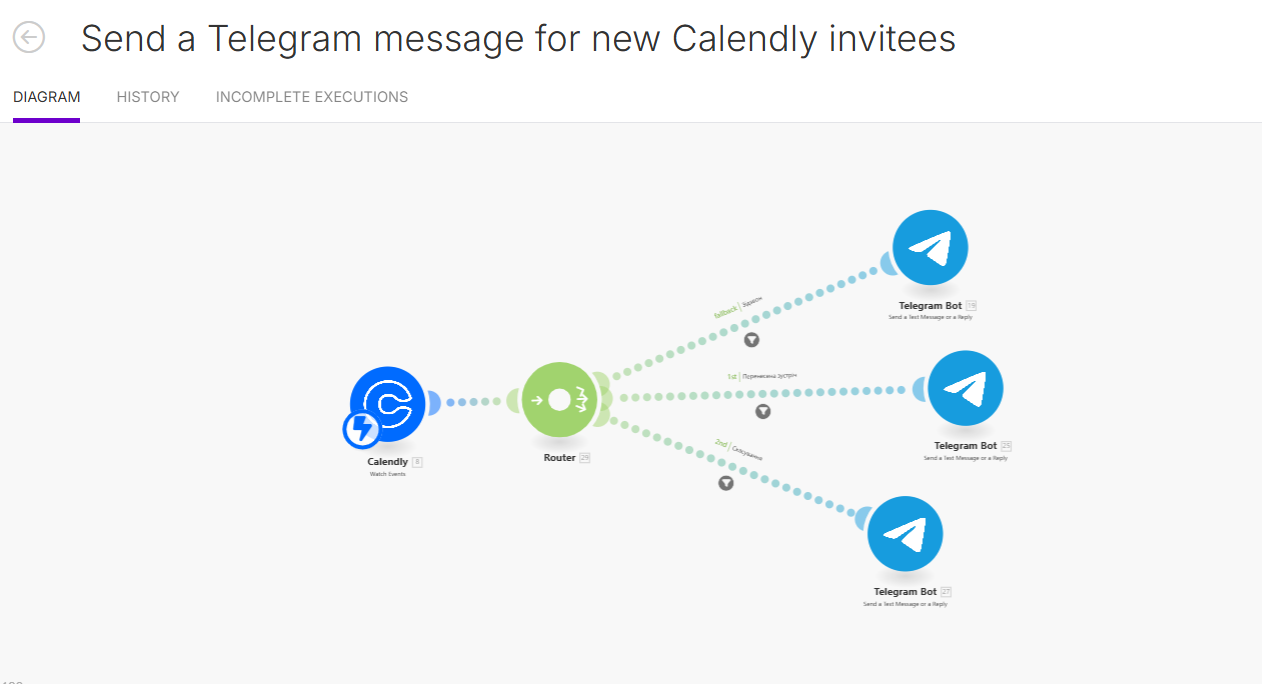
Налаштування Calendly: створено спеціальну форму для бронювання дзвінків, яка слугуватиме джерелом даних. Створення бота Telegram. Створено скрипт, який запускається щоразу, коли в Calendly з'являється нове бронювання. Модуль Telegram Bot налаштовано для надсилання повідомлень. Створено детальний текст повідомлення, що містить дані клієнта. Додано функціональні кнопки: «Скасувати» та «Перенести». Ці кнопки ведуть безпосередньо на відповідні сторінки Calendly. Автоматизована система значно покращує комунікацію та ефективність бізнес-процесів, пов'язаних з управлінням зустрічами.
Calendly settings: a special form for booking calls has been created, which will serve as a source of data. Creation of a Telegram bot. A script has been created that runs every time a new booking appears in Calendly. The Telegram Bot module has been configured to send messages. A detailed message text containing customer data has been created. Functional buttons have been added: ‘Cancel’ and ‘Reschedule’. These buttons lead directly to the corresponding Calendly pages. The automated system significantly improves communication and the efficiency of business processes related to meeting management.
Calendly settings: a special form for booking calls has been created, which will serve as a source of data. Creation of a Telegram bot. A script has been created that runs every time a new booking appears in Calendly. The Telegram Bot module has been configured to send messages. A detailed message text containing customer data has been created. Functional buttons have been added: ‘Cancel’ and ‘Reschedule’. These buttons lead directly to the corresponding Calendly pages. The automated system significantly improves communication and the efficiency of business processes related to meeting management.