Atelier-store
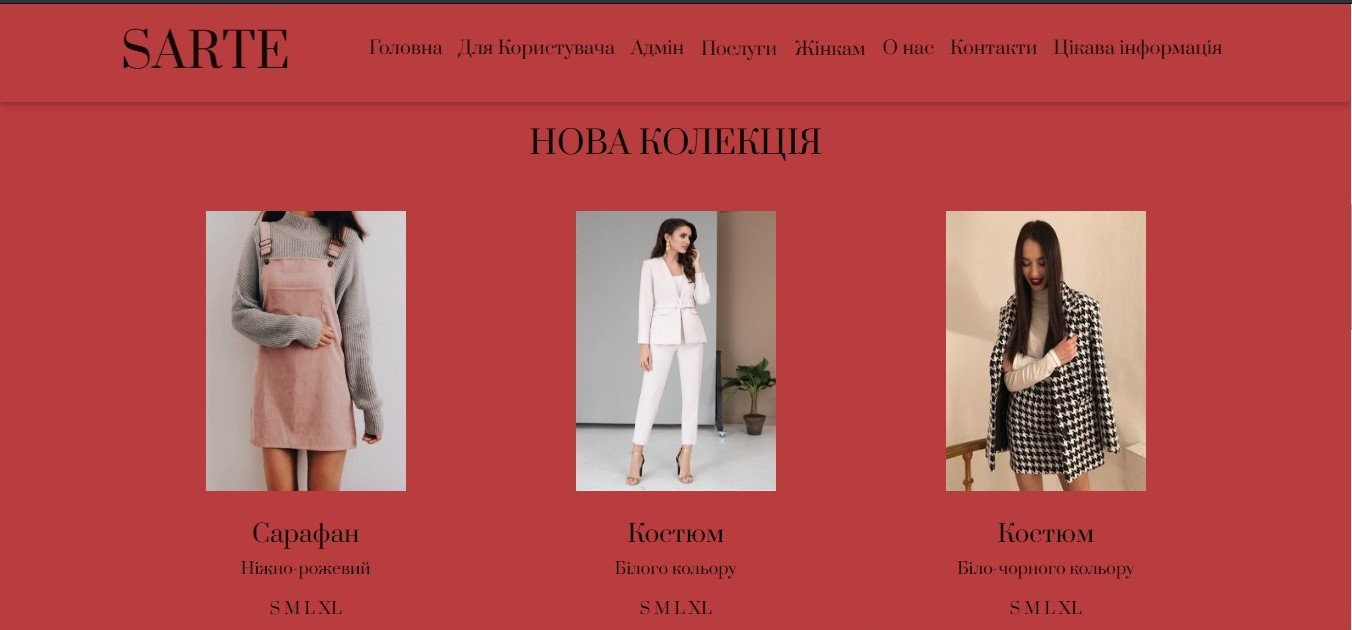
On the main form of the application for the user, which was developed for the Windows operating system, there is a horizontal menu that contains the tab "Home," where a new clothing collection is presented, the atelier-store number, and an invitation to order clothing tailoring. The next item in the menu is "For User," where clicking on this tab will provide the option to register or log in to the site. Next is the "Admin" item, where the site administrator can access the Admin panel of the site. The menu also includes the item "Services," which has sub-items "Women's Clothing Tailoring" and "Men's Clothing Tailoring," where users will be able to sign up online for the atelier-store. The next item in the menu is "For Women," which has sub-items "Blouses/Tops," "Dresses," and "Skirts," where users will have the opportunity to view already completed clothing tailoring orders. Next is the item "About Us," where the user will have the chance to learn more about the atelier. The penultimate item in the menu is "Contacts," where the user will have the opportunity to find out the atelier's working hours, contact numbers, and address. And the last item in the menu is "Interesting Information," where you can view articles about clothing.
In the application for the administrator, which was also developed for the Windows operating system, there is a main menu located horizontally at the top. This menu contains tabs that present options for interacting with the database for adding data to it and deleting data from the database.
All forms have the ability to view previously saved data, add new records, delete them, or edit them if necessary. When using the form, the user will have a sense of pleasure.
In the application for the administrator, which was also developed for the Windows operating system, there is a main menu located horizontally at the top. This menu contains tabs that present options for interacting with the database for adding data to it and deleting data from the database.
All forms have the ability to view previously saved data, add new records, delete them, or edit them if necessary. When using the form, the user will have a sense of pleasure.

 Kyiv
Kyiv  Available for hire