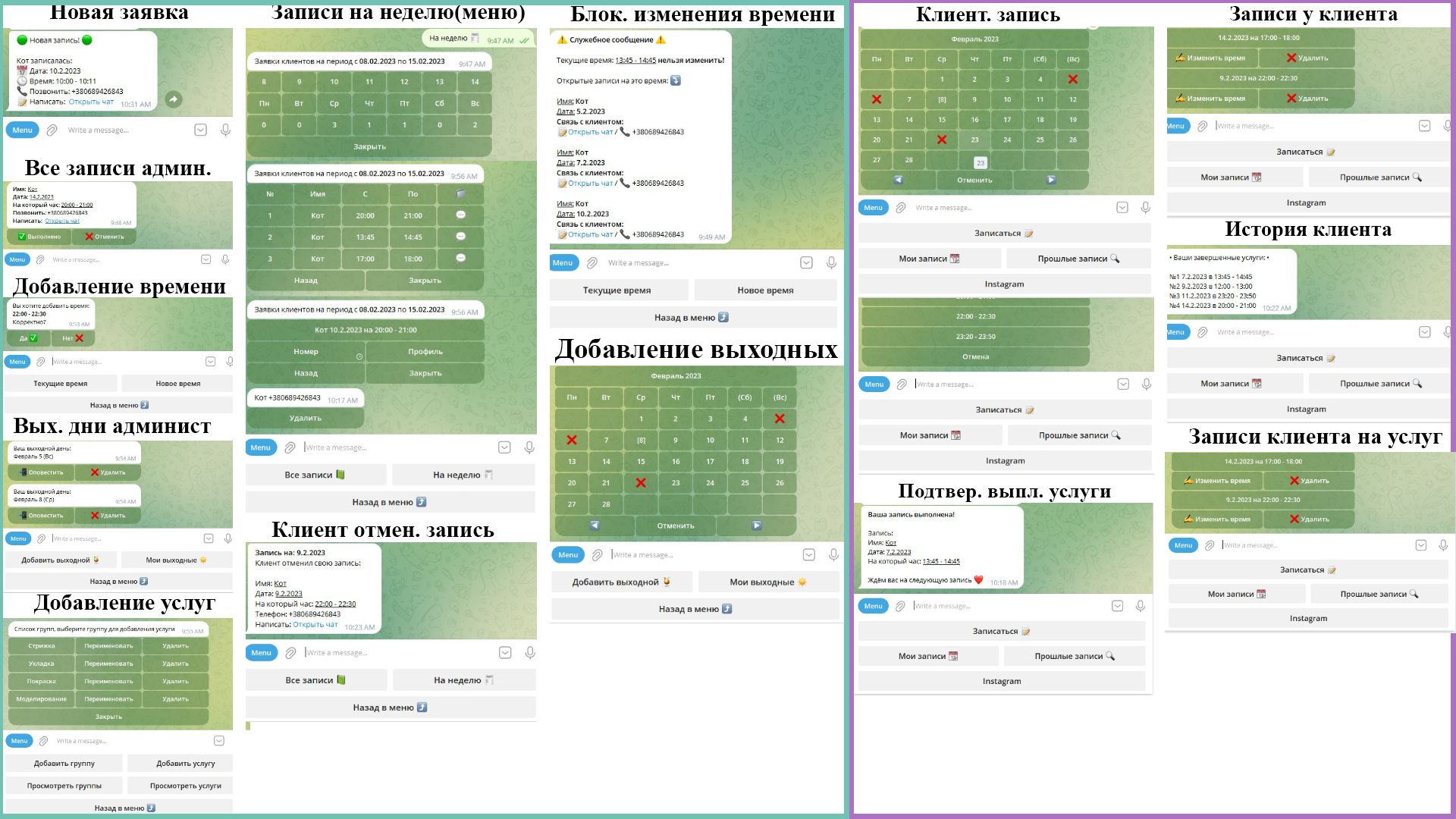
***Admin***
[Client Records]
1. Display all records:
- Full name, phone, date;
- Open chat with the user;
1.2 Confirm the appointment/cancel;
- 1.2.1 "Confirmation" records that the service was provided and notifies the user of successful completion. Adds this service to the user's visit history.
- 1.2.2 "Cancellation" cancels the appointment, notifying the client that the appointment was canceled by the administrator (with the administrator's details and contact information).
2. For the week:
- Dynamic inline menu with a calendar and functionality for viewing appointments, confirmation/cancellation.
- Full name, phone, date, open chat, button to call the client.
[Appointment Time]
1. View current time
1.1 Edit service time
- 1.1.1 When editing, consider if there are users with active appointments at that time, display full information about the users and prohibit changes to the time. If there are no active appointments at that time, the service time can be changed.
1.2 Deletions:
- 1.2.1 When deleting, consider if there are users with active appointments at that time, display full information about the users. Upon confirming the deletion, users will receive a notification about the cancellation of their appointments for each day at the current time. If there are no active appointments, deleting the time will not notify anyone.
1.3 Notification of new time to users.
[My Schedule]
1. Add a day off
1.1 View calendar with visualization of working/off days, select a date in the calendar and confirm it as a day off.
- 1.1.1 If there are users on the day marked by the administrator, a message about the clients will be displayed with the option to cancel their appointments (similar to item 1.2.1). The ability to create a day off is only available if there are no clients on the current day.
1.2 Functionality to send notifications to all clients about the administrator's day off.
2. Display current days off.
2.1 Ability to notify about the current day off.
2.2 Deletion of a day off.
***User***
Initially, when the bot is first opened, the user goes through registration, one button press sends the user's phone number and name. Based on this, a user is created, and administrators gain the ability to contact the client via Telegram or phone call.
[Appointment]
1. Display dynamic inline calendar with visualization of days off.
1.1 After selecting a date, an inline menu is displayed with the choice of time set by the administrator.
1.2 Cancel the selected day.
#After selecting the day and time, the administrator receives a notification about the new client with detailed information. The client receives confirmation that they have booked the current date and time.
[My Appointments]
1. Display inline menu with the user's current appointments.
1.1 Change appointment time: Provides the user with the functionality to choose free time, after confirming the time change, the administrator receives a message that the user has changed the service time.
1.2 Deletion notifies the administrator of the cancellation of the service. The user receives confirmation that they have canceled the appointment for the current service.
[Appointment History]
1. Display a list of dates and times when the service was provided.
[Master Profile]
1. Information about the master, links to social networks, works, description.
[Client Records]
1. Display all records:
- Full name, phone, date;
- Open chat with the user;
1.2 Confirm the appointment/cancel;
- 1.2.1 "Confirmation" records that the service was provided and notifies the user of successful completion. Adds this service to the user's visit history.
- 1.2.2 "Cancellation" cancels the appointment, notifying the client that the appointment was canceled by the administrator (with the administrator's details and contact information).
2. For the week:
- Dynamic inline menu with a calendar and functionality for viewing appointments, confirmation/cancellation.
- Full name, phone, date, open chat, button to call the client.
[Appointment Time]
1. View current time
1.1 Edit service time
- 1.1.1 When editing, consider if there are users with active appointments at that time, display full information about the users and prohibit changes to the time. If there are no active appointments at that time, the service time can be changed.
1.2 Deletions:
- 1.2.1 When deleting, consider if there are users with active appointments at that time, display full information about the users. Upon confirming the deletion, users will receive a notification about the cancellation of their appointments for each day at the current time. If there are no active appointments, deleting the time will not notify anyone.
1.3 Notification of new time to users.
[My Schedule]
1. Add a day off
1.1 View calendar with visualization of working/off days, select a date in the calendar and confirm it as a day off.
- 1.1.1 If there are users on the day marked by the administrator, a message about the clients will be displayed with the option to cancel their appointments (similar to item 1.2.1). The ability to create a day off is only available if there are no clients on the current day.
1.2 Functionality to send notifications to all clients about the administrator's day off.
2. Display current days off.
2.1 Ability to notify about the current day off.
2.2 Deletion of a day off.
***User***
Initially, when the bot is first opened, the user goes through registration, one button press sends the user's phone number and name. Based on this, a user is created, and administrators gain the ability to contact the client via Telegram or phone call.
[Appointment]
1. Display dynamic inline calendar with visualization of days off.
1.1 After selecting a date, an inline menu is displayed with the choice of time set by the administrator.
1.2 Cancel the selected day.
#After selecting the day and time, the administrator receives a notification about the new client with detailed information. The client receives confirmation that they have booked the current date and time.
[My Appointments]
1. Display inline menu with the user's current appointments.
1.1 Change appointment time: Provides the user with the functionality to choose free time, after confirming the time change, the administrator receives a message that the user has changed the service time.
1.2 Deletion notifies the administrator of the cancellation of the service. The user receives confirmation that they have canceled the appointment for the current service.
[Appointment History]
1. Display a list of dates and times when the service was provided.
[Master Profile]
1. Information about the master, links to social networks, works, description.