Dashboard
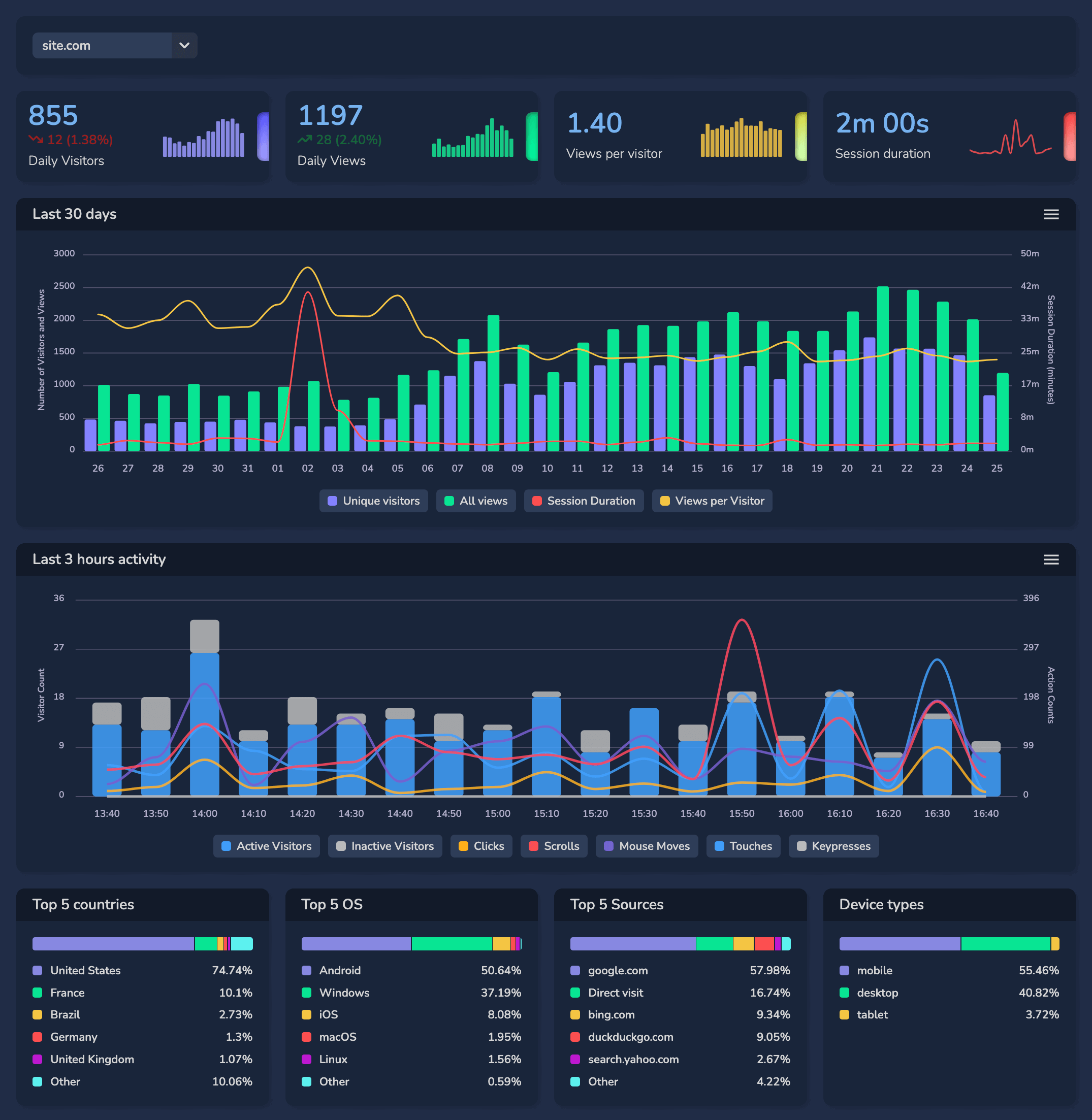
As a rule, the most basic parameters are displayed:
- Unique visitors for today, difference from yesterday at the same time, mini graph.
- All views for today, difference from yesterday at the same time, mini chart.
- Views per visitor for today, mini chart.
- Average session length for today, mini chart.
- Graph for the last 30 days, grouped by day, with indicators: unique visitors, all views, views per visitor, average session duration.
- Activity graph for the last 3 hours, grouped by 10 minutes, with metrics: active visitors, inactive visitors, clicks, mouse movement, keystrokes, touch touch, scrolling.
- Grouping for the last 30 days, top 5 countries.
- Grouping for last 30 days, top 5 operating systems.
- Grouping for last 30 days, top 5 traffic sources.
- Grouped in the last 30 days, device types.
Statistics
This is the main statistics section where you can perform a detailed aggregation of statistics on any parameters for any period of time without restrictions.
The time zone of statistics is always adjusted to your local time.
By default, the graph shows two lines: all views, and unique visitors for the last 30 days.
Below is a map with a visual representation by color depending on the number of visitors from a particular country, from white to blue, where white is minimum visitors, blue is maximum visitors, and gray is 0.
All other blocks display the number and percentage of visitors according to the following parameters:
- Country;
- Region;
- City;
- Browser;
- Operating System;
- Source;
- Page visited;
- Useragent;
- Screen resolution;
- Browser language;
- Device type.
To the left of each parameter name the corresponding icon is displayed, clicking on it activates a checkbox and you can select or exclude the selected parameter, if you select or exclude one or more parameters, they are displayed at the top in a green or red frame respectively.
All values and their number on the page are rearranged, the chart is redrawn and the colors on the map are rearranged taking into account the set filter. Thus you can add or exclude an unlimited number of parameters in the filters, selecting only the necessary visits.
You can also select the activity of visitors: only active, only inactive, or any activity.
Activity
The activity section displays visitors visiting the site in real time, for each visitor the following parameters are available:
- Visitor Icon: For each unique visitor a unique icon to distinguish different users of the site (icon can be custom selected and fixed for each visitor).
- Time: The time when the visitor visited the site (according to your time zone).
- Visit Number: Displays the visitor's visit number for today, for the current month, for all time.
- URL Address: The URL and title of the page visited.
- Visitor Location: Country, Region, City.
- Activity: Active time, clicks, mouse movement, keystrokes, touching the sensor, scrolling.
- Operating system.
- Browser.
- Device type.
- Screen resolution.
- Browser language.
- Source: Where the visitor came from.
In order to change the visitor's avatar, it is enough to click on it and change it with the arrows “left” “right”, there-also displays detailed information on the operating system and browser versions, also displays the full useragent of the user.
If you need to look at recent visitors, not only those who are currently online, you can select activity for the last 5, 10, 60, 120 minutes.
You can choose to sort by any of the listed parameters and set the sort order.
As a rule, the most basic parameters are displayed:
- Unique visitors for today, difference from yesterday at the same time, mini graph.
- All views for today, difference from yesterday at the same time, mini chart.
- Views per visitor for today, mini chart.
- Average session length for today, mini chart.
- Graph for the last 30 days, grouped by day, with indicators: unique visitors, all views, views per visitor, average session duration.
- Activity graph for the last 3 hours, grouped by 10 minutes, with metrics: active visitors, inactive visitors, clicks, mouse movement, keystrokes, touch touch, scrolling.
- Grouping for the last 30 days, top 5 countries.
- Grouping for last 30 days, top 5 operating systems.
- Grouping for last 30 days, top 5 traffic sources.
- Grouped in the last 30 days, device types.
Statistics
This is the main statistics section where you can perform a detailed aggregation of statistics on any parameters for any period of time without restrictions.
The time zone of statistics is always adjusted to your local time.
By default, the graph shows two lines: all views, and unique visitors for the last 30 days.
Below is a map with a visual representation by color depending on the number of visitors from a particular country, from white to blue, where white is minimum visitors, blue is maximum visitors, and gray is 0.
All other blocks display the number and percentage of visitors according to the following parameters:
- Country;
- Region;
- City;
- Browser;
- Operating System;
- Source;
- Page visited;
- Useragent;
- Screen resolution;
- Browser language;
- Device type.
To the left of each parameter name the corresponding icon is displayed, clicking on it activates a checkbox and you can select or exclude the selected parameter, if you select or exclude one or more parameters, they are displayed at the top in a green or red frame respectively.
All values and their number on the page are rearranged, the chart is redrawn and the colors on the map are rearranged taking into account the set filter. Thus you can add or exclude an unlimited number of parameters in the filters, selecting only the necessary visits.
You can also select the activity of visitors: only active, only inactive, or any activity.
Activity
The activity section displays visitors visiting the site in real time, for each visitor the following parameters are available:
- Visitor Icon: For each unique visitor a unique icon to distinguish different users of the site (icon can be custom selected and fixed for each visitor).
- Time: The time when the visitor visited the site (according to your time zone).
- Visit Number: Displays the visitor's visit number for today, for the current month, for all time.
- URL Address: The URL and title of the page visited.
- Visitor Location: Country, Region, City.
- Activity: Active time, clicks, mouse movement, keystrokes, touching the sensor, scrolling.
- Operating system.
- Browser.
- Device type.
- Screen resolution.
- Browser language.
- Source: Where the visitor came from.
In order to change the visitor's avatar, it is enough to click on it and change it with the arrows “left” “right”, there-also displays detailed information on the operating system and browser versions, also displays the full useragent of the user.
If you need to look at recent visitors, not only those who are currently online, you can select activity for the last 5, 10, 60, 120 minutes.
You can choose to sort by any of the listed parameters and set the sort order.