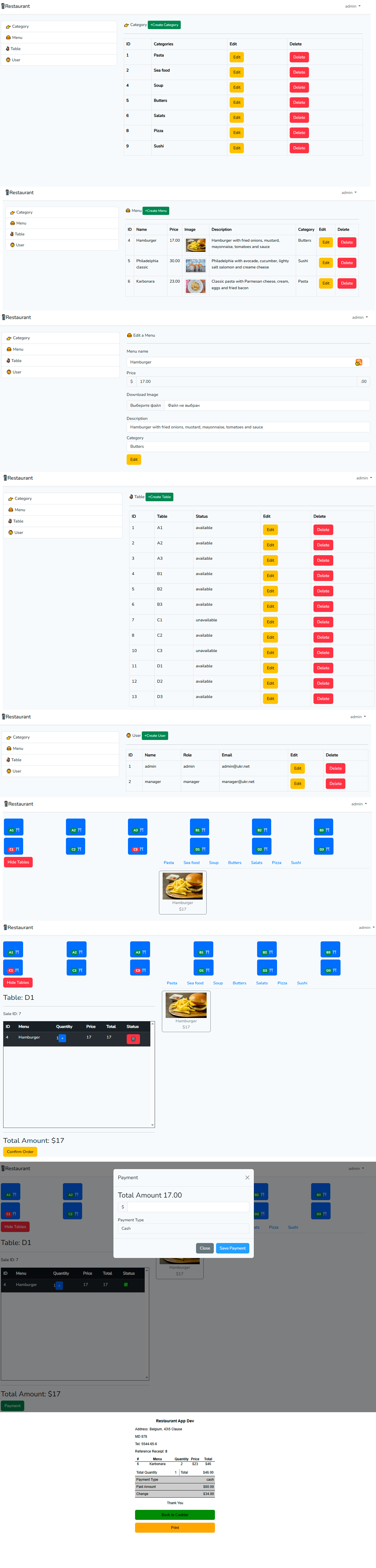
A lightweight and functional CMS tool has been developed for managing a restaurant website: menu, categories, dish photos, contacts, orders, and everything required for a restaurant administrator to quickly edit content without technical knowledge.
Purpose and Objective
The goal of the project was to create a content management system (CMS) tailored to the specifics of the restaurant business:
the ability for restaurant administrators without programming skills to add/edit menus, dish categories, dish images, establishment information, and contact details.
providing a simple yet effective control panel that allows changing visual content, prices, menu sections, and promotions.
creating a base on which a restaurant or café website can be quickly launched and further developed (adding online orders, reservations, reviews).
Technology Stack
Backend: #Laravel (PHP framework)
Database: #MySQL
Frontend: Laravel Blade templates, #HTML5 / #CSS3, #JavaScript (minimal)
File Storage: standard #Laravel Storage (for dish images, restaurant logo)
Authentication: built-in #Laravel mechanisms for system administrators
Version Control: Git + GitHub
Deployment / Environment: local or hosting environment, including migrations, seed data, and environment setup via .env
Key Features
Administrator User (CMS Panel):
creating / editing / deleting menu categories (e.g., "Salads," "Hot Dishes," "Desserts")
adding / editing / deleting menu items: dish name, description, price, photo
uploading dish images, restaurant logo, possibly photo gallery
managing establishment information: address, working hours, contacts, social media
Public Part of the Website (for customers):
displaying the menu by categories
viewing dish photos and information about them
restaurant contact information
(upon further development) reservations, orders, reviews
Configuring visual content without code intervention: the administrator can update text, images, prices through the panel
Image storage and access system: uploaded files are stored via Laravel Storage, publicly accessible (via public/storage or similar route)
Data validation: all input forms are protected from incorrect types, image checks (size, format), mandatory field checks
Authorization and access: only registered administrators can log into the #CMS panel and perform CRUD actions.
Purpose and Objective
The goal of the project was to create a content management system (CMS) tailored to the specifics of the restaurant business:
the ability for restaurant administrators without programming skills to add/edit menus, dish categories, dish images, establishment information, and contact details.
providing a simple yet effective control panel that allows changing visual content, prices, menu sections, and promotions.
creating a base on which a restaurant or café website can be quickly launched and further developed (adding online orders, reservations, reviews).
Technology Stack
Backend: #Laravel (PHP framework)
Database: #MySQL
Frontend: Laravel Blade templates, #HTML5 / #CSS3, #JavaScript (minimal)
File Storage: standard #Laravel Storage (for dish images, restaurant logo)
Authentication: built-in #Laravel mechanisms for system administrators
Version Control: Git + GitHub
Deployment / Environment: local or hosting environment, including migrations, seed data, and environment setup via .env
Key Features
Administrator User (CMS Panel):
creating / editing / deleting menu categories (e.g., "Salads," "Hot Dishes," "Desserts")
adding / editing / deleting menu items: dish name, description, price, photo
uploading dish images, restaurant logo, possibly photo gallery
managing establishment information: address, working hours, contacts, social media
Public Part of the Website (for customers):
displaying the menu by categories
viewing dish photos and information about them
restaurant contact information
(upon further development) reservations, orders, reviews
Configuring visual content without code intervention: the administrator can update text, images, prices through the panel
Image storage and access system: uploaded files are stored via Laravel Storage, publicly accessible (via public/storage or similar route)
Data validation: all input forms are protected from incorrect types, image checks (size, format), mandatory field checks
Authorization and access: only registered administrators can log into the #CMS panel and perform CRUD actions.