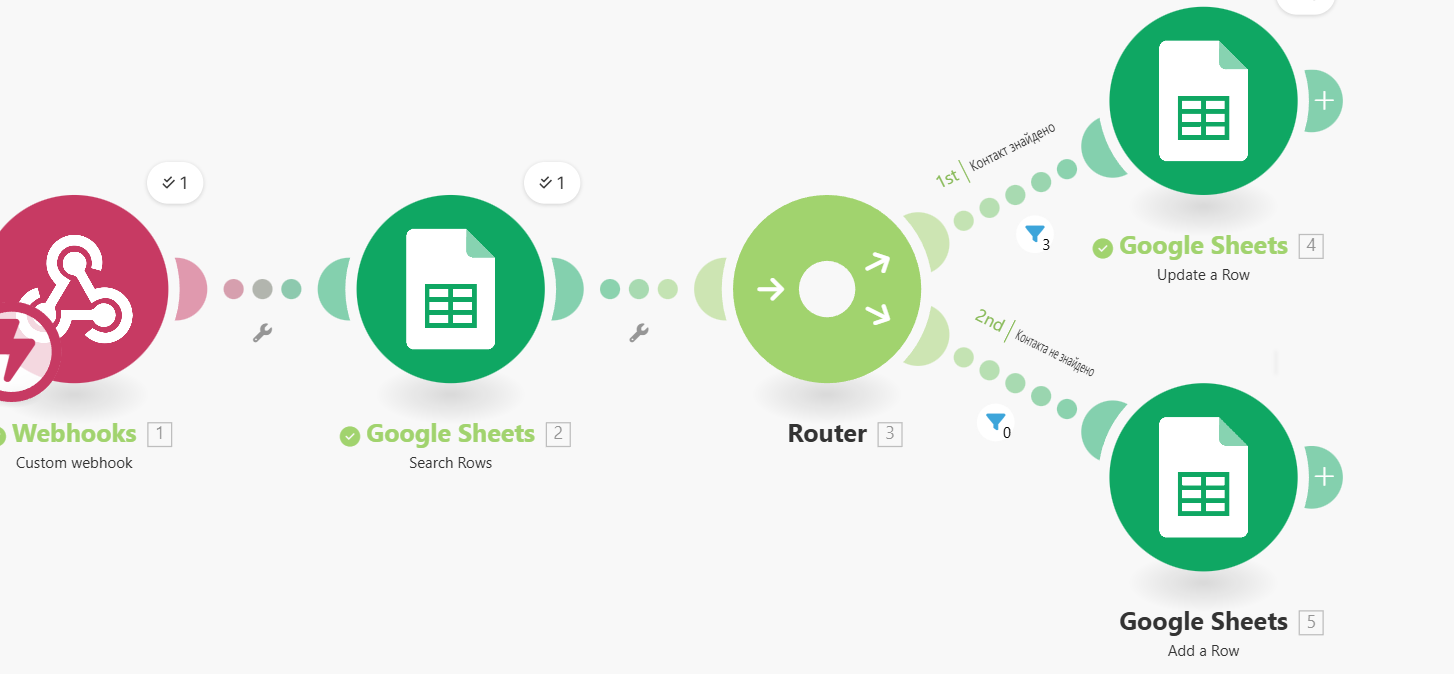
This script is designed for the automatic processing of incoming data (for example, from a form on the website or another CRM):
Webhooks (Custom webhook): The script is triggered when new data arrives via webhook.
Google Sheets (Search Rows): The system searches for an existing record in the table based on a specific criterion (for example, by email or ID).
Router: Distributes the flow of data into two branches depending on the search result:
Branch 1 ("Contact found"): Updates the existing row in Google Sheets (Update a Row).
Branch 2 ("Contact not found"): Creates a new record in the table (Add a Row).
2. Data processing script using AI Agents
This is a more complex workflow that integrates artificial intelligence:
Google Sheets (Watch New Rows): The script is triggered when a new row appears in the table.
Google Sheets (Search Rows) & Tools: Additional search and variable storage are performed for further use.
Iterator: Breaks down the received data arrays into individual elements for step-by-step processing.
Make AI Agents (Run an agent): Uses AI to analyze, process, or generate text based on the received data.
Google Sheets (Add a Row): The result of the artificial intelligence work is recorded in a new table or row.
Webhooks (Custom webhook): The script is triggered when new data arrives via webhook.
Google Sheets (Search Rows): The system searches for an existing record in the table based on a specific criterion (for example, by email or ID).
Router: Distributes the flow of data into two branches depending on the search result:
Branch 1 ("Contact found"): Updates the existing row in Google Sheets (Update a Row).
Branch 2 ("Contact not found"): Creates a new record in the table (Add a Row).
2. Data processing script using AI Agents
This is a more complex workflow that integrates artificial intelligence:
Google Sheets (Watch New Rows): The script is triggered when a new row appears in the table.
Google Sheets (Search Rows) & Tools: Additional search and variable storage are performed for further use.
Iterator: Breaks down the received data arrays into individual elements for step-by-step processing.
Make AI Agents (Run an agent): Uses AI to analyze, process, or generate text based on the received data.
Google Sheets (Add a Row): The result of the artificial intelligence work is recorded in a new table or row.