Client's task:
The owner of the online store wanted not just quality product photos - he needed complete visual content: macro shots of each item, structured descriptions for the catalog, and live photographs of models in outfits made from his assortment. Plus - the ability to quickly try on any new item on a ready photo without re-shooting.
Solution:
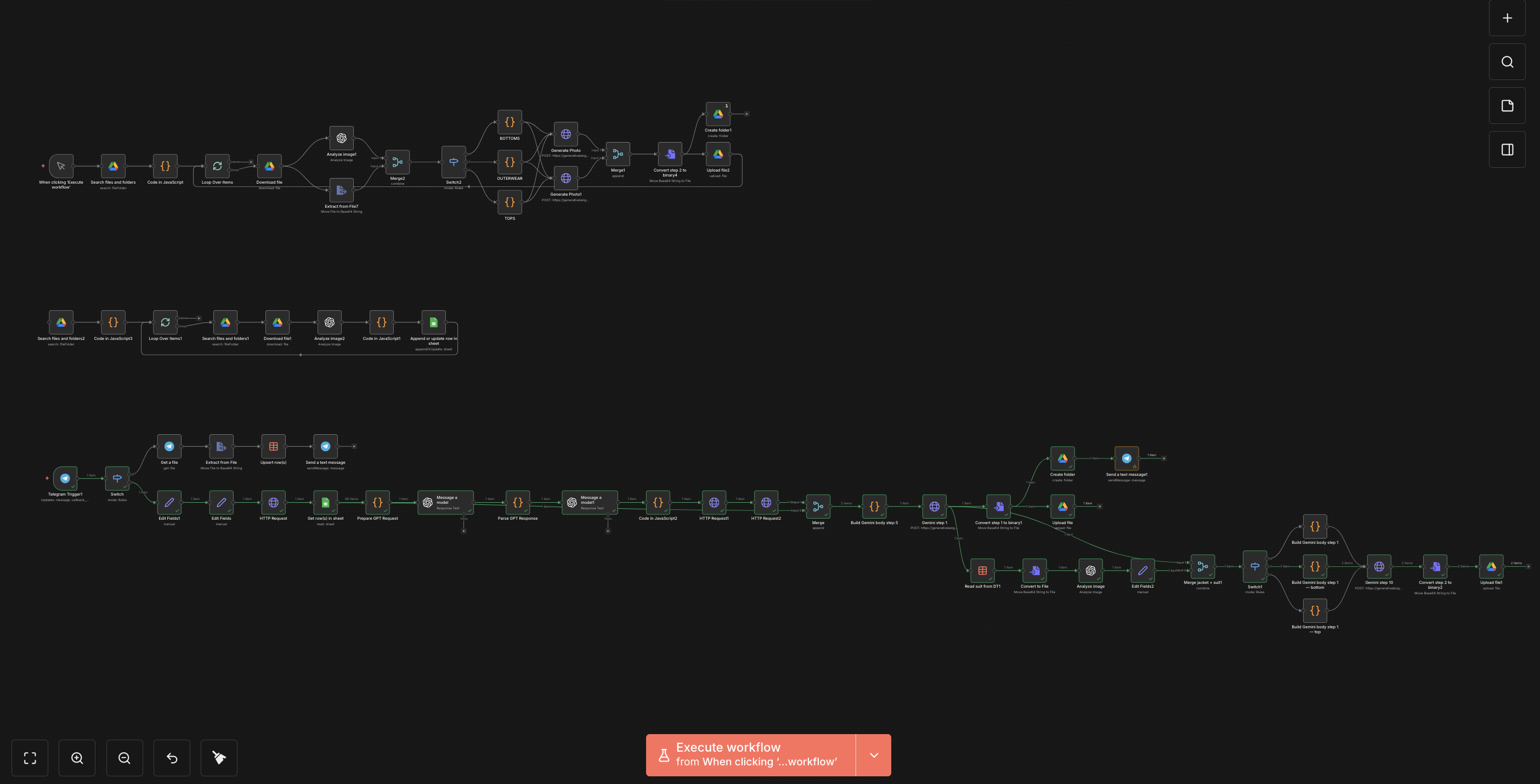
I created an automated pipeline on n8n consisting of three sequential modules, each of which performs its task and passes the result further.
How it works:
Part 1 - Macro photography of the product:
The system scans a folder on Google Drive and retrieves uploaded photos. Gemini generates 8 professional macro shots with a clean white studio background - overall view, details of the cut, fabric texture. Each product receives a named folder on Google Drive.
Part 2 - Analysis and description.
The first photo from each folder is taken, and GPT-4o mini conducts a detailed analysis: category, color and color group, formality, subcategory, cut, combinations with other items. All this is stored in Google Sheets and becomes the basis for the third part.
Part 3 - Model photo and item replacement.
Through a Telegram bot, the client selects a model and uploads the item they want to try on to the ready outfit. GPT-4o mini-stylist forms the look: a top with the highest potential is selected from the catalog, then a suitable bottom is chosen according to the color compatibility and formality algorithm. Gemini generates a photo of the model in this look in a smart casual style. After that, the item uploaded by the client is automatically overlaid on the ready photo - the system recognizes its type (outerwear, top, or bottom) and replaces the corresponding element of the outfit, keeping the model's face, background, and pose unchanged.
Result for the business:
The client receives a complete visual package for each item in the catalog - from product photography to the look on the model - without a studio, photographer, or stylist. Any new item can be "tried on" to an already ready photo in seconds. The content scales without increasing costs.
Numbers:
- 1 original photo → 8 macro shots + description + image on the model
- 4 types of models to choose from
- 3 categories of clothing with unique prompts for each
- 2 options for the final shot (item unbuttoned / buttoned)
- 0 manual actions after uploading
Stack:
n8n · GPT-4o mini (OpenAI) · Gemini 3.1 Flash (Google AI) · Google Drive API · Google Sheets · Telegram Bot API · JavaScript
The owner of the online store wanted not just quality product photos - he needed complete visual content: macro shots of each item, structured descriptions for the catalog, and live photographs of models in outfits made from his assortment. Plus - the ability to quickly try on any new item on a ready photo without re-shooting.
Solution:
I created an automated pipeline on n8n consisting of three sequential modules, each of which performs its task and passes the result further.
How it works:
Part 1 - Macro photography of the product:
The system scans a folder on Google Drive and retrieves uploaded photos. Gemini generates 8 professional macro shots with a clean white studio background - overall view, details of the cut, fabric texture. Each product receives a named folder on Google Drive.
Part 2 - Analysis and description.
The first photo from each folder is taken, and GPT-4o mini conducts a detailed analysis: category, color and color group, formality, subcategory, cut, combinations with other items. All this is stored in Google Sheets and becomes the basis for the third part.
Part 3 - Model photo and item replacement.
Through a Telegram bot, the client selects a model and uploads the item they want to try on to the ready outfit. GPT-4o mini-stylist forms the look: a top with the highest potential is selected from the catalog, then a suitable bottom is chosen according to the color compatibility and formality algorithm. Gemini generates a photo of the model in this look in a smart casual style. After that, the item uploaded by the client is automatically overlaid on the ready photo - the system recognizes its type (outerwear, top, or bottom) and replaces the corresponding element of the outfit, keeping the model's face, background, and pose unchanged.
Result for the business:
The client receives a complete visual package for each item in the catalog - from product photography to the look on the model - without a studio, photographer, or stylist. Any new item can be "tried on" to an already ready photo in seconds. The content scales without increasing costs.
Numbers:
- 1 original photo → 8 macro shots + description + image on the model
- 4 types of models to choose from
- 3 categories of clothing with unique prompts for each
- 2 options for the final shot (item unbuttoned / buttoned)
- 0 manual actions after uploading
Stack:
n8n · GPT-4o mini (OpenAI) · Gemini 3.1 Flash (Google AI) · Google Drive API · Google Sheets · Telegram Bot API · JavaScript