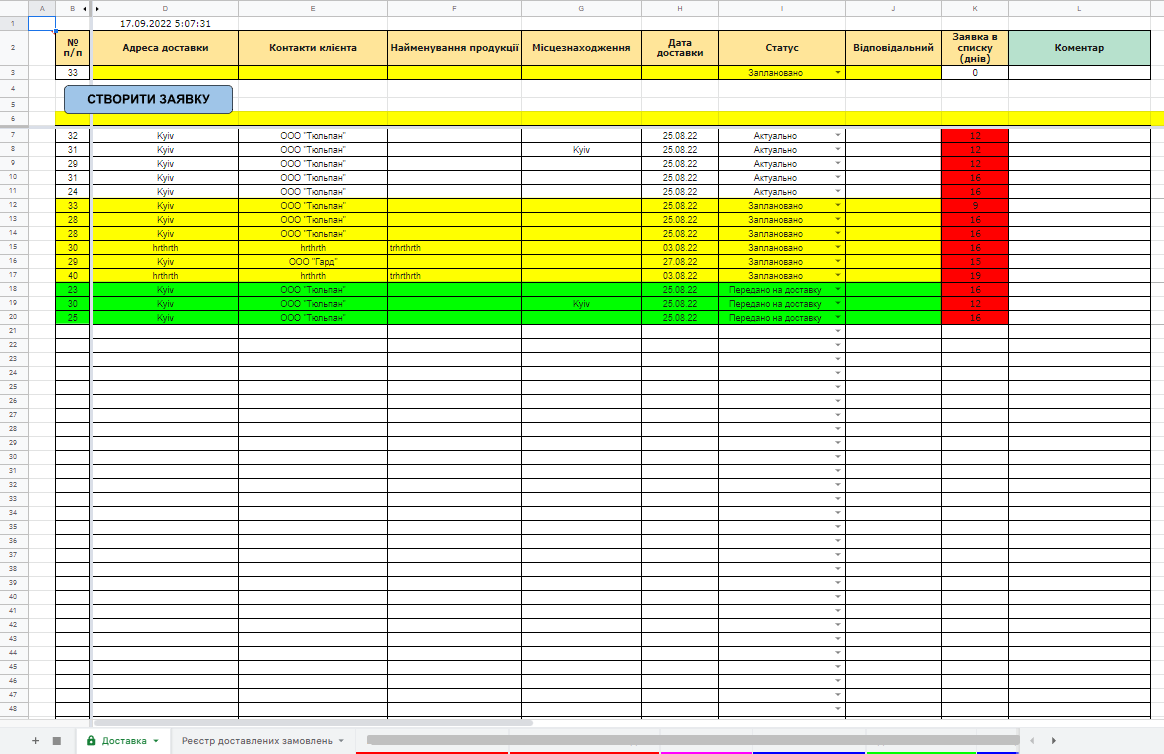
You need to create a table based on a table in a attached photo with the following modernization.What to do:
Prohibit filling the lines manually.To be able to submit a request for delivery only through the form.The 2ndCreate a form to create a new line with the button "Add Order" .After filling out the form and clicking on the button - create the corresponding line with these data.3 .With the possibility to make possible filling the form only with a standard non-fat black font.and 4.Fix the date of submission of the application and the timer of the glass of time passed after the submission of the application.To be seen in the list of applications how many days the application is required
and 5.Add the status of the application to the drop-down menu.Show only current applications with current status.The second status is planned delivery, the third status is delivered.6 .Form a second list -> register of submitted applications.After changing the status to delivered -> the application disappears from the delivery table and enters the application register and does not interfere with the main table.In the main table, only current applications and scheduled will remain.7 .Create a way of grouping applications into one trip.Now from the whole list, the logist according to his requirements forms a group of applications and indicates the line above - the date of delivery and driver.My idea is to add the column delivery date and make the lighting of all lines with requests with a certain color for the visual effect.The trigger for lighting can be the delivery date or the status of "planned delivery"
Ready to answer all the exhaustive questions.If some of the points are impossible to realize or can be realized in another way - ready to consider an alternative
Updated #1 from 12 August, 22:27
Added photo example of form of filling
Updated #2 from 12 August, 22:44
The 9.Applications are filtered by adding from above to the bottom.The longer the application in the table - the lower will be in the list.The 10.When choosing the status of "planned" applications automatically drop into a series, forming a list of planned discounts
Prohibit filling the lines manually.To be able to submit a request for delivery only through the form.The 2ndCreate a form to create a new line with the button "Add Order" .After filling out the form and clicking on the button - create the corresponding line with these data.3 .With the possibility to make possible filling the form only with a standard non-fat black font.and 4.Fix the date of submission of the application and the timer of the glass of time passed after the submission of the application.To be seen in the list of applications how many days the application is required
and 5.Add the status of the application to the drop-down menu.Show only current applications with current status.The second status is planned delivery, the third status is delivered.6 .Form a second list -> register of submitted applications.After changing the status to delivered -> the application disappears from the delivery table and enters the application register and does not interfere with the main table.In the main table, only current applications and scheduled will remain.7 .Create a way of grouping applications into one trip.Now from the whole list, the logist according to his requirements forms a group of applications and indicates the line above - the date of delivery and driver.My idea is to add the column delivery date and make the lighting of all lines with requests with a certain color for the visual effect.The trigger for lighting can be the delivery date or the status of "planned delivery"
Ready to answer all the exhaustive questions.If some of the points are impossible to realize or can be realized in another way - ready to consider an alternative
Updated #1 from 12 August, 22:27
Added photo example of form of filling
Updated #2 from 12 August, 22:44
The 9.Applications are filtered by adding from above to the bottom.The longer the application in the table - the lower will be in the list.The 10.When choosing the status of "planned" applications automatically drop into a series, forming a list of planned discounts