Deploying Spring PetClinic Application using Vagrant
DevOps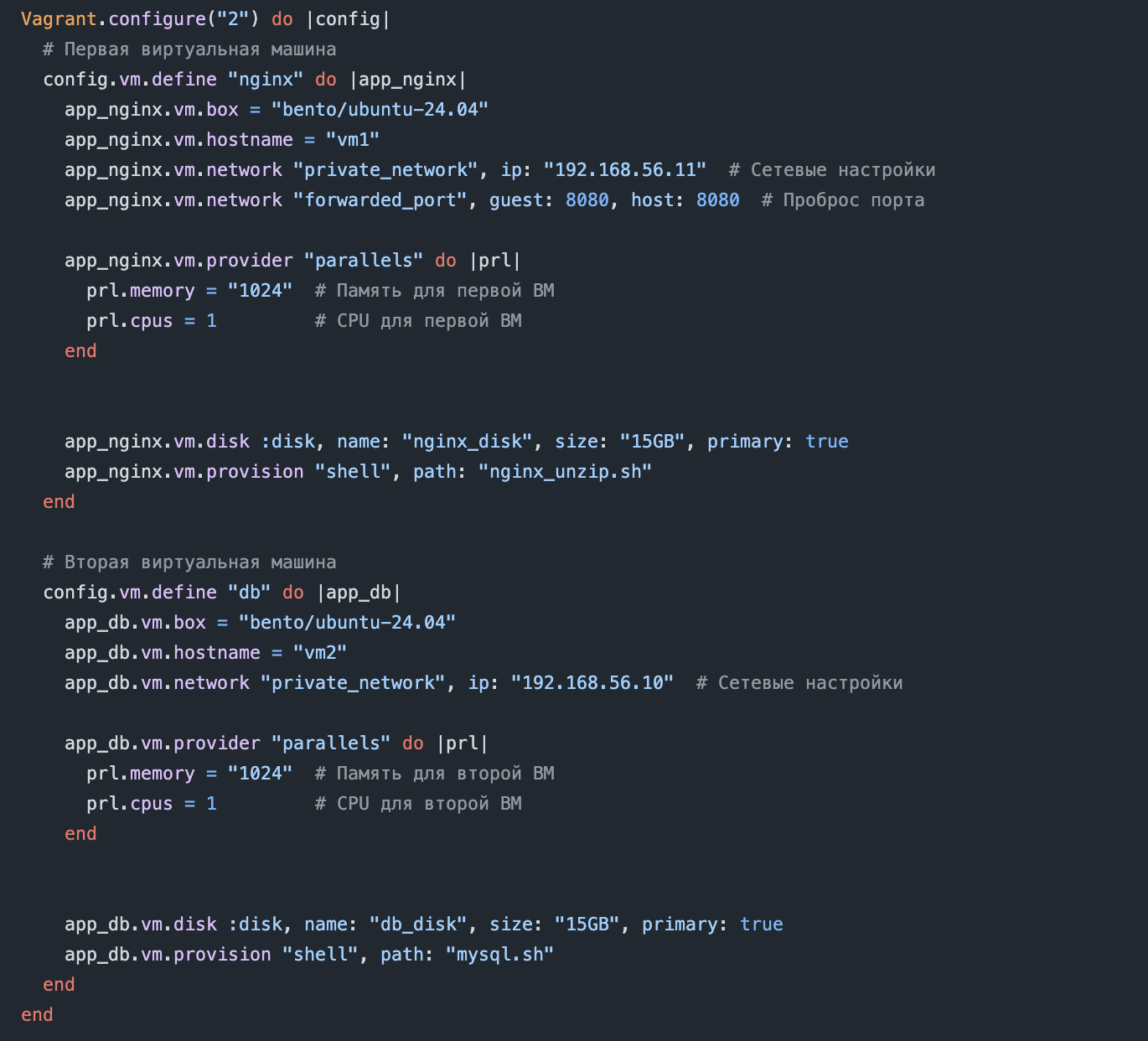
Create repository on Gitlab and commit all changes to your gitlab repository
Create a deployment script for the PetClinic application. Use Vagrant to automate the process of creating the infrastructure for the deployment with Virtualbox (preferably). As for provisioning you can choose to use bash, python or ansible in any combination.
Subtask I - Infrastructure
Describe two virtual machines using Vagrantfile for deployment of the application (codename APP_VM) and the database (codename DB_VM)
Preferably use private networking feature for easy VM communication
VMs should be either Centos or Ubuntu
If not using private networking then APP_VM should have port 8080 forwarded to host
Subtask II - Database
Use any provisioning script that you created to install MySQL and any dependency on DB_VM
Customize the mysql database to accept connections only from your vagrant private network subnet
Create a non root user and password (codename DB_USER and DB_PASS) in mysql. Use host environment variable to set these values and pass them to the Vagrantfile using ENV
Create a database in mysql (codename DB_NAME) and grant all privileges for the DB_USER to access the database
Subtask III - Application
Create a non root user (codename APP_USER) that will be used to run the application on APP_VM
Use any provisioner to install Java JDK, git and any dependency on APP_VM
Clone this repository to the working folder (codename PROJECT_DIR)
Use the Maven tool to run tests and package the application. For more info you can use this 5 minutes maven documentation. For convenience the project folder has Maven wrapper script (mvnw) that downloads and executes the required Maven binary automatically.
If testing and packaging is successful, then get the *.jar package from $PROJECT_DIR/target folder and place it in the APP_USER home folder (codename APP_DIR).
Set environment variables in APP_VM (preferably use the same environment variables passed from host machine using ENV as in DB_VM):
DB_HOST - IP of the DB_VM
DB_PORT - MySql port (default 3306)
DB_NAME - MySql database name
DB_USER - MySql user
DB_PASS - MySql user's password
Run the application with the APP_USER using the java -jar command
If everything is successful - you will see the PetClinic application on $APP_VM_IP:8080
Create a deployment script for the PetClinic application. Use Vagrant to automate the process of creating the infrastructure for the deployment with Virtualbox (preferably). As for provisioning you can choose to use bash, python or ansible in any combination.
Subtask I - Infrastructure
Describe two virtual machines using Vagrantfile for deployment of the application (codename APP_VM) and the database (codename DB_VM)
Preferably use private networking feature for easy VM communication
VMs should be either Centos or Ubuntu
If not using private networking then APP_VM should have port 8080 forwarded to host
Subtask II - Database
Use any provisioning script that you created to install MySQL and any dependency on DB_VM
Customize the mysql database to accept connections only from your vagrant private network subnet
Create a non root user and password (codename DB_USER and DB_PASS) in mysql. Use host environment variable to set these values and pass them to the Vagrantfile using ENV
Create a database in mysql (codename DB_NAME) and grant all privileges for the DB_USER to access the database
Subtask III - Application
Create a non root user (codename APP_USER) that will be used to run the application on APP_VM
Use any provisioner to install Java JDK, git and any dependency on APP_VM
Clone this repository to the working folder (codename PROJECT_DIR)
Use the Maven tool to run tests and package the application. For more info you can use this 5 minutes maven documentation. For convenience the project folder has Maven wrapper script (mvnw) that downloads and executes the required Maven binary automatically.
If testing and packaging is successful, then get the *.jar package from $PROJECT_DIR/target folder and place it in the APP_USER home folder (codename APP_DIR).
Set environment variables in APP_VM (preferably use the same environment variables passed from host machine using ENV as in DB_VM):
DB_HOST - IP of the DB_VM
DB_PORT - MySql port (default 3306)
DB_NAME - MySql database name
DB_USER - MySql user
DB_PASS - MySql user's password
Run the application with the APP_USER using the java -jar command
If everything is successful - you will see the PetClinic application on $APP_VM_IP:8080