Client: German Language Teacher.
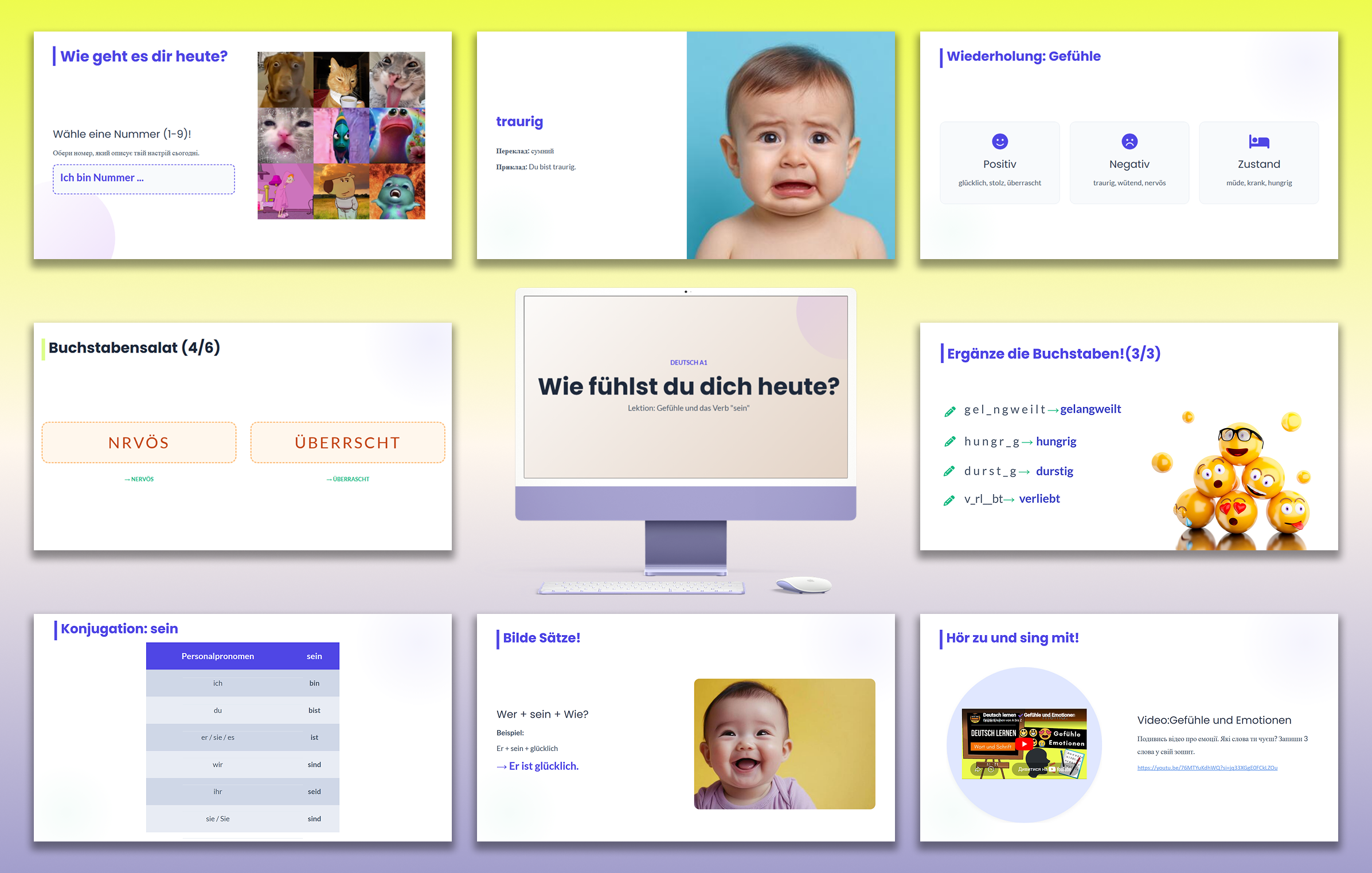
Task: Create the structure and design for a 120-minute lesson focused on visual perception and minimal use of text.
What was done: 1. Instructional Design According to the technical specifications, the lesson was divided into 4 logical blocks:
Warm-up: An interactive "Mood Scale" with visual images for quick student engagement.
Wortschatz (Vocabulary): Introduction of 12 new words using vibrant 3D illustrations and associations.
Grammatik (Grammar): A visual conjugation table for the verb sein with color-coded forms.
Anwendung (Practice): Construction slides for building first sentences based on a template.
2. Interactive Exercises and Gamification Developed a series of game-based slides in Google Slides:
Buchstabensalat (Anagrams): A spelling exercise where letters are scrambled, and the correct answer appears upon clicking.
Ergänze die Buchstaben: Slides for filling in missing letters with three levels of difficulty.
Finde den Fehler: A "work on mistakes" mechanic where the incorrect verb is crossed out in red and the correct one appears alongside.
3. Visual Concept and Design * Style: Modern minimalism, free of visual noise.
Color Palette: Pleasant pastel tones with bright functional accents (green for success, orange for tasks).
Educational UX/UI: Use of marker icons (pencils, arrows) that make the presentation interface intuitive without extra translation.
Results: * 33 interactive slides created.
Work completed ahead of schedule (within 3 days).
The project received positive feedback from the client and a request for further cooperation on a series of lessons.
Tools: Google Slides.
Content Language: German (instructions and materials).
Task: Create the structure and design for a 120-minute lesson focused on visual perception and minimal use of text.
What was done: 1. Instructional Design According to the technical specifications, the lesson was divided into 4 logical blocks:
Warm-up: An interactive "Mood Scale" with visual images for quick student engagement.
Wortschatz (Vocabulary): Introduction of 12 new words using vibrant 3D illustrations and associations.
Grammatik (Grammar): A visual conjugation table for the verb sein with color-coded forms.
Anwendung (Practice): Construction slides for building first sentences based on a template.
2. Interactive Exercises and Gamification Developed a series of game-based slides in Google Slides:
Buchstabensalat (Anagrams): A spelling exercise where letters are scrambled, and the correct answer appears upon clicking.
Ergänze die Buchstaben: Slides for filling in missing letters with three levels of difficulty.
Finde den Fehler: A "work on mistakes" mechanic where the incorrect verb is crossed out in red and the correct one appears alongside.
3. Visual Concept and Design * Style: Modern minimalism, free of visual noise.
Color Palette: Pleasant pastel tones with bright functional accents (green for success, orange for tasks).
Educational UX/UI: Use of marker icons (pencils, arrows) that make the presentation interface intuitive without extra translation.
Results: * 33 interactive slides created.
Work completed ahead of schedule (within 3 days).
The project received positive feedback from the client and a request for further cooperation on a series of lessons.
Tools: Google Slides.
Content Language: German (instructions and materials).