Task: create a commercial proposal that does not get lost among other emails during distribution and effectively conveys information to prospective students.
Problem: the previous version of the company presentation was a solid block of text: without a clear structure, visual hierarchy, and corporate style. This format did not hold attention, did not create a desire to read the document to the end, and consequently, poorly converted readers.
Solution: according to the technical assignment (TA), 18 pages of an interactive PDF presentation were designed and implemented with a completely updated logic and visual style.
What was done:
Interactivity: clickable links were added within the PDF. This transformed the static document into a convenient tool where the user can quickly navigate to the desired section or contact the manager.
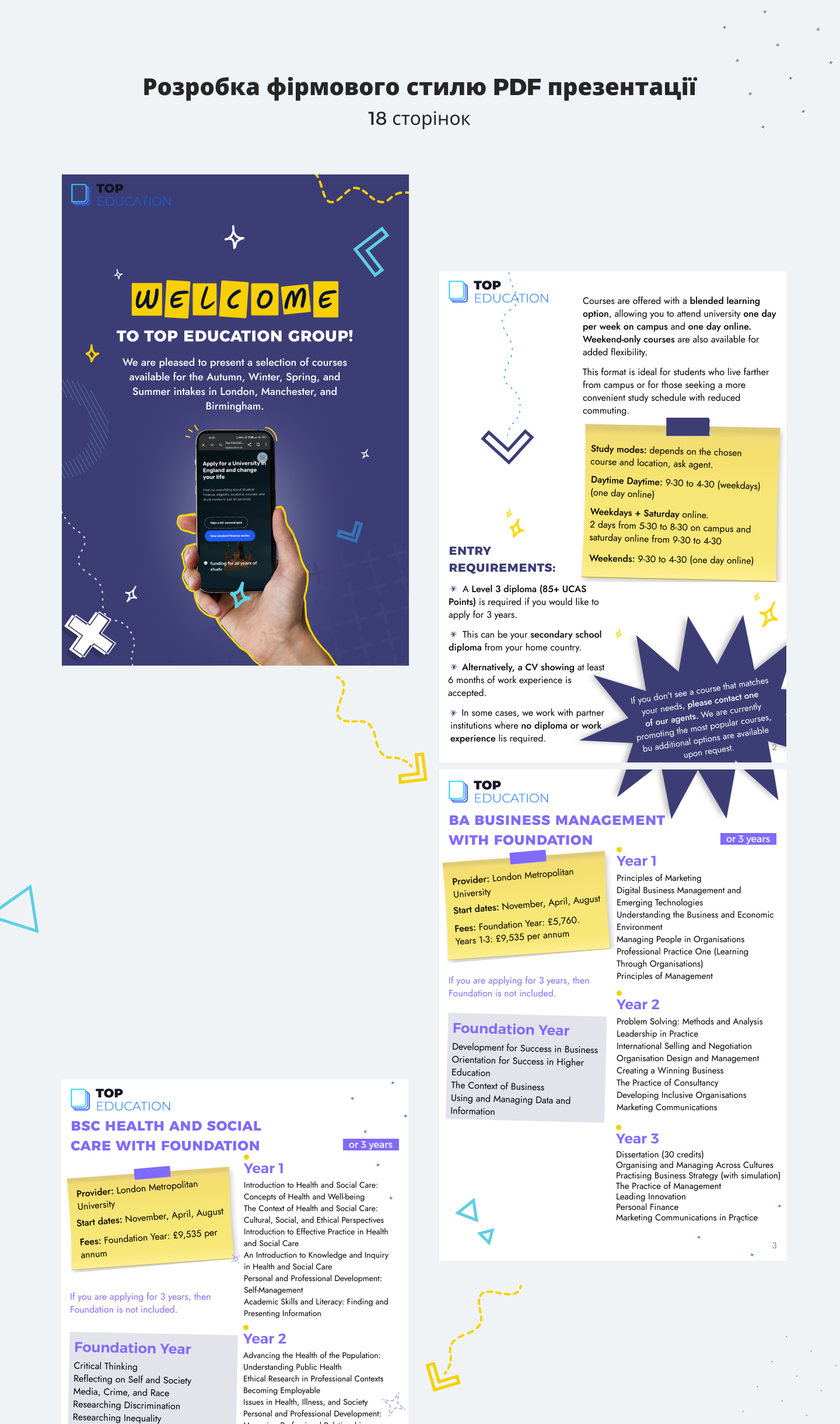
Structuring through the pain points of the target audience: the information was completely repackaged. All content was grouped to clearly address key queries and pain points of students (admission requirements, learning formats, programs by year). The most important points were highlighted in separate blocks of "sticker" labels.
Dynamic visual: to make the presentation stand out during email distribution, a bright and modern style was developed. Accent typography and fun graphic elements (arrows, stars, markers) were used to create reading dynamics and guide the user's gaze.
Result: instead of a boring text document, the client received a stylish, structured, and user-friendly marketing tool. The new design not only captures attention from the first page but is also easy to read, keeping the student's focus on the main advantages of studying.
Problem: the previous version of the company presentation was a solid block of text: without a clear structure, visual hierarchy, and corporate style. This format did not hold attention, did not create a desire to read the document to the end, and consequently, poorly converted readers.
Solution: according to the technical assignment (TA), 18 pages of an interactive PDF presentation were designed and implemented with a completely updated logic and visual style.
What was done:
Interactivity: clickable links were added within the PDF. This transformed the static document into a convenient tool where the user can quickly navigate to the desired section or contact the manager.
Structuring through the pain points of the target audience: the information was completely repackaged. All content was grouped to clearly address key queries and pain points of students (admission requirements, learning formats, programs by year). The most important points were highlighted in separate blocks of "sticker" labels.
Dynamic visual: to make the presentation stand out during email distribution, a bright and modern style was developed. Accent typography and fun graphic elements (arrows, stars, markers) were used to create reading dynamics and guide the user's gaze.
Result: instead of a boring text document, the client received a stylish, structured, and user-friendly marketing tool. The new design not only captures attention from the first page but is also easy to read, keeping the student's focus on the main advantages of studying.