General Report Generator - Wildberries
Desktop Apps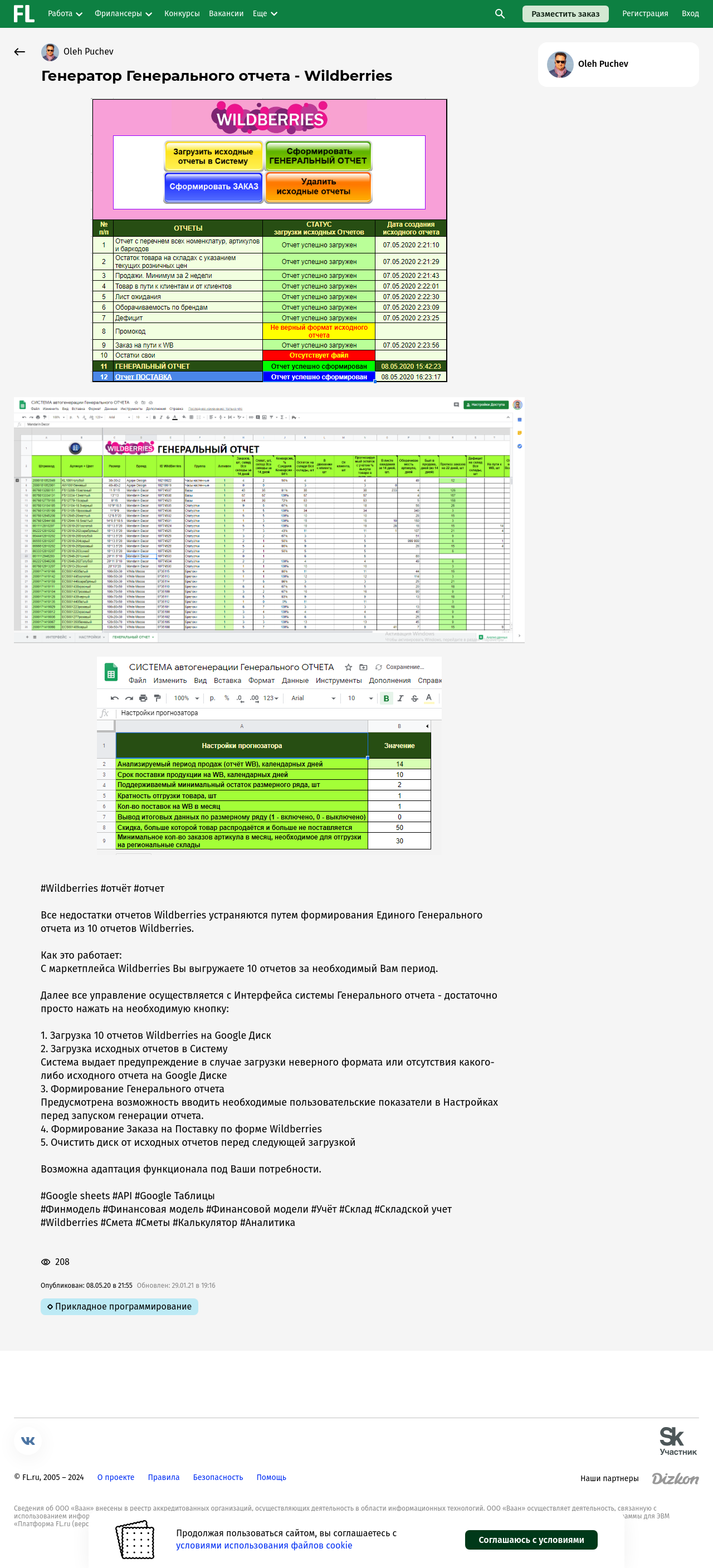
All the shortcomings of Wildberries reports are eliminated by creating a Unified General Report from 10 Wildberries reports.
How it works:
From the Wildberries marketplace, you download 10 reports for the period you need.
Next, all management is carried out from the General Report system interface - just press the necessary button:
1. Uploading 10 Wildberries reports to Google Drive
2. Uploading original reports to the System
The system issues a warning in case of uploading an incorrect format or the absence of any original report on Google Drive
3. Generating the General Report
There is an option to enter necessary user metrics in Settings before starting the report generation.
4. Creating a Supply Order in the Wildberries format
5. Clearing the drive of original reports before the next upload
Functionality can be adapted to your needs.
How it works:
From the Wildberries marketplace, you download 10 reports for the period you need.
Next, all management is carried out from the General Report system interface - just press the necessary button:
1. Uploading 10 Wildberries reports to Google Drive
2. Uploading original reports to the System
The system issues a warning in case of uploading an incorrect format or the absence of any original report on Google Drive
3. Generating the General Report
There is an option to enter necessary user metrics in Settings before starting the report generation.
4. Creating a Supply Order in the Wildberries format
5. Clearing the drive of original reports before the next upload
Functionality can be adapted to your needs.