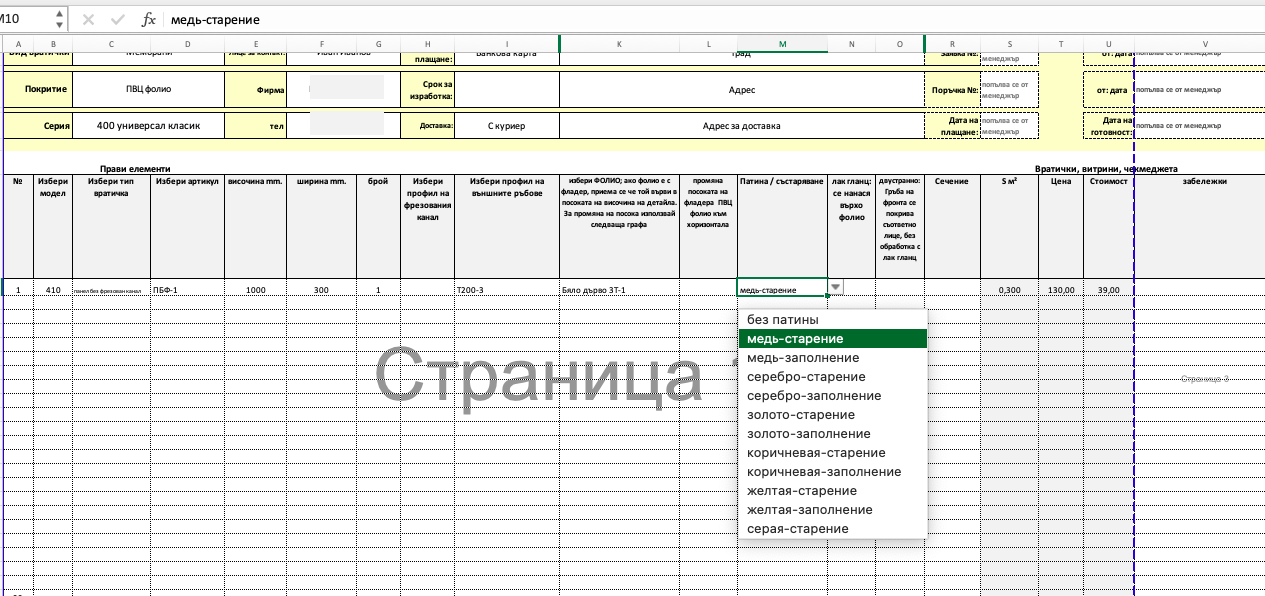
Order form and price calculator for the furniture company. The customer must select the data from the falling lists or mark the bullet in the necessary cells to fill the order.
Each subsequent dynamic list is formed depending on the information selected in the previous cells. At each stage of the order entry is provided to verify the possibility of the order in accordance with the introduced parameters.
The price of each option and the final amounts on order, including the rates for the performance speed and the small area of the furniture, are automatically delivered in the process of ordering.
There are two modes of use of the order form: 1. for the customer (only the order entry and its print) and 2. for the company (the input of the starting parameters, formula, furniture lists, the input and the editing of the price, this information is unavailable to the customer and is used only by the store).
There are several types of order forms in one file depending on the material and the furniture series.
Each subsequent dynamic list is formed depending on the information selected in the previous cells. At each stage of the order entry is provided to verify the possibility of the order in accordance with the introduced parameters.
The price of each option and the final amounts on order, including the rates for the performance speed and the small area of the furniture, are automatically delivered in the process of ordering.
There are two modes of use of the order form: 1. for the customer (only the order entry and its print) and 2. for the company (the input of the starting parameters, formula, furniture lists, the input and the editing of the price, this information is unavailable to the customer and is used only by the store).
There are several types of order forms in one file depending on the material and the furniture series.