Marketing ROI Dashboard — Google Sheets and Excel
Enterprise Resource Planning (ERP)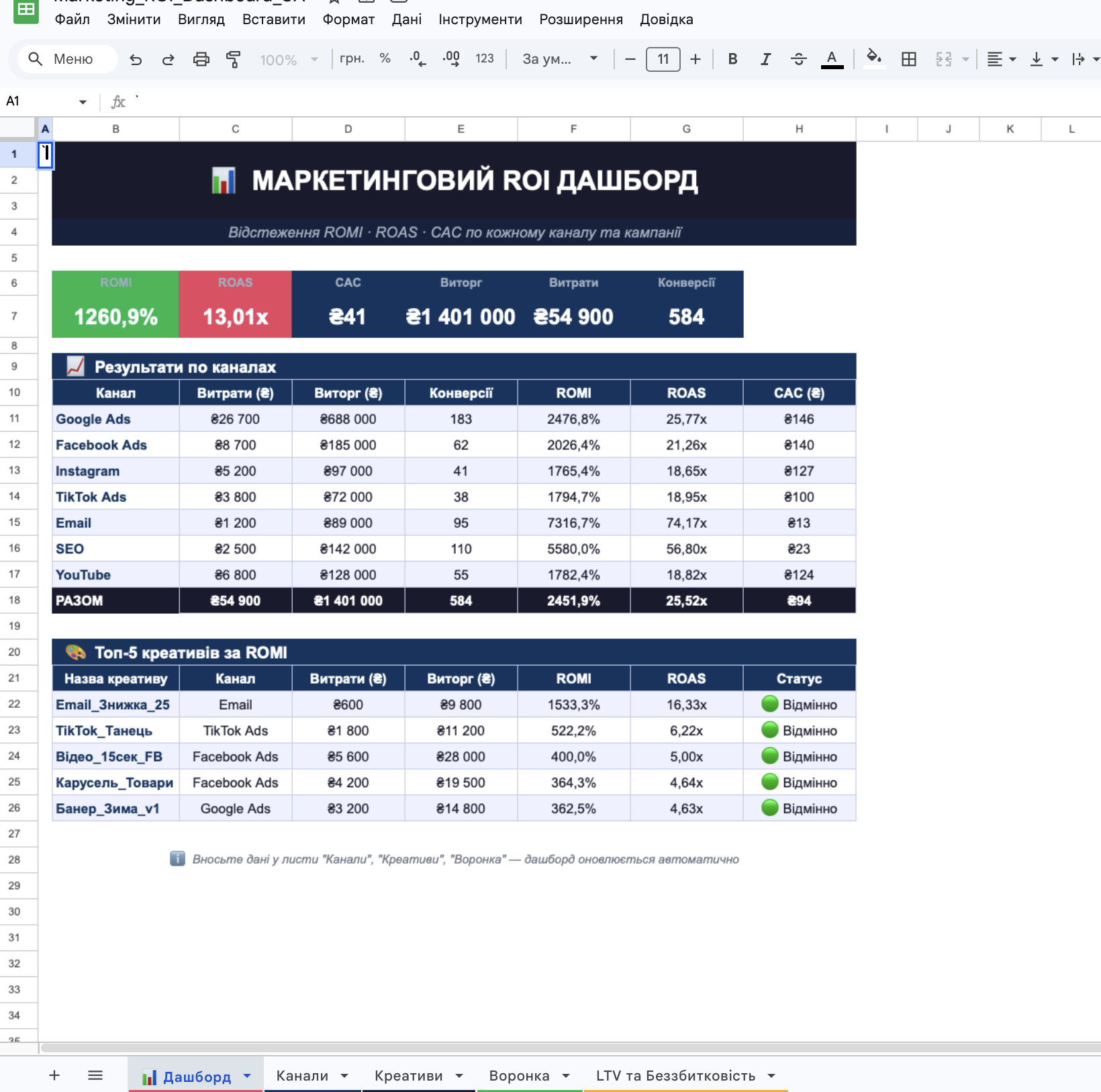
Developed a dashboard for tracking marketing ROI, which allows monitoring the effectiveness of the advertising budget across all channels in one place.
What is included in the template:
Dashboard — a real-time summary panel with key metrics: ROMI, ROAS, CAC, revenue, conversions
Sheet "Channels" — accounting for campaigns, advertising expenses, impressions, clicks, leads, and revenue for each channel (Google Ads, Facebook, Instagram, TikTok, Email, SEO, YouTube)
Sheet "Creatives" — tracking the performance and status of advertising creatives (Excellent / Good / Poor)
Sales funnel — visualization of the customer journey: impressions → clicks → leads → add to cart → purchases
LTV and breakeven point calculator — calculation of breakeven ROAS based on average check, margin, and customer churn
How it works:
The user enters data into the highlighted cells — all formulas automatically recalculate metrics and update the dashboard, without code, plugins, or additional software.
Compatibility: works in both Google Sheets and Microsoft Excel.
Suitable for: digital marketing agencies, freelancers in media buying, e-commerce brands, and small business owners launching paid advertising.
Result — a ready tool for accurately tracking advertising profitability across each channel and making decisions based on real data.
Tags:
#GoogleSheets #Excel #MarketingAnalysis #ROI #ROAS #Dashboard #Automation #DigitalMarketing #Analytics #Formulas
What is included in the template:
Dashboard — a real-time summary panel with key metrics: ROMI, ROAS, CAC, revenue, conversions
Sheet "Channels" — accounting for campaigns, advertising expenses, impressions, clicks, leads, and revenue for each channel (Google Ads, Facebook, Instagram, TikTok, Email, SEO, YouTube)
Sheet "Creatives" — tracking the performance and status of advertising creatives (Excellent / Good / Poor)
Sales funnel — visualization of the customer journey: impressions → clicks → leads → add to cart → purchases
LTV and breakeven point calculator — calculation of breakeven ROAS based on average check, margin, and customer churn
How it works:
The user enters data into the highlighted cells — all formulas automatically recalculate metrics and update the dashboard, without code, plugins, or additional software.
Compatibility: works in both Google Sheets and Microsoft Excel.
Suitable for: digital marketing agencies, freelancers in media buying, e-commerce brands, and small business owners launching paid advertising.
Result — a ready tool for accurately tracking advertising profitability across each channel and making decisions based on real data.
Tags:
#GoogleSheets #Excel #MarketingAnalysis #ROI #ROAS #Dashboard #Automation #DigitalMarketing #Analytics #Formulas