Event Planner
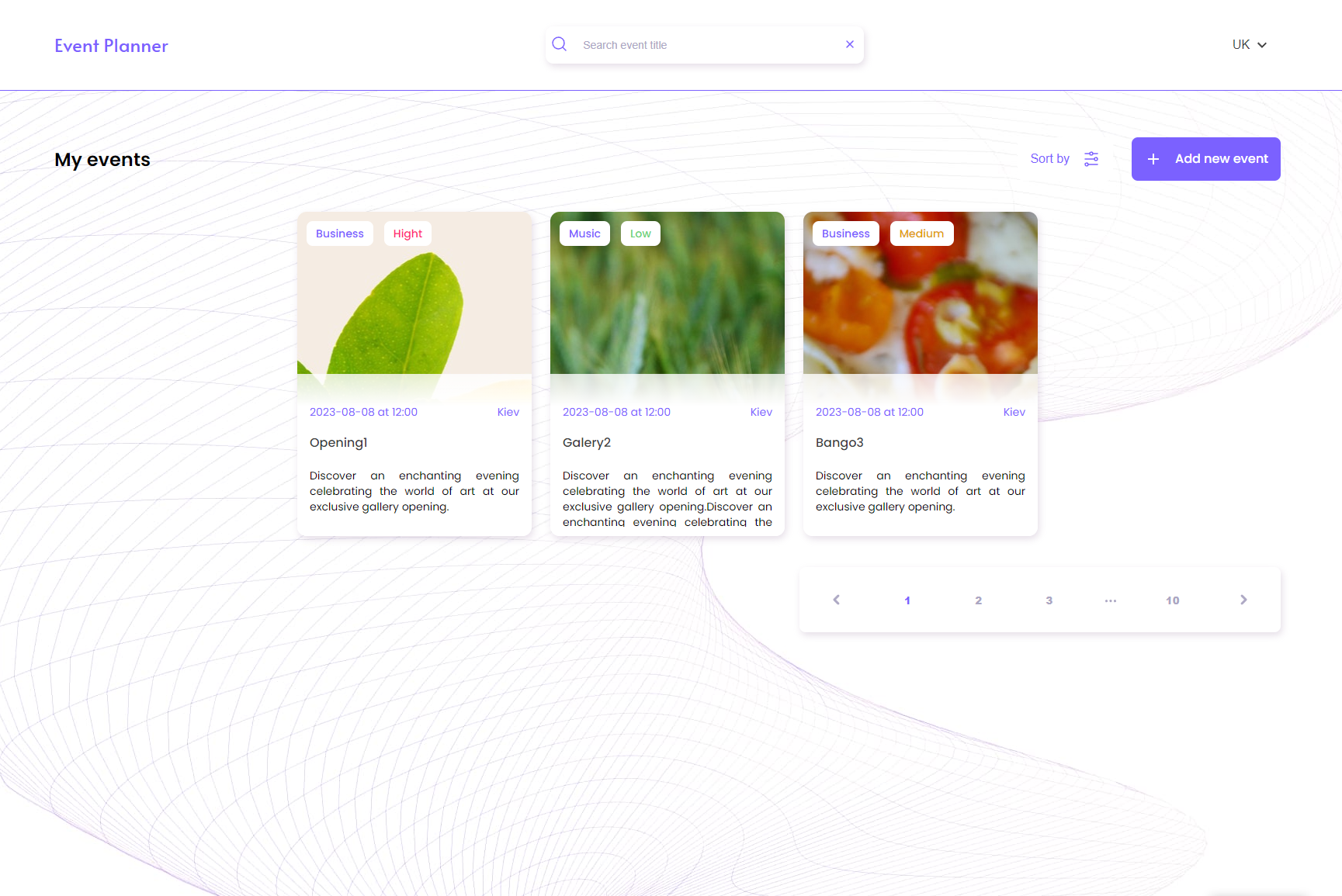
Event Planner is a web plugin that allows users to plan and organize events.Event Planner has the following pages:
The main page:
On this page, users can view the list of the nearest events.There is the possibility to sort events according to different criteria, for example, by name, date or priority.With the hover and focus on the event card, a button appears,which gives the opportunity to go to a more detailed description of the event (the passage to the event page).Also on the page is a button to add a new event, when you click on which the user goes to the event creation page.The site of the event:
On this page users can fill out the form with the necessary information about the event, such as name, date, time, place, description, etc.Page of the event:
Detailed information about the specific event.There is a possibility for users to return to the previous page, or to delete the event, or to edit it.When you click on the Edit button, the application is translated to the Event Edit page.Page of event editing:
On this page users can edit a filled form with information about the event, such as name, date, time, place, description, etc.After storing the editing form, the user returns automatically to the event page.The application is also implemented:
Searching for an event is an opportunity to search for an event by name, using the input in the header.Pagination on the main page.Support of different languages - translator to Ukrainian and English.From the event page by clicking on the Video button, a modal window opens where the user can view the event video (at the default).Adaptive and cross-browser layer - a mobile from 320px, a tablet from 768px, a desktop from 1280px.The mobile first approach is used.The list of events is used by the CSS Grid algorithm.In the development used React, JS, TS (colender).Forms of creation and editing of the event are realized with validation using formik.The approach is realised without requests and attachments to the backdrop.
The main page:
On this page, users can view the list of the nearest events.There is the possibility to sort events according to different criteria, for example, by name, date or priority.With the hover and focus on the event card, a button appears,which gives the opportunity to go to a more detailed description of the event (the passage to the event page).Also on the page is a button to add a new event, when you click on which the user goes to the event creation page.The site of the event:
On this page users can fill out the form with the necessary information about the event, such as name, date, time, place, description, etc.Page of the event:
Detailed information about the specific event.There is a possibility for users to return to the previous page, or to delete the event, or to edit it.When you click on the Edit button, the application is translated to the Event Edit page.Page of event editing:
On this page users can edit a filled form with information about the event, such as name, date, time, place, description, etc.After storing the editing form, the user returns automatically to the event page.The application is also implemented:
Searching for an event is an opportunity to search for an event by name, using the input in the header.Pagination on the main page.Support of different languages - translator to Ukrainian and English.From the event page by clicking on the Video button, a modal window opens where the user can view the event video (at the default).Adaptive and cross-browser layer - a mobile from 320px, a tablet from 768px, a desktop from 1280px.The mobile first approach is used.The list of events is used by the CSS Grid algorithm.In the development used React, JS, TS (colender).Forms of creation and editing of the event are realized with validation using formik.The approach is realised without requests and attachments to the backdrop.

 Odessa
  Available for hire