WP Plugin for ordering driver insurance OSAGO
Web Programming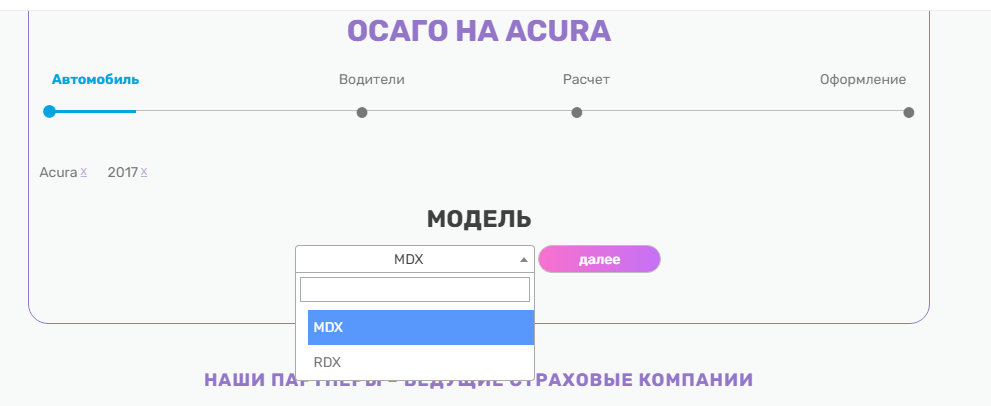
WP Plugin for Ordering Driver's Insurance OSAGO
This plugin is a module for WordPress that allows users to order car insurance.
The plugin works in 4 stages.
Stages of the plugin's operation:
1. Select the car and its parameters
2. Fill out the form with drivers
3. Choose the insurance company
4. Fill out the final form, where we specify the car number, passport number, and everything else
Let's consider each stage in more detail.
Car Selection
Here we select the make, year of manufacture, model, body type, transmission, and other characteristics of the car, choose the duration of the policy, and from which day to start.
Adding Drivers
We fill out a form where we specify the full name of the drivers. There can be many drivers, not just one. Multi-drive can be selected for any number of drivers.
Choosing a Company
A list of companies with prices is displayed on the screen, and the user selects one of the companies. The price for each company is calculated based on a formula.
Registration
The final form is displayed, where we add the full name, phone number, and email of the driver. We add information for the policy: VIN, CTC number, series and number of the policyholder's passport, registration address of the policyholder, choose the delivery method. An extension can also be added, which is an offer from the company for an additional fee. Scans of documents can be added.
jQuery plugins used:
1. select2 for replacing the standard one https://select2.github.io/
2. jqueryUI datepicker for date selection https://jqueryui.com/datepicker/
3. for masks masked input plugin http://digitalbush.com/projects/masked-input-plugin/
Protection from Bots
When submitting forms, a new Google invisible reCAPTCHA is placed on the buttons https://developers.google.com/recaptcha/docs/invisible.
After submitting the final form, an email with the order details is sent to the client and the website owner.
In the admin panel, insurance companies need to be added. For this, a page called companies has been created in the admin panel. There are pages where the added data is displayed.
Database
Three tables are created in the database.
1. A table for insurance companies. Insurance companies are added.
2. A table for saving data after submitting the first form. Data about the car and drivers are recorded there.
3. In the last table, we add order data.
Databases of cars and their characteristics are added separately to the WordPress database and need to be imported via phpMyAdmin, where there are 5 tables.
This plugin is a module for WordPress that allows users to order car insurance.
The plugin works in 4 stages.
Stages of the plugin's operation:
1. Select the car and its parameters
2. Fill out the form with drivers
3. Choose the insurance company
4. Fill out the final form, where we specify the car number, passport number, and everything else
Let's consider each stage in more detail.
Car Selection
Here we select the make, year of manufacture, model, body type, transmission, and other characteristics of the car, choose the duration of the policy, and from which day to start.
Adding Drivers
We fill out a form where we specify the full name of the drivers. There can be many drivers, not just one. Multi-drive can be selected for any number of drivers.
Choosing a Company
A list of companies with prices is displayed on the screen, and the user selects one of the companies. The price for each company is calculated based on a formula.
Registration
The final form is displayed, where we add the full name, phone number, and email of the driver. We add information for the policy: VIN, CTC number, series and number of the policyholder's passport, registration address of the policyholder, choose the delivery method. An extension can also be added, which is an offer from the company for an additional fee. Scans of documents can be added.
jQuery plugins used:
1. select2 for replacing the standard one https://select2.github.io/
2. jqueryUI datepicker for date selection https://jqueryui.com/datepicker/
3. for masks masked input plugin http://digitalbush.com/projects/masked-input-plugin/
Protection from Bots
When submitting forms, a new Google invisible reCAPTCHA is placed on the buttons https://developers.google.com/recaptcha/docs/invisible.
After submitting the final form, an email with the order details is sent to the client and the website owner.
In the admin panel, insurance companies need to be added. For this, a page called companies has been created in the admin panel. There are pages where the added data is displayed.
Database
Three tables are created in the database.
1. A table for insurance companies. Insurance companies are added.
2. A table for saving data after submitting the first form. Data about the car and drivers are recorded there.
3. In the last table, we add order data.
Databases of cars and their characteristics are added separately to the WordPress database and need to be imported via phpMyAdmin, where there are 5 tables.