AI Telegram Bot + Google Calendar Automation in n8n
Bot Development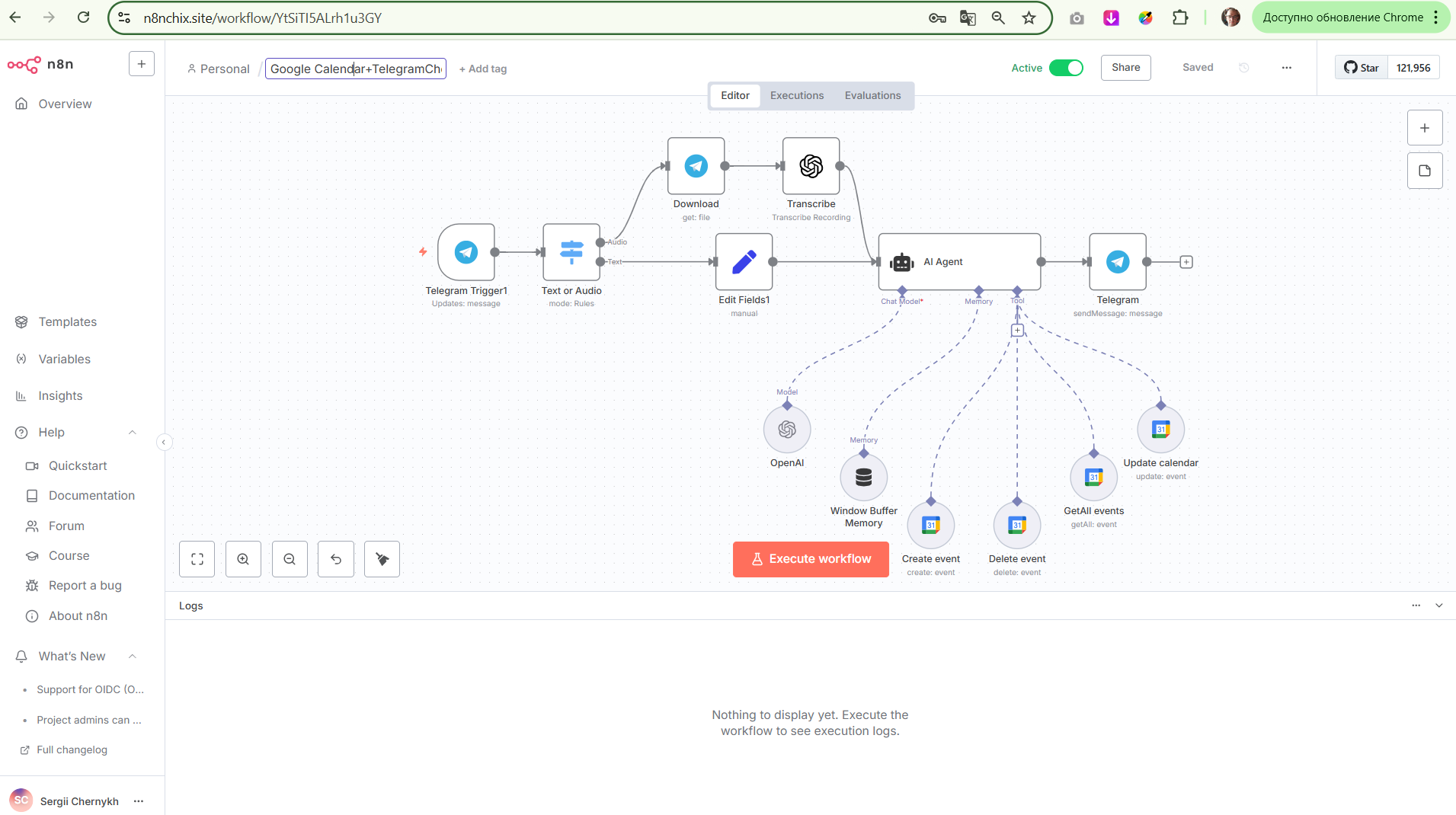
AI Telegram Bot + Google Calendar Automation in n8n
I have created a full no-code system in n8n that allows managing Google Calendar events through messages or voice in Telegram.
Features implemented:
Telegram Trigger — the bot responds to incoming messages or voice.
Text or Audio Parser — automatic recognition: text or audio.
Download + Transcribe — downloading and transcribing voice via OpenAI Whisper.
AI Agent (GPT-4o) — AI processes the request, recognizes the intent (create, update, delete, or view an event).
Window Memory — session memory provides contextual conversation.
Google Calendar (4 actions):
Create event
Update event
Delete event
Get list of events by dates
Telegram Response — AI sends a reply to the user in chat.
Technologies:
n8n (SaaS)
Telegram Bot API
Google Calendar API
OpenAI GPT-4o + Whisper (speech recognition)
Dynamic logic via $fromAI, $now, {{ $json.message.text }}, and others.
Example usage:
User sends a voice message: “Create a meeting tomorrow at 2:00 PM with Alexander,” — the bot recognizes, transcribes, interprets the intent, creates an event in Google Calendar, and sends a confirmation in Telegram.
I have created a full no-code system in n8n that allows managing Google Calendar events through messages or voice in Telegram.
Features implemented:
Telegram Trigger — the bot responds to incoming messages or voice.
Text or Audio Parser — automatic recognition: text or audio.
Download + Transcribe — downloading and transcribing voice via OpenAI Whisper.
AI Agent (GPT-4o) — AI processes the request, recognizes the intent (create, update, delete, or view an event).
Window Memory — session memory provides contextual conversation.
Google Calendar (4 actions):
Create event
Update event
Delete event
Get list of events by dates
Telegram Response — AI sends a reply to the user in chat.
Technologies:
n8n (SaaS)
Telegram Bot API
Google Calendar API
OpenAI GPT-4o + Whisper (speech recognition)
Dynamic logic via $fromAI, $now, {{ $json.message.text }}, and others.
Example usage:
User sends a voice message: “Create a meeting tomorrow at 2:00 PM with Alexander,” — the bot recognizes, transcribes, interprets the intent, creates an event in Google Calendar, and sends a confirmation in Telegram.