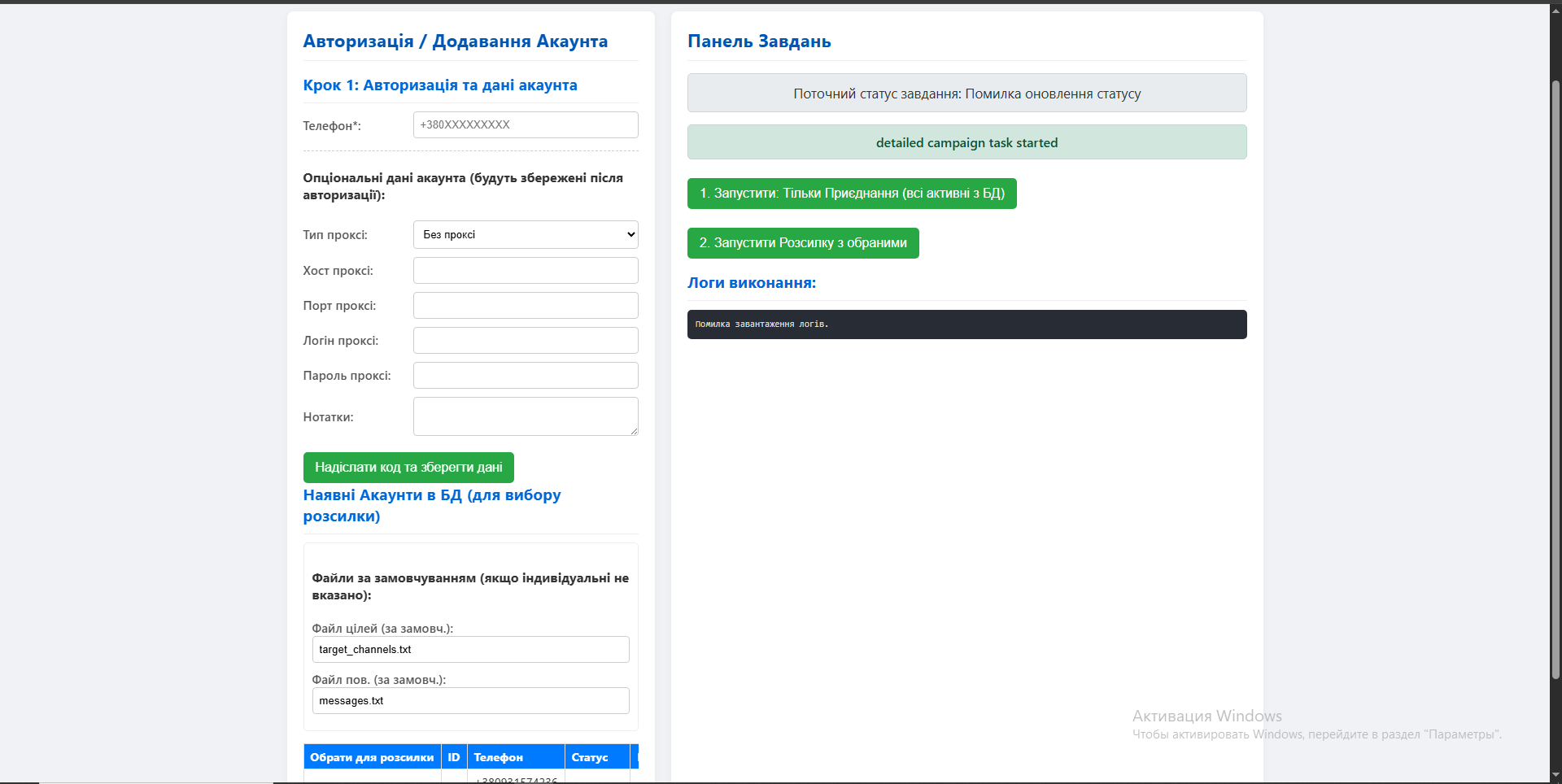
This is a web control panel written in Python using the FastAPI framework, which serves as a graphical interface for the previously described Telegram automation script (core_logic.py). The panel allows the user to manage Telegram accounts, launch broadcasts, and track their execution through a browser. SQLAlchemy is used for data storage.
Key Features
Centralized account management: The web interface allows adding new accounts, viewing the list of existing ones, and deleting Telegram accounts from the database along with their session files.
Web authorization: A step-by-step process for adding new accounts directly through the browser is implemented. The user enters the phone number, then the confirmation code from Telegram, and, if necessary, the two-factor authentication (2FA) password. The system handles all stages, creates a session file, and saves the account.
Launching and configuring campaigns: The user can select accounts to participate in the broadcast and run tasks in the background. Individual settings can be specified for each campaign (e.g., files with targets and messages).
Background task execution: Broadcasts are executed as background processes (BackgroundTasks). This means that the user can close the browser page, and the task will continue to run on the server.
Real-time monitoring: The panel displays the current status of the task (e.g., "Ready to start," "In progress," "Completed," "Error") and allows viewing the latest entries from the log file, enabling tracking of progress and diagnosing issues.
Safe stop: There is an option to send a signal for a proper stop of the current task. The script will complete its current action (e.g., sending a message) and stop without abruptly terminating the process.
Operational Logic
The user opens the main page, where they see a table with all added Telegram accounts and their statuses, as well as a control panel for launching tasks.
Adding an account: The user fills out a form, specifying the phone number and other settings (proxy, files). The server initiates the authorization process via Telethon, sending a code to the specified number. After entering the code (and the 2FA password, if needed), the server saves the session file and adds an account record to the database.
Launching a campaign: The user selects one or more active accounts, configures the parameters, and clicks the "Start" button.
The browser sends a request to the server. The server (FastAPI) receives this request, checks if another task is not running, and starts the main broadcast logic (run_script_logic) in the background.
The user is immediately redirected back to the main page, where they see that the task status has changed to "Starting..." or "In progress."
JavaScript on the page periodically sends requests to the server to get the current status and logs, updating the information on the screen without reloading the page.
After the broadcast is completed, the status is automatically updated to "Completed" or "Error."
Key Features
Centralized account management: The web interface allows adding new accounts, viewing the list of existing ones, and deleting Telegram accounts from the database along with their session files.
Web authorization: A step-by-step process for adding new accounts directly through the browser is implemented. The user enters the phone number, then the confirmation code from Telegram, and, if necessary, the two-factor authentication (2FA) password. The system handles all stages, creates a session file, and saves the account.
Launching and configuring campaigns: The user can select accounts to participate in the broadcast and run tasks in the background. Individual settings can be specified for each campaign (e.g., files with targets and messages).
Background task execution: Broadcasts are executed as background processes (BackgroundTasks). This means that the user can close the browser page, and the task will continue to run on the server.
Real-time monitoring: The panel displays the current status of the task (e.g., "Ready to start," "In progress," "Completed," "Error") and allows viewing the latest entries from the log file, enabling tracking of progress and diagnosing issues.
Safe stop: There is an option to send a signal for a proper stop of the current task. The script will complete its current action (e.g., sending a message) and stop without abruptly terminating the process.
Operational Logic
The user opens the main page, where they see a table with all added Telegram accounts and their statuses, as well as a control panel for launching tasks.
Adding an account: The user fills out a form, specifying the phone number and other settings (proxy, files). The server initiates the authorization process via Telethon, sending a code to the specified number. After entering the code (and the 2FA password, if needed), the server saves the session file and adds an account record to the database.
Launching a campaign: The user selects one or more active accounts, configures the parameters, and clicks the "Start" button.
The browser sends a request to the server. The server (FastAPI) receives this request, checks if another task is not running, and starts the main broadcast logic (run_script_logic) in the background.
The user is immediately redirected back to the main page, where they see that the task status has changed to "Starting..." or "In progress."
JavaScript on the page periodically sends requests to the server to get the current status and logs, updating the information on the screen without reloading the page.
After the broadcast is completed, the status is automatically updated to "Completed" or "Error."