Workout Dashboard
Web Programming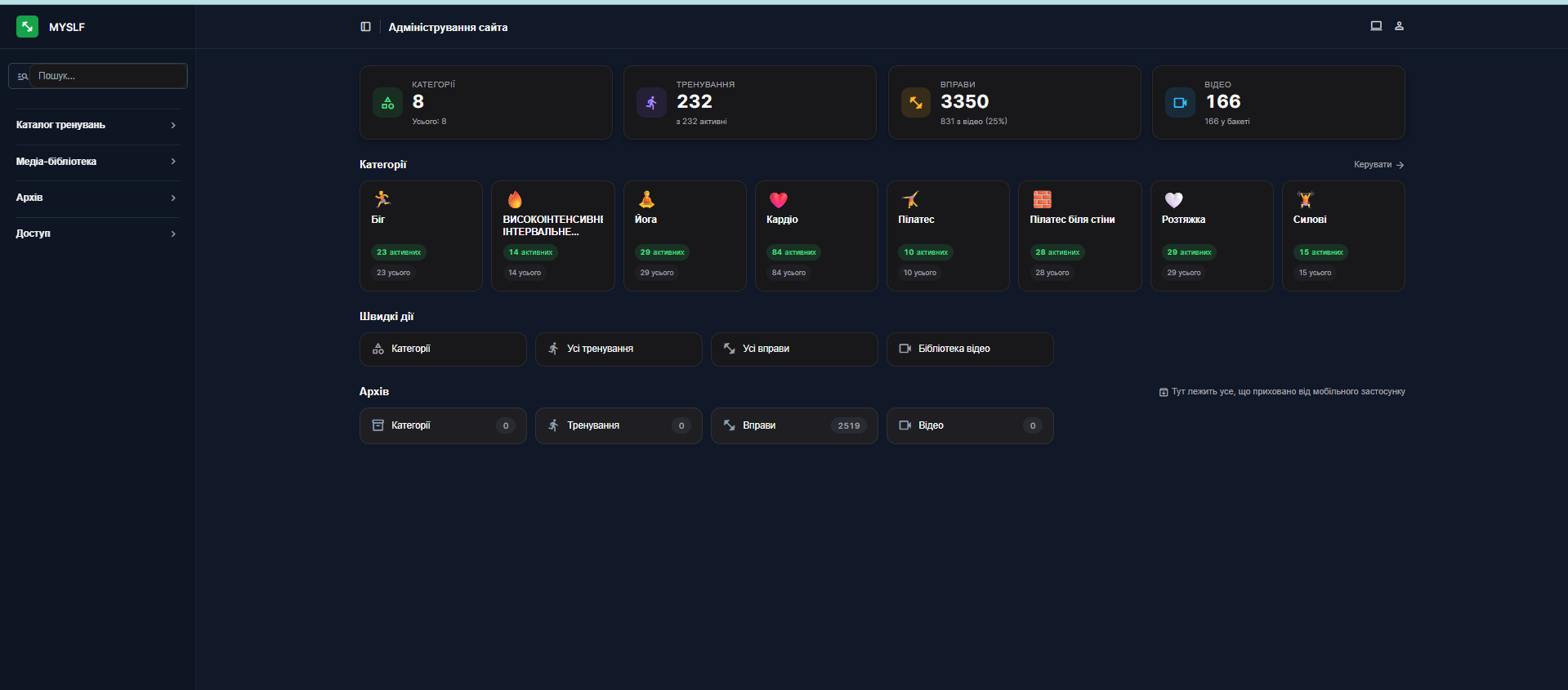
Workout Dashboard — Django admin panel for managing workouts and videos
Workout Dashboard is an administrative panel for a mobile fitness application that allows centralized management of workouts, categories, exercises, and video content. The system is integrated with Cloudflare R2 for video storage and synchronizes prepared content with the mobile application.
The main task of the project is to simplify the addition of new workouts to the mobile application without manual work with Excel spreadsheets, file names, video archives, and complex data structures. The administrator receives a convenient dashboard where categories can be created, exercises added, videos attached, descriptions, timings, difficulty levels, and other parameters configured.
What has been implemented
- Developed a custom admin panel on Django
- Implemented management of workout categories
- Added modules for creating and editing workouts
- Implemented a database of exercises with descriptions, parameters, and category links
- Configured video content management through Cloudflare R2
- Added the ability to pull videos from the R2 bucket
- Implemented video linking to exercises and workouts
- Added an archive for hidden or inactive elements
- Implemented a statistics panel with the number of categories, workouts, exercises, and videos
- Added quick actions for navigating to main sections
- Prepared data structure for transfer to the mobile fitness application
- Implemented logic for activating/deactivating content
- Processed a scenario where part of the content is hidden from the mobile application
Main functionality
The administrator can create workout categories, add workouts to them, form a list of exercises, attach videos from Cloudflare R2, edit descriptions, sorting, activity, and additional parameters.
After filling in the data in the dashboard, the content becomes ready for use in the mobile fitness application. This allows for quick updates to the workout library without direct intervention in the application code or manual editing of complex tables.
Sections of the admin panel
- Workout catalog — management of categories, workouts, and exercises
- Media library — working with videos from Cloudflare R2
- Archive — hidden or inactive content
- Access — managing administrative access
- Dashboard — overall statistics on content
- Quick actions — quick navigation to key modules
Technologies
Backend: Python, Django, Django Admin / Custom Admin, Django ORM
Storage: Cloudflare R2, S3-compatible storage
Database: PostgreSQL / SQLite depending on the environment
Frontend of the admin panel: custom dashboard interface
Integrations: Cloudflare R2, mobile app content API
DevOps: Docker, environment-based configuration
Result
As a result, a convenient content management system for the mobile fitness application was created. The dashboard eliminated the dependency on manual synchronization of Excel spreadsheets and video files, reduced the risk of errors in names and structures, and allowed for quick addition of new workouts, exercises, and videos through a single administrative panel.
The project became an internal tool for scaling fitness content: the administrator can manage the entire library of workouts, and the mobile application receives already structured and ready-to-display data.
Workout Dashboard is an administrative panel for a mobile fitness application that allows centralized management of workouts, categories, exercises, and video content. The system is integrated with Cloudflare R2 for video storage and synchronizes prepared content with the mobile application.
The main task of the project is to simplify the addition of new workouts to the mobile application without manual work with Excel spreadsheets, file names, video archives, and complex data structures. The administrator receives a convenient dashboard where categories can be created, exercises added, videos attached, descriptions, timings, difficulty levels, and other parameters configured.
What has been implemented
- Developed a custom admin panel on Django
- Implemented management of workout categories
- Added modules for creating and editing workouts
- Implemented a database of exercises with descriptions, parameters, and category links
- Configured video content management through Cloudflare R2
- Added the ability to pull videos from the R2 bucket
- Implemented video linking to exercises and workouts
- Added an archive for hidden or inactive elements
- Implemented a statistics panel with the number of categories, workouts, exercises, and videos
- Added quick actions for navigating to main sections
- Prepared data structure for transfer to the mobile fitness application
- Implemented logic for activating/deactivating content
- Processed a scenario where part of the content is hidden from the mobile application
Main functionality
The administrator can create workout categories, add workouts to them, form a list of exercises, attach videos from Cloudflare R2, edit descriptions, sorting, activity, and additional parameters.
After filling in the data in the dashboard, the content becomes ready for use in the mobile fitness application. This allows for quick updates to the workout library without direct intervention in the application code or manual editing of complex tables.
Sections of the admin panel
- Workout catalog — management of categories, workouts, and exercises
- Media library — working with videos from Cloudflare R2
- Archive — hidden or inactive content
- Access — managing administrative access
- Dashboard — overall statistics on content
- Quick actions — quick navigation to key modules
Technologies
Backend: Python, Django, Django Admin / Custom Admin, Django ORM
Storage: Cloudflare R2, S3-compatible storage
Database: PostgreSQL / SQLite depending on the environment
Frontend of the admin panel: custom dashboard interface
Integrations: Cloudflare R2, mobile app content API
DevOps: Docker, environment-based configuration
Result
As a result, a convenient content management system for the mobile fitness application was created. The dashboard eliminated the dependency on manual synchronization of Excel spreadsheets and video files, reduced the risk of errors in names and structures, and allowed for quick addition of new workouts, exercises, and videos through a single administrative panel.
The project became an internal tool for scaling fitness content: the administrator can manage the entire library of workouts, and the mobile application receives already structured and ready-to-display data.