API request. Weather App
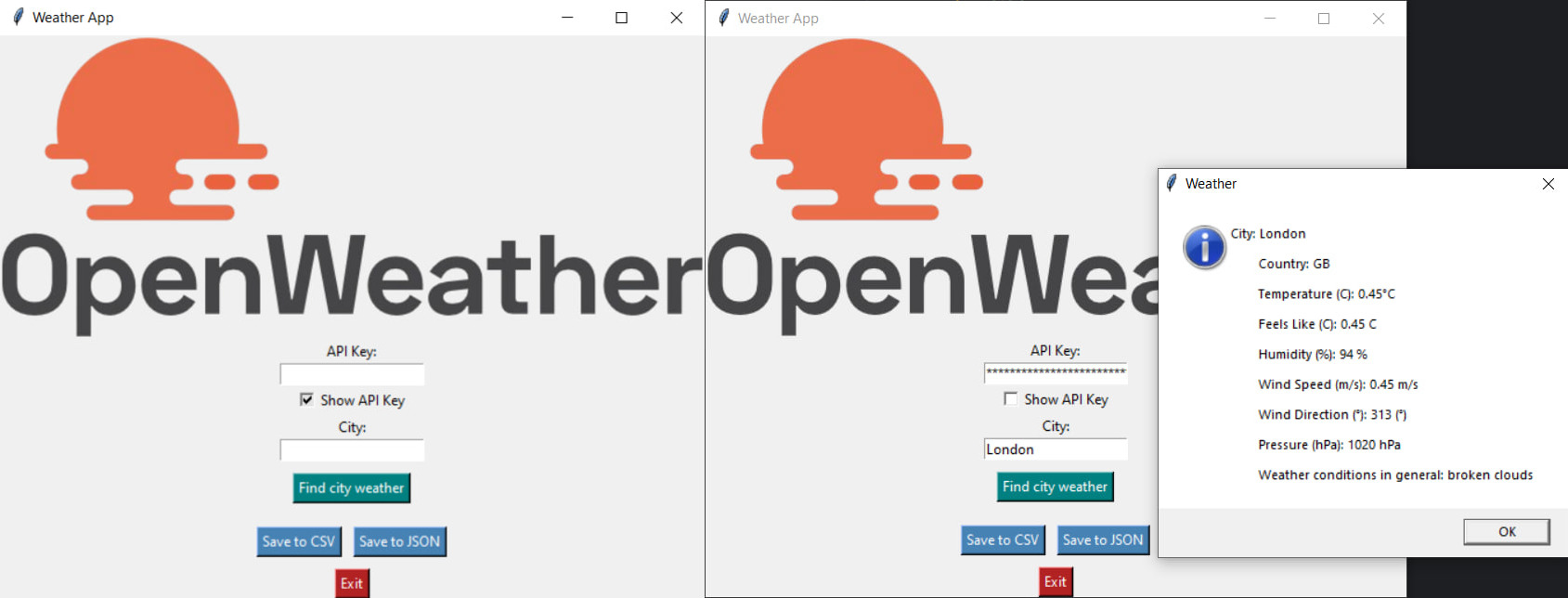
The Weather App program is a convenient tool for receiving and saving weather data with an intuitive interface. The application provides information about the current weather in a given city, interacting with the OpenWeatherMap API. It also supports saving the received data to CSV and JSON files. Programming language: Ruby.
• Program functionality
Data input: The user enters the city name and the OpenWeatherMap API key.
Input validation is implemented: the city name must contain only Latin letters, spaces and hyphens.
Receiving weather data: The program sends an HTTP request to the OpenWeatherMap API.
If the data is successfully received, it includes: City and country; Air temperature (°C); Feels like temperature (°C); Humidity (%); Wind speed (m/s) and direction (°); Atmospheric pressure (hPa); Brief description of the weather.
User information:
If the request is successful, weather information is displayed through a graphical pop-up window. In case of errors (e.g. invalid API key, service unavailability), a corresponding error message is displayed.
Saving data: Saving weather information to files is supported:
CSV: appending or overwriting data.
JSON: merging with existing data or creating a new file.
The user can select an existing file or specify a new name via a graphical dialog.
User interface (UI): Input fields for the API key and city; Buttons for getting the weather, saving data to CSV and JSON, and exiting the application; The application logo is displayed at the top of the window; Context menu for text fields (copy/paste); Interactive elements: buttons, pop-up windows, and a checkbox for displaying the API key.
Exiting the program: The user can exit the application via the "Exit" button.
• Program features
Ease of use: Intuitive graphical interface. User data validation with error messages.
Support for multiple saving formats: CSV and JSON are popular formats for working with data.
Interactive elements: Checkbox to show or hide the entered API key.
Dialogs for selecting or saving a file.
Flexibility: Ability to add data to an existing file (for both formats).
Error handling: The program handles HTTP request errors, exceptions when working with files, and incorrect data entry.
• How to use the application
1. Open the application.
2. Enter the API key (you can get it by registering on the website https://home.openweathermap.org/) and the city name (in Latin).
3. Click the "Find city weather" button to get weather data.
4. To save the data, select the format (CSV or JSON) and specify the file.
5. Click "Exit" to exit.
#ruby #requests #request #api #requestapi #apirequest #programming #api-разработка #csv #json #HTTP
• Program functionality
Data input: The user enters the city name and the OpenWeatherMap API key.
Input validation is implemented: the city name must contain only Latin letters, spaces and hyphens.
Receiving weather data: The program sends an HTTP request to the OpenWeatherMap API.
If the data is successfully received, it includes: City and country; Air temperature (°C); Feels like temperature (°C); Humidity (%); Wind speed (m/s) and direction (°); Atmospheric pressure (hPa); Brief description of the weather.
User information:
If the request is successful, weather information is displayed through a graphical pop-up window. In case of errors (e.g. invalid API key, service unavailability), a corresponding error message is displayed.
Saving data: Saving weather information to files is supported:
CSV: appending or overwriting data.
JSON: merging with existing data or creating a new file.
The user can select an existing file or specify a new name via a graphical dialog.
User interface (UI): Input fields for the API key and city; Buttons for getting the weather, saving data to CSV and JSON, and exiting the application; The application logo is displayed at the top of the window; Context menu for text fields (copy/paste); Interactive elements: buttons, pop-up windows, and a checkbox for displaying the API key.
Exiting the program: The user can exit the application via the "Exit" button.
• Program features
Ease of use: Intuitive graphical interface. User data validation with error messages.
Support for multiple saving formats: CSV and JSON are popular formats for working with data.
Interactive elements: Checkbox to show or hide the entered API key.
Dialogs for selecting or saving a file.
Flexibility: Ability to add data to an existing file (for both formats).
Error handling: The program handles HTTP request errors, exceptions when working with files, and incorrect data entry.
• How to use the application
1. Open the application.
2. Enter the API key (you can get it by registering on the website https://home.openweathermap.org/) and the city name (in Latin).
3. Click the "Find city weather" button to get weather data.
4. To save the data, select the format (CSV or JSON) and specify the file.
5. Click "Exit" to exit.
#ruby #requests #request #api #requestapi #apirequest #programming #api-разработка #csv #json #HTTP

 Augsburg
  Available for hire