2D/3D apartment configurator Floor Craft
3D Modeling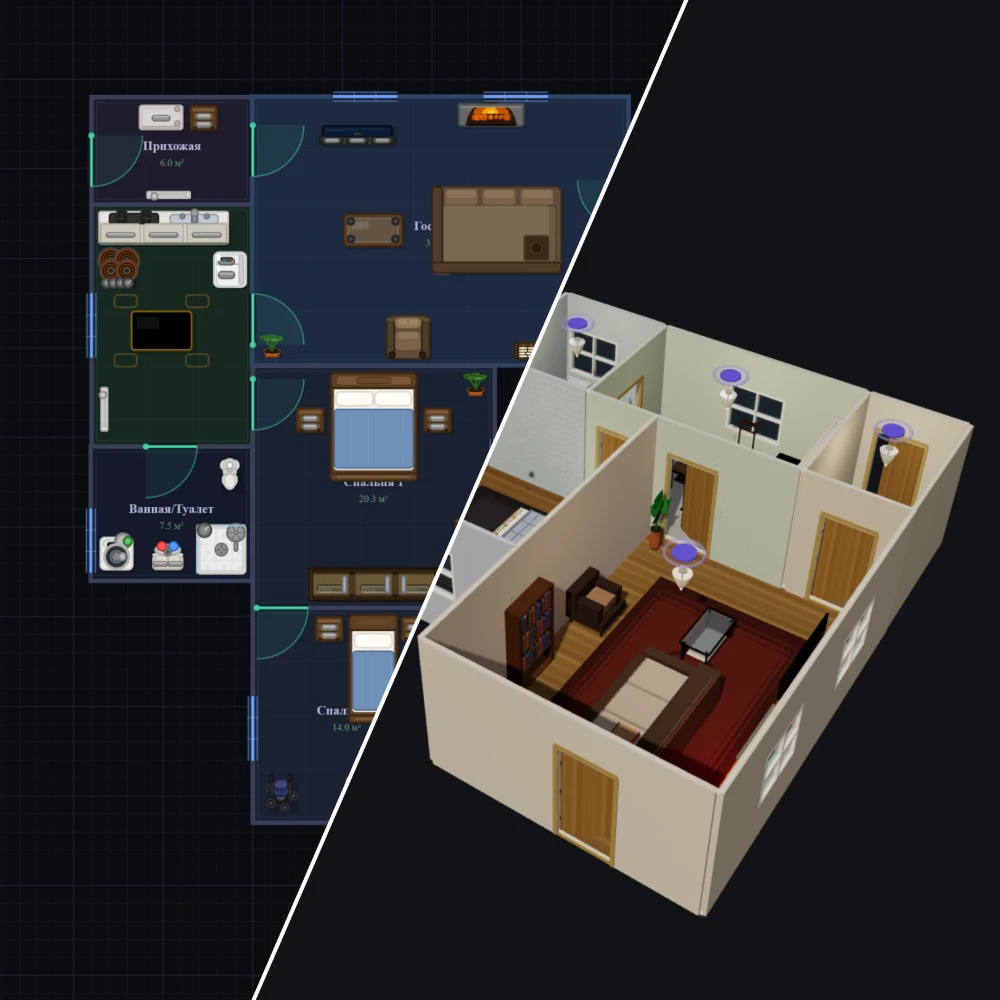
An interactive apartment designer in 2D floor plan format (top view) has been developed for real estate and interior design. This solution demonstrates how a modern space design tool can work: the user independently creates an apartment plan, manages rooms, arranges furniture, and configures object parameters in the browser.
The designer is aimed at developers, interior designers, real estate agencies, and housing search platforms.
Users can build an apartment floor plan from scratch or edit an existing one:
- add and remove rooms
- set room dimensions
- change shape and layout
- customize walls, doors, and windows
Each element is displayed on the floor plan and edited in real time.
The designer supports switching from a 2D floor plan to 3D visualization mode. With a single click, users can switch from the floor plan (top view) to a 3D representation of the apartment and view the created layout in space.
The 3D mode is automatically generated based on the assembled 2D floor plan:
- the room structure is preserved
- walls, openings, windows, and doors are correctly displayed
- all added furniture is transferred to the scene
- the dimensions and proportions of objects are taken into account
This allows you to move from technical planning to a visual perception of the project and significantly simplifies decision-making.
The designer is aimed at developers, interior designers, real estate agencies, and housing search platforms.
Users can build an apartment floor plan from scratch or edit an existing one:
- add and remove rooms
- set room dimensions
- change shape and layout
- customize walls, doors, and windows
Each element is displayed on the floor plan and edited in real time.
The designer supports switching from a 2D floor plan to 3D visualization mode. With a single click, users can switch from the floor plan (top view) to a 3D representation of the apartment and view the created layout in space.
The 3D mode is automatically generated based on the assembled 2D floor plan:
- the room structure is preserved
- walls, openings, windows, and doors are correctly displayed
- all added furniture is transferred to the scene
- the dimensions and proportions of objects are taken into account
This allows you to move from technical planning to a visual perception of the project and significantly simplifies decision-making.