Admin Panel for warming up Gmail accounts
Web Programming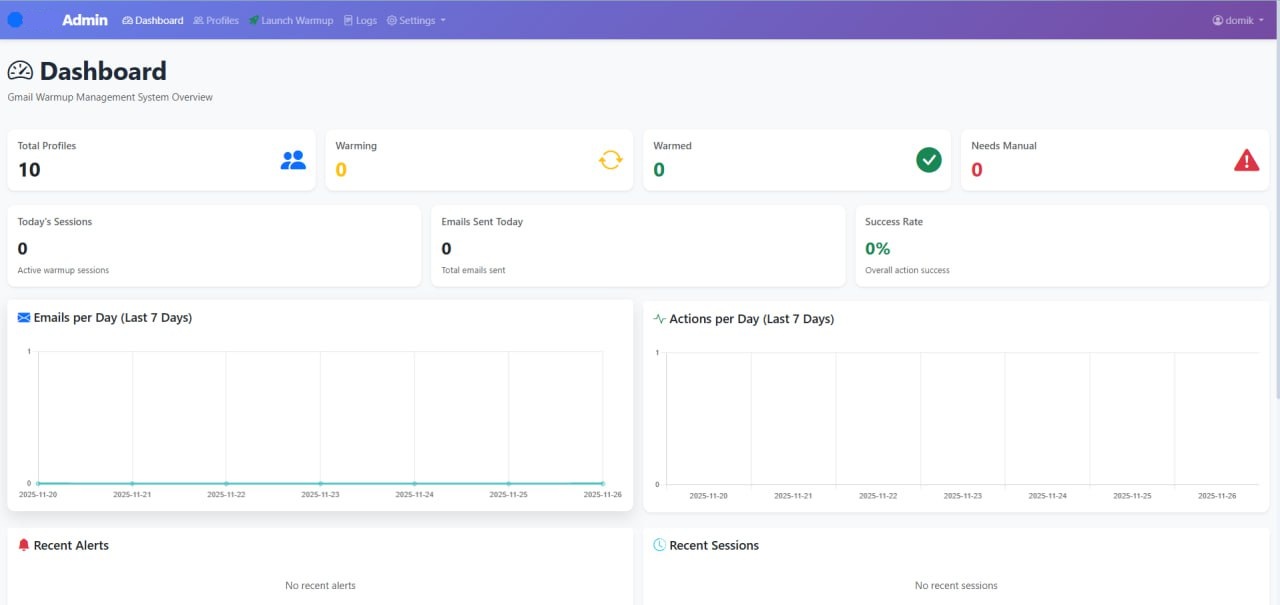
Developed a Django admin panel for managing the process of warming up Gmail accounts through profiles from an external profile manager. The system centralizes the creation/configuration of profiles, launching warm-ups according to templates, monitoring progress, and logging actions — to ensure accounts are "warmed up" consistently.
Key functionality
Dashboard: overview of all profiles + statistics and graphs, with a focus on operational control.
Profile Management: creation/editing of profiles and monitoring of warm-up.
Warmup Templates: ready-made scenarios for 7/30 days + custom warm-up plans.
Activity Logs: detailed logs of all actions, filtering, and exporting (convenient for debugging/auditing).
Pool Management: management of resource pools for warming up (sites, contacts, email templates).
Alerts: notifications about captcha / 2FA / errors (real-time response).
REST API: endpoints for integrations and obtaining statistics/logs.
Google Sheets API — automatic data export/synchronization (logs, statuses, warm-up statistics) into spreadsheets for reporting and control.
Telegram bot — receives information about logs and warm-up status (health/status), and allows for quick responses without accessing the admin panel.
The configuration includes settings for alerts for Telegram and Google Sheets.
Automation through Celery: scheduling and executing tasks in the background.
Automated tasks (scheduler)
Daily Warmup (09:00) — creation/scheduling of warm-up sessions for active profiles.
Health Check (every 30 minutes) — monitoring the status of profiles and generating alerts.
Cleanup (02:00) — cleaning logs older than 30 days.
Technologies used
Backend: Django 5.0.2
DB: PostgreSQL
Background jobs: Celery + Redis
Real-time database/infrastructure: Django Channels (WebSocket support)
Deploy: Docker Compose + Nginx reverse proxy; services web/db/redis/celery/celery-beat/nginx
Aiogram
asyncio
Google Sheets API, Telegram Bot API
My contribution to the project
Implemented the main functionality of the admin panel: profiles, warm-up templates, logs, resource pools, alerts.
Configured background tasks (Celery worker + Celery Beat) and the schedule for automations.
Set up the deployment infrastructure using Docker Compose + Nginx.
Added REST API for obtaining statistics and the latest logs.
Key functionality
Dashboard: overview of all profiles + statistics and graphs, with a focus on operational control.
Profile Management: creation/editing of profiles and monitoring of warm-up.
Warmup Templates: ready-made scenarios for 7/30 days + custom warm-up plans.
Activity Logs: detailed logs of all actions, filtering, and exporting (convenient for debugging/auditing).
Pool Management: management of resource pools for warming up (sites, contacts, email templates).
Alerts: notifications about captcha / 2FA / errors (real-time response).
REST API: endpoints for integrations and obtaining statistics/logs.
Google Sheets API — automatic data export/synchronization (logs, statuses, warm-up statistics) into spreadsheets for reporting and control.
Telegram bot — receives information about logs and warm-up status (health/status), and allows for quick responses without accessing the admin panel.
The configuration includes settings for alerts for Telegram and Google Sheets.
Automation through Celery: scheduling and executing tasks in the background.
Automated tasks (scheduler)
Daily Warmup (09:00) — creation/scheduling of warm-up sessions for active profiles.
Health Check (every 30 minutes) — monitoring the status of profiles and generating alerts.
Cleanup (02:00) — cleaning logs older than 30 days.
Technologies used
Backend: Django 5.0.2
DB: PostgreSQL
Background jobs: Celery + Redis
Real-time database/infrastructure: Django Channels (WebSocket support)
Deploy: Docker Compose + Nginx reverse proxy; services web/db/redis/celery/celery-beat/nginx
Aiogram
asyncio
Google Sheets API, Telegram Bot API
My contribution to the project
Implemented the main functionality of the admin panel: profiles, warm-up templates, logs, resource pools, alerts.
Configured background tasks (Celery worker + Celery Beat) and the schedule for automations.
Set up the deployment infrastructure using Docker Compose + Nginx.
Added REST API for obtaining statistics and the latest logs.