Agentam.by — setting up online payments and a paid video course
Online Stores & E-commerce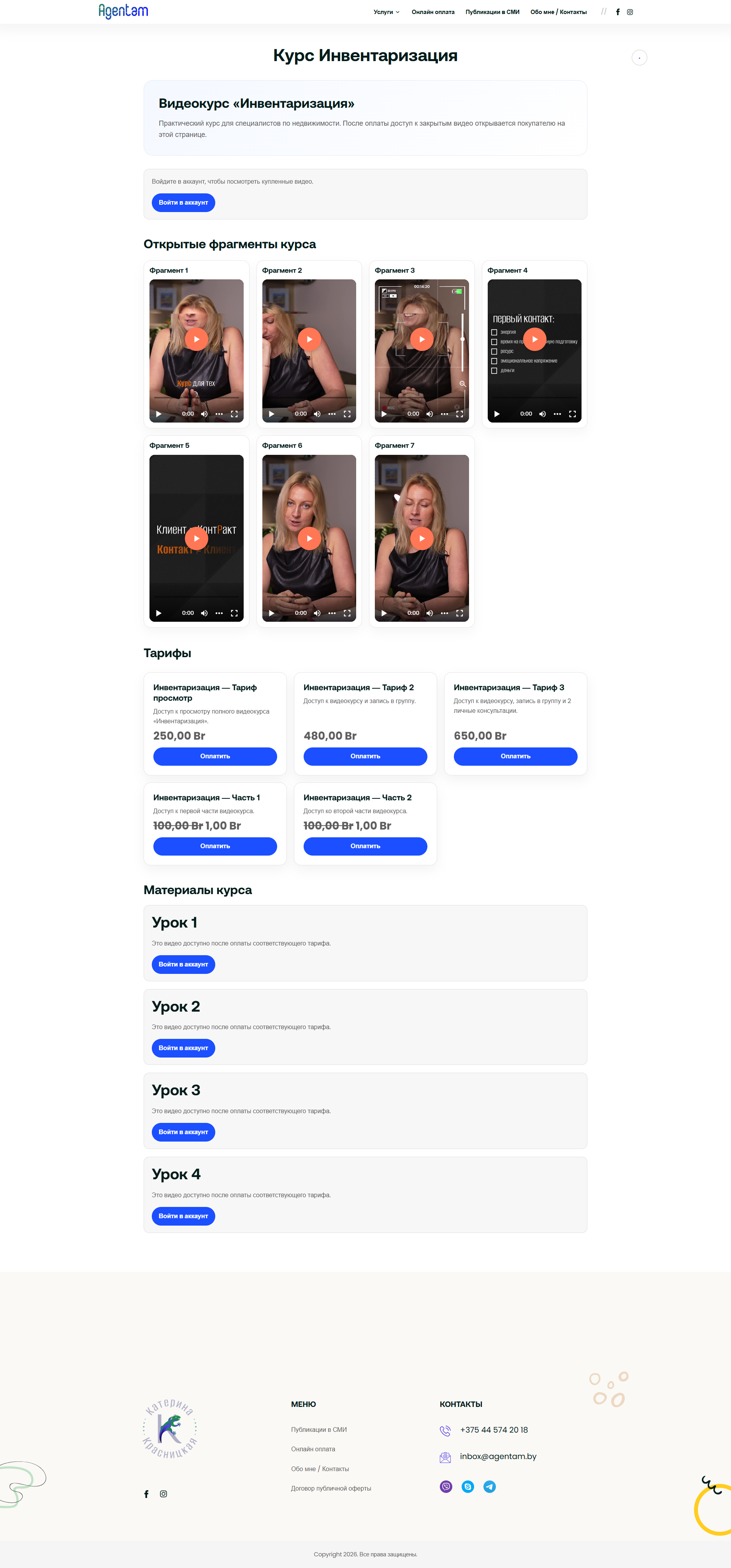
Portfolio Title: Online Payment and Paid Video Course on WordPress / WooCommerce
Main Category: Online Stores and E-commerce
Link: https://agentam.by
Type of Work: WordPress Enhancements + WooCommerce + Payment Integration + Video Course + Admin Panel
Stack: WordPress, WooCommerce, PHP, HTML/CSS, JavaScript, bePaid / BeGateway, Bunny Stream, SMTP, Contact Form 7
I enhanced an existing WordPress site and implemented online payment functionality and a paid video course.
The task was to create a user-friendly system where the client can manage payment buttons, rates, prices, display order, promo codes, and access to videos after purchase.
What was done:
Online Payment and WooCommerce
- Configured WooCommerce to accept payments on the site;
- Connected and set up payment through bePaid / BeGateway;
- Replaced the old bank form with managed payment buttons;
- Created an online payment page with service cards;
- Configured the ability to change the name, price, and order of buttons through WooCommerce products;
- Added the ability to create new payment buttons without code editing;
- Removed unnecessary fields on checkout and simplified the order process;
- Renamed standard WooCommerce elements for the task: "Product" -> "Service", "Subtotal" -> "Amount";
- Fixed the order cancellation scenario so that the client returns to a clear page.
Paid Video Course
- Created the course page "Inventory";
- Configured course rates through WooCommerce products;
- Implemented different access levels: full course, part 1, part 2;
- Added open preview videos for all visitors;
- Added closed videos that open only after purchasing the required rate;
- Configured access checks based on purchased WooCommerce products;
- Added clear messages for users without access;
- Set up a login button for course buyers through their personal account.
Video and Content Protection
- Uploaded videos to Bunny Stream;
- Connected the video player to the course page;
- Configured restrictions so that direct links to videos cannot be simply copied and opened separately;
- Closed access to full videos without purchase;
- Left only preview fragments of the course open.
Admin Panel and Site Management
- Managed payments through WooCommerce products;
- Configured product categories for online payments and course rates;
- Added the ability to change the order of cards through "Menu Order";
- Set up promo codes for different products and rates;
- Enhanced the admin panel so that the client could change names, prices, descriptions, order, and add new payment options herself;
- Configured SMTP and checked the submission of requests from the site form.
Result
The site received functional online payment, managed payment buttons, promo codes, a paid video course page, closed access to videos after purchase, and a convenient management system through the admin panel.
The client can independently add new services, change prices, edit rates, manage the order of buttons, and work with the course without constantly contacting the developer.
Main Category: Online Stores and E-commerce
Link: https://agentam.by
Type of Work: WordPress Enhancements + WooCommerce + Payment Integration + Video Course + Admin Panel
Stack: WordPress, WooCommerce, PHP, HTML/CSS, JavaScript, bePaid / BeGateway, Bunny Stream, SMTP, Contact Form 7
I enhanced an existing WordPress site and implemented online payment functionality and a paid video course.
The task was to create a user-friendly system where the client can manage payment buttons, rates, prices, display order, promo codes, and access to videos after purchase.
What was done:
Online Payment and WooCommerce
- Configured WooCommerce to accept payments on the site;
- Connected and set up payment through bePaid / BeGateway;
- Replaced the old bank form with managed payment buttons;
- Created an online payment page with service cards;
- Configured the ability to change the name, price, and order of buttons through WooCommerce products;
- Added the ability to create new payment buttons without code editing;
- Removed unnecessary fields on checkout and simplified the order process;
- Renamed standard WooCommerce elements for the task: "Product" -> "Service", "Subtotal" -> "Amount";
- Fixed the order cancellation scenario so that the client returns to a clear page.
Paid Video Course
- Created the course page "Inventory";
- Configured course rates through WooCommerce products;
- Implemented different access levels: full course, part 1, part 2;
- Added open preview videos for all visitors;
- Added closed videos that open only after purchasing the required rate;
- Configured access checks based on purchased WooCommerce products;
- Added clear messages for users without access;
- Set up a login button for course buyers through their personal account.
Video and Content Protection
- Uploaded videos to Bunny Stream;
- Connected the video player to the course page;
- Configured restrictions so that direct links to videos cannot be simply copied and opened separately;
- Closed access to full videos without purchase;
- Left only preview fragments of the course open.
Admin Panel and Site Management
- Managed payments through WooCommerce products;
- Configured product categories for online payments and course rates;
- Added the ability to change the order of cards through "Menu Order";
- Set up promo codes for different products and rates;
- Enhanced the admin panel so that the client could change names, prices, descriptions, order, and add new payment options herself;
- Configured SMTP and checked the submission of requests from the site form.
Result
The site received functional online payment, managed payment buttons, promo codes, a paid video course page, closed access to videos after purchase, and a convenient management system through the admin panel.
The client can independently add new services, change prices, edit rates, manage the order of buttons, and work with the course without constantly contacting the developer.