My AI IDE
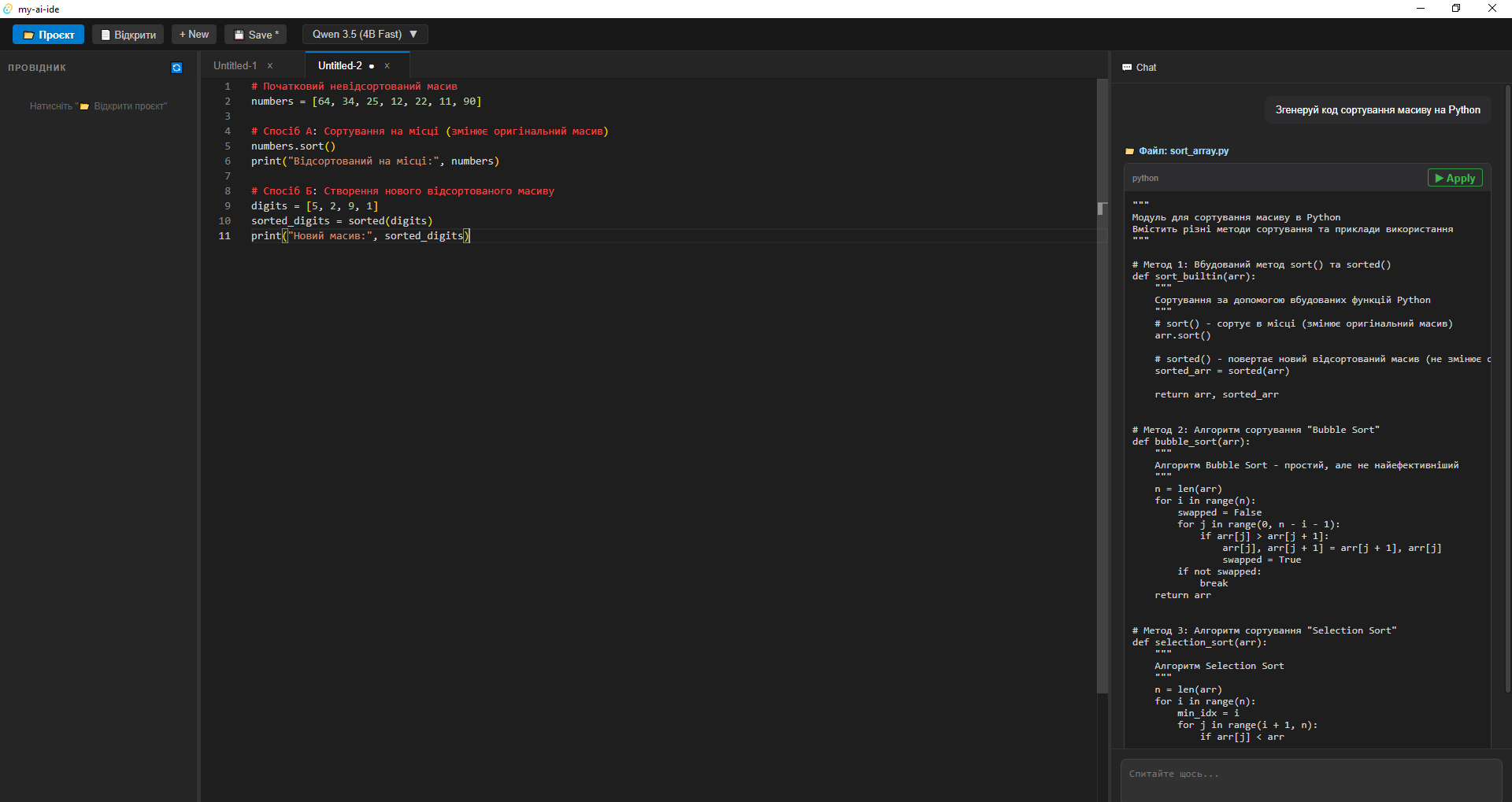
My AI IDE is a local environment for code editing with a built-in AI assistant. The program opens a separate desktop window where you can work with project files, write code in the Monaco editor, and ask questions to the local AI model via Ollama.
Key features:
- Opening a project folder and displaying files in the left explorer.
- Opening, creating, editing, and saving files.
- Syntax highlighting for TypeScript, JavaScript, HTML, CSS, Python, JSON, Markdown, GML, and other text files.
- Tabs for multiple open files.
- AI chat on the right that receives context from the current file, highlighted code, and files in the open project.
- Code autocompletion directly in the editor through the local Ollama model.
- Automatic application of AI responses to files if the response contains the special format Target, SEARCH, and REPLACE.
- Confirmation or rejection of changes suggested by the AI.
- Switching between models qwen3.5:4b and qwen3.5:9b.
- Changing the width of the explorer, editor, and chat panels.
- Hotkeys: Ctrl+O to open a file, Ctrl+N for a new file, Ctrl+S to save.
Important: AI features work locally through Ollama. Without running Ollama, the program can still function as a code editor, but the chat and autocompletion will not provide responses.
Key features:
- Opening a project folder and displaying files in the left explorer.
- Opening, creating, editing, and saving files.
- Syntax highlighting for TypeScript, JavaScript, HTML, CSS, Python, JSON, Markdown, GML, and other text files.
- Tabs for multiple open files.
- AI chat on the right that receives context from the current file, highlighted code, and files in the open project.
- Code autocompletion directly in the editor through the local Ollama model.
- Automatic application of AI responses to files if the response contains the special format Target, SEARCH, and REPLACE.
- Confirmation or rejection of changes suggested by the AI.
- Switching between models qwen3.5:4b and qwen3.5:9b.
- Changing the width of the explorer, editor, and chat panels.
- Hotkeys: Ctrl+O to open a file, Ctrl+N for a new file, Ctrl+S to save.
Important: AI features work locally through Ollama. Without running Ollama, the program can still function as a code editor, but the chat and autocompletion will not provide responses.

 Zbarazh
  Available for hire