Image Quality Enhancer
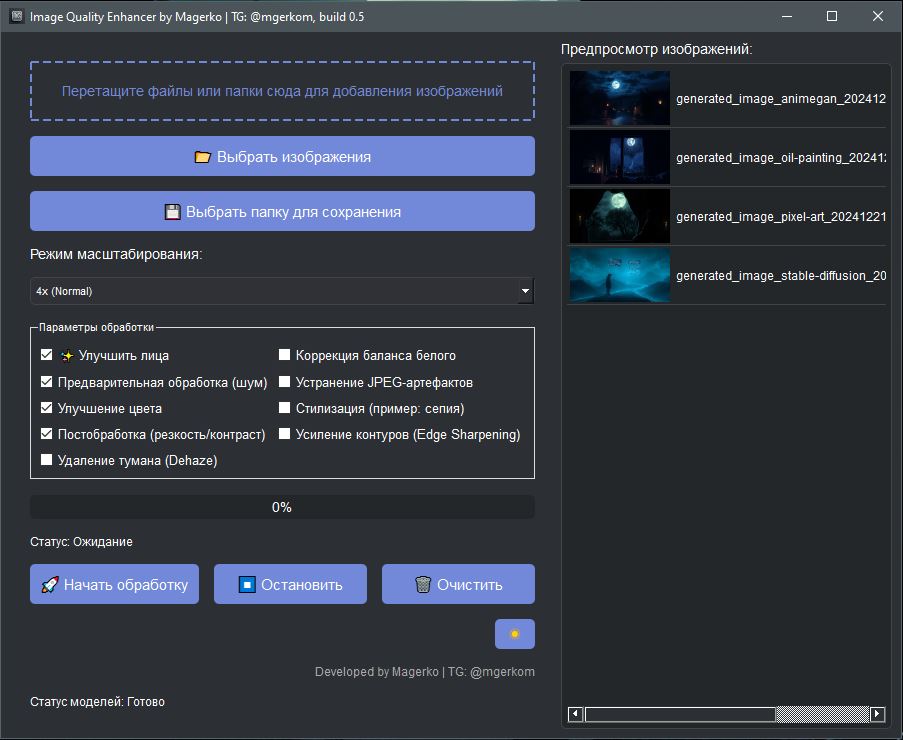
This is an application for improving image quality using neural networks and processing algorithms.
Features:
- Resolution enhancement: Increase images by 2 or 4 times using Real-ESRGAN.
- Face enhancement: Automatically enhance faces in photos using GFPGAN.
- Image processing: Apply various filters: noise reduction, color enhancement, sharpening, haze removal, and more.
- Batch processing: Process multiple images at once.
- Preview: View images before processing and compare results.
- Settings: Customize processing parameters and choose models for resolution enhancement.
- Drag and drop files: Drag images and folders into the application window for convenience.
Easy to use:
- Select images, adjust parameters, and start processing.
- Monitor progress with a progress indicator.
Technologies:
- PyQt5: for creating a user-friendly graphical interface.
- Real-ESRGAN: neural network for image resolution enhancement.
- GFPGAN: neural network for enhancing faces in photos.
- OpenCV: computer vision library for image processing.
- PIL: library for working with images.
P.S.
Pay attention to the user-friendly interface and variety of settings in the screenshots!
#python #pytorch #ai #programming #Python-developer
Features:
- Resolution enhancement: Increase images by 2 or 4 times using Real-ESRGAN.
- Face enhancement: Automatically enhance faces in photos using GFPGAN.
- Image processing: Apply various filters: noise reduction, color enhancement, sharpening, haze removal, and more.
- Batch processing: Process multiple images at once.
- Preview: View images before processing and compare results.
- Settings: Customize processing parameters and choose models for resolution enhancement.
- Drag and drop files: Drag images and folders into the application window for convenience.
Easy to use:
- Select images, adjust parameters, and start processing.
- Monitor progress with a progress indicator.
Technologies:
- PyQt5: for creating a user-friendly graphical interface.
- Real-ESRGAN: neural network for image resolution enhancement.
- GFPGAN: neural network for enhancing faces in photos.
- OpenCV: computer vision library for image processing.
- PIL: library for working with images.
P.S.
Pay attention to the user-friendly interface and variety of settings in the screenshots!
#python #pytorch #ai #programming #Python-developer

 Kyiv
Kyiv  Available for hire