LMS Quiz Builder Design
Interface Design (UI/UX)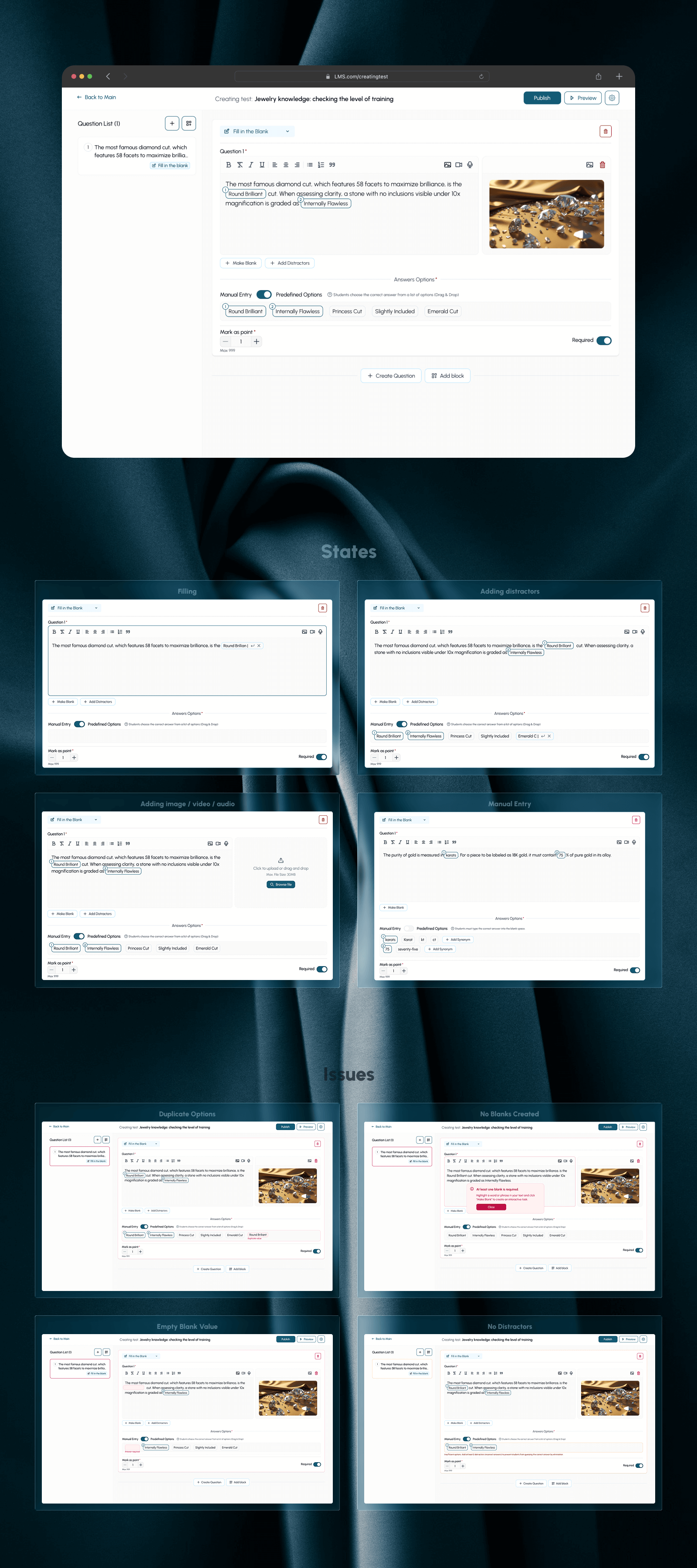
LMS Platform Interface Design: Test Builder and Corporate Training
This case demonstrates the development of complex functionality for an LMS (Learning Management System) — a test creation module with "Fill in the Blank" logic. The project is designed with the needs of both the large corporate sector and independent EdTech platforms in mind, where the speed of content creation and convenience for the student are important.
What has been done (Key Solutions):
- UX logic design of the builder: An intuitive inline editor has been created that allows the course author to turn any word in the text into an interactive fill-in field with just one click.
- Flexibility for different types of learning: Two interaction modes have been implemented:
- Manual Entry – for assessing real knowledge (for example, in language schools).
- Drag & Drop – for quick testing and interactivity in corporate training.
- Error handling system and validation: Scenarios have been developed to prevent duplicate answers and check for empty fields, minimizing moderation errors.
- Design for specialized niches: The interface is adapted for working with high-quality media content (for example, in the jewelry industry), which is important for specialized training programs.
Why this design is effective for your business:
- Scalability: The modular grid allows for easy integration of the builder into any existing corporate LMS.
- Reduced development costs: Thoughtful state logic (Error/Success/Empty) simplifies the work for frontend developers.
- High User Engagement: A modern and clean UI promotes better material retention by employees or clients.
#LMS #UI/UX-designer #educationalplatform #saas #edtech #Figma
This case demonstrates the development of complex functionality for an LMS (Learning Management System) — a test creation module with "Fill in the Blank" logic. The project is designed with the needs of both the large corporate sector and independent EdTech platforms in mind, where the speed of content creation and convenience for the student are important.
What has been done (Key Solutions):
- UX logic design of the builder: An intuitive inline editor has been created that allows the course author to turn any word in the text into an interactive fill-in field with just one click.
- Flexibility for different types of learning: Two interaction modes have been implemented:
- Manual Entry – for assessing real knowledge (for example, in language schools).
- Drag & Drop – for quick testing and interactivity in corporate training.
- Error handling system and validation: Scenarios have been developed to prevent duplicate answers and check for empty fields, minimizing moderation errors.
- Design for specialized niches: The interface is adapted for working with high-quality media content (for example, in the jewelry industry), which is important for specialized training programs.
Why this design is effective for your business:
- Scalability: The modular grid allows for easy integration of the builder into any existing corporate LMS.
- Reduced development costs: Thoughtful state logic (Error/Success/Empty) simplifies the work for frontend developers.
- High User Engagement: A modern and clean UI promotes better material retention by employees or clients.
#LMS #UI/UX-designer #educationalplatform #saas #edtech #Figma