Marketing ROI dashboard — Google Sheets (ROMI, ROAS, CAC)
Enterprise Resource Planning (ERP)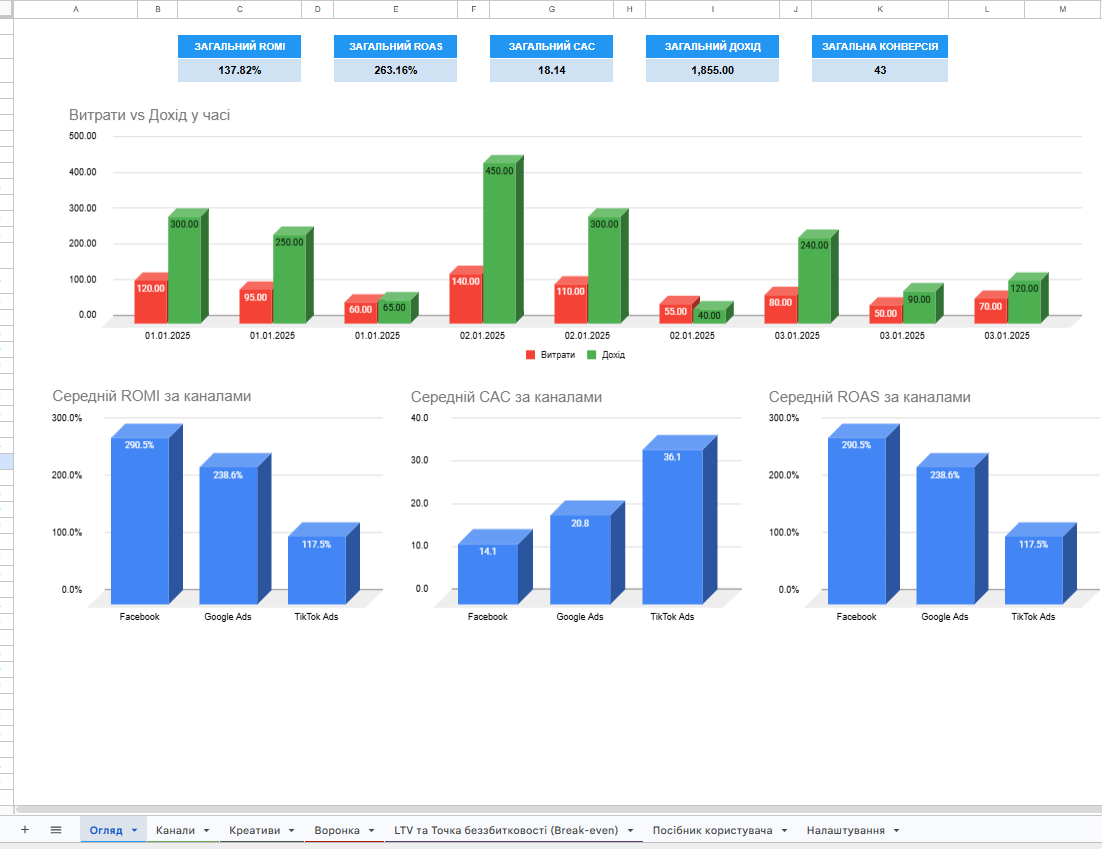
Developed a dashboard in Google Sheets for tracking real ROI of advertising campaigns by channels, campaigns, and creatives — focusing on actual profit rather than superficial metrics like clicks.
Template structure (5 interconnected tabs):
Dashboard — a summary overview of key metrics: ROMI, ROAS, CAC, revenue, conversions; updates automatically upon data entry
"Channels" sheet — main data entry: expenses, clicks, leads, purchases, and revenue by date, channel, and campaign
"Creatives" sheet — accounting for individual advertising materials with ROMI calculation for each creative and identification of performance leaders
"Funnel" sheet — complete visibility of the customer journey (impressions → clicks → leads → purchases → revenue) with metrics at each stage
"LTV and Breakeven" sheet — calculation of customer lifetime value over 12 months, breakeven ROAS, and maximum allowable CPA
How it works:
The user enters campaign data into the respective sheets — the dashboard instantly recalculates all metrics without manual formulas, macros, or scripts.
Suitable for: performance and digital marketers, online store owners, marketing agencies managing multiple clients, as well as freelancers reporting to clients on advertising budgets.
Result — a ready analytical tool for making budget decisions based on real profitability indicators, not guesses.
Tags:
#GoogleSheets #ROI #ROAS #CAC #MarketingAnalysis #Dashboard #Automation #DigitalMarketing #Analytics #LTV
Template structure (5 interconnected tabs):
Dashboard — a summary overview of key metrics: ROMI, ROAS, CAC, revenue, conversions; updates automatically upon data entry
"Channels" sheet — main data entry: expenses, clicks, leads, purchases, and revenue by date, channel, and campaign
"Creatives" sheet — accounting for individual advertising materials with ROMI calculation for each creative and identification of performance leaders
"Funnel" sheet — complete visibility of the customer journey (impressions → clicks → leads → purchases → revenue) with metrics at each stage
"LTV and Breakeven" sheet — calculation of customer lifetime value over 12 months, breakeven ROAS, and maximum allowable CPA
How it works:
The user enters campaign data into the respective sheets — the dashboard instantly recalculates all metrics without manual formulas, macros, or scripts.
Suitable for: performance and digital marketers, online store owners, marketing agencies managing multiple clients, as well as freelancers reporting to clients on advertising budgets.
Result — a ready analytical tool for making budget decisions based on real profitability indicators, not guesses.
Tags:
#GoogleSheets #ROI #ROAS #CAC #MarketingAnalysis #Dashboard #Automation #DigitalMarketing #Analytics #LTV