Telegram bot for creating QR codes with detailed analytics
Project Overview
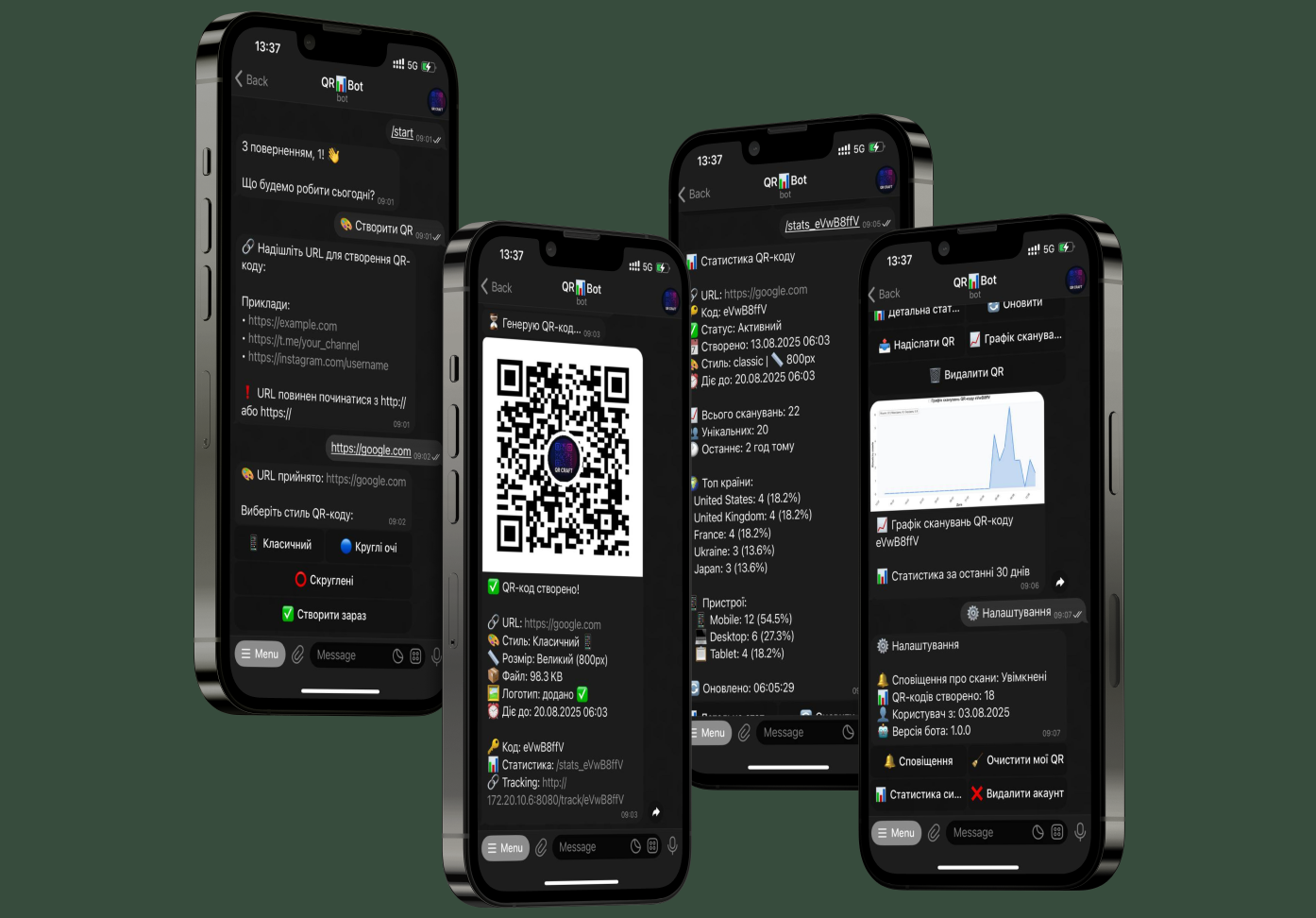
QRCraft Bot is a fully functional bot for generating stylish QR codes with an integrated analytics and tracking system. The project demonstrates a comprehensive architecture with a web server for tracking, geolocation by IP, device analytics, and an automated data cleaning system.
Key Features
- Stylish QR Code Generation: Three design styles with support for logos, color schemes, and various sizes
- Scan Tracking System: Web endpoint for intercepting scans with a redirect to the original URL
- Detailed Analytics: Geolocation by IP, device analysis, browsers, time patterns, and country statistics
- Data Visualization: Automatic generation of scan graphs using matplotlib
- Automated Cleaning System: Background tasks for removing outdated QR codes and optimizing the database
Technical Stack
Backend:
- Python - asynchronous programming with async/await
- SQLAlchemy - asynchronous ORM for database interaction
- aiogram - modern framework for Telegram Bot API
- aiohttp - asynchronous HTTP server for tracking endpoints
API Integrations:
- Telegram Bot API - main user interface
- ipapi.co - geolocation by IP addresses
DevOps & Tools:
- aiosqlite - asynchronous driver for SQLite
- PIL/Pillow - image processing and QR code generation
- matplotlib - creating graphs and visualizing statistics
- user-agents - parsing User-Agent headers
Tracking and Analytics System
- Intermediate URLs: Creating tracking links to intercept scans before redirecting
- Real-time Geolocation: Determining the user's country and city via IP API
- Device Analysis: Detailed parsing of User-Agent to identify browser, OS, and device type
- Time Analytics: Collecting statistics by hours and days to identify usage patterns
Image Processing and Personalization
- Logo Uploads: Support for PNG/JPG up to 1MB with automatic compression
- Removing EXIF Data: Cleaning metadata for user security
- Color Schemes: Six pre-configured color combinations
- Adaptive Sizes: Three size options for different use cases
Main Flow
Creating a QR Code
Input URL -> style selection -> customization -> generation -> sending QR with tracking URL
Viewing Statistics
Command /stats_CODE -> extracting data from the database -> rendering graphs -> sending detailed analytics
Detailed Process:
1. URL Input - the user sends a link to create a QR code.
2. Parameter Selection - eye style, colors, size, logo, and expiration.
3. QR Generation - creating an image with the tracking URL and saving it in the database.
4. Scan Tracking - the web server intercepts scans, collects analytics, and performs a redirect.
5. Analytics - aggregating data by countries, devices, time with report generation.
Links
GitHub: [https://github.com/YouCanTrustMe/QRCraftBot}
#python #pytelegrambot #aiogram #SQLite
#webanalytics #geo #pillow #matplotlib #asyncio #tracking #telebot #qr
QRCraft Bot is a fully functional bot for generating stylish QR codes with an integrated analytics and tracking system. The project demonstrates a comprehensive architecture with a web server for tracking, geolocation by IP, device analytics, and an automated data cleaning system.
Key Features
- Stylish QR Code Generation: Three design styles with support for logos, color schemes, and various sizes
- Scan Tracking System: Web endpoint for intercepting scans with a redirect to the original URL
- Detailed Analytics: Geolocation by IP, device analysis, browsers, time patterns, and country statistics
- Data Visualization: Automatic generation of scan graphs using matplotlib
- Automated Cleaning System: Background tasks for removing outdated QR codes and optimizing the database
Technical Stack
Backend:
- Python - asynchronous programming with async/await
- SQLAlchemy - asynchronous ORM for database interaction
- aiogram - modern framework for Telegram Bot API
- aiohttp - asynchronous HTTP server for tracking endpoints
API Integrations:
- Telegram Bot API - main user interface
- ipapi.co - geolocation by IP addresses
DevOps & Tools:
- aiosqlite - asynchronous driver for SQLite
- PIL/Pillow - image processing and QR code generation
- matplotlib - creating graphs and visualizing statistics
- user-agents - parsing User-Agent headers
Tracking and Analytics System
- Intermediate URLs: Creating tracking links to intercept scans before redirecting
- Real-time Geolocation: Determining the user's country and city via IP API
- Device Analysis: Detailed parsing of User-Agent to identify browser, OS, and device type
- Time Analytics: Collecting statistics by hours and days to identify usage patterns
Image Processing and Personalization
- Logo Uploads: Support for PNG/JPG up to 1MB with automatic compression
- Removing EXIF Data: Cleaning metadata for user security
- Color Schemes: Six pre-configured color combinations
- Adaptive Sizes: Three size options for different use cases
Main Flow
Creating a QR Code
Input URL -> style selection -> customization -> generation -> sending QR with tracking URL
Viewing Statistics
Command /stats_CODE -> extracting data from the database -> rendering graphs -> sending detailed analytics
Detailed Process:
1. URL Input - the user sends a link to create a QR code.
2. Parameter Selection - eye style, colors, size, logo, and expiration.
3. QR Generation - creating an image with the tracking URL and saving it in the database.
4. Scan Tracking - the web server intercepts scans, collects analytics, and performs a redirect.
5. Analytics - aggregating data by countries, devices, time with report generation.
Links
GitHub: [https://github.com/YouCanTrustMe/QRCraftBot}
#python #pytelegrambot #aiogram #SQLite
#webanalytics #geo #pillow #matplotlib #asyncio #tracking #telebot #qr

 Khmelnitskyi
  Available for hire