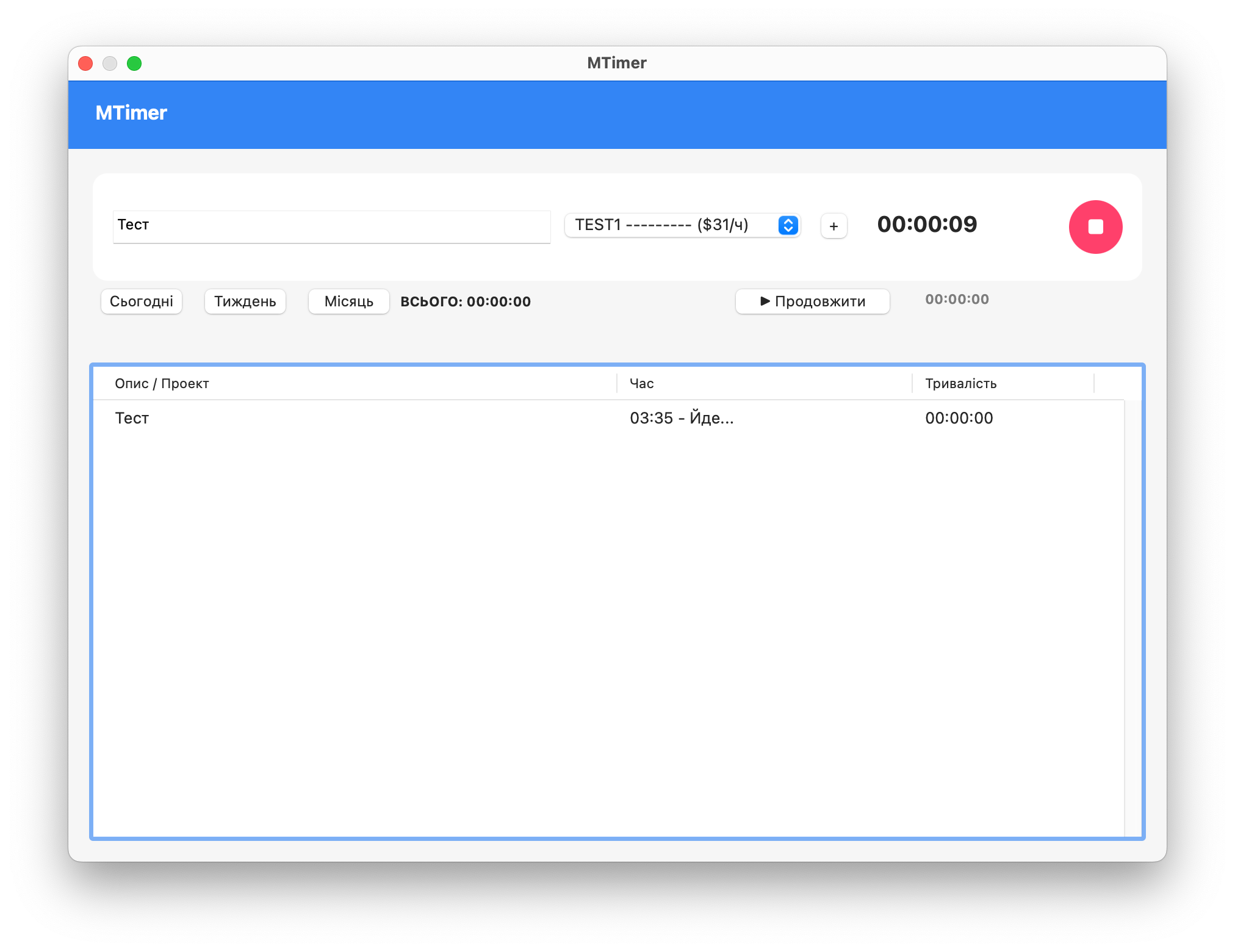
# MTimer — Native Time Tracker for macOS
## About the Project
A fully functional native application for time tracking on macOS. Developed using PyObjC (AppKit) and SQLite, it demonstrates a deep understanding of the Apple ecosystem and the creation of professional desktop applications in Python.
**Key Achievements:**
- 100% native UI through AppKit without web technologies
- Universal binary (x86_64 + arm64) ready for distribution
- Multilingual support with automatic detection of system language (UK/EN/RU)
- Production-ready architecture with clean separation of logic
## Technical Stack
**Base:** PyObjC (AppKit), SQLite, py2app
**Patterns:** MVC, Singleton, Observer, State Management
**UI:** NSTableView, NSStatusBar, NSAlert, NSUserNotificationCenter
## Core Functionality
**Time Management**
- Smart Timer with automatic session splitting at midnight
- Period filters (Today/Week/Month) with real-time aggregation
- Dynamic cost calculation based on hourly rates
- Automatic recovery of active session after restart
**User Experience**
- Adaptive design with support for light/dark theme
- Keyboard shortcuts (⌘ for Settings, Delete for removal)
- Native notifications when starting/stopping tracking
- Menu Bar App with live timer and quick task switching
**Data Management**
- CRUD operations with projects and hourly rates
- Editing through a separate Settings window
- Safe deletion with NSAlert confirmation
- Real-time sync UI and menu bar upon data changes
## Technical Challenges
**1. Keyboard Handling in NSTableView**
Created `DeletableTableView` subclass with overridden `keyDown_` for Delete key, using `objc.super()` for proper interaction with Objective-C runtime.
**2. UI Synchronization After Editing**
Implemented a callback system preserving selection through project_id, refreshing all components (table, status bar, filters) simultaneously.
**3. Localization in Compiled App**
Used `NSLocale.preferredLanguages()` instead of locale module with fallback chain for maximum compatibility.
**4. Application Lifecycle**
Overrode `windowShouldClose_` with `orderOut_`, `setReleasedWhenClosed_(False)` and `applicationShouldHandleReopen_` for correct hide/show behavior.
## Results
✓ Stable production-ready application without crashes
✓ Support for Intel Mac and Apple Silicon
✓ Minimal footprint (~50MB standalone)
✓ Instant UI response
✓ Fully documented code
## Skills Acquired
- **macOS Development:** AppKit framework, NSStatusBar/NSMenu/NSTableView, system events handling, multi-window coordination
- **Python Advanced:** PyObjC bridging, Objective-C runtime interaction, py2app packaging, code signing
- **Database:** SQLite optimization, aggregate queries, transaction management
- **Software Engineering:** i18n best practices, UX design for desktop, error handling, version control
---
**GitHub:** https://github.com/maciborka/MTimer
**Stack:** Python 3.12, PyObjC (AppKit), SQLite, py2app
**Platform:** macOS 12+ Universal (x86_64 + arm64)
**License:** MIT
## About the Project
A fully functional native application for time tracking on macOS. Developed using PyObjC (AppKit) and SQLite, it demonstrates a deep understanding of the Apple ecosystem and the creation of professional desktop applications in Python.
**Key Achievements:**
- 100% native UI through AppKit without web technologies
- Universal binary (x86_64 + arm64) ready for distribution
- Multilingual support with automatic detection of system language (UK/EN/RU)
- Production-ready architecture with clean separation of logic
## Technical Stack
**Base:** PyObjC (AppKit), SQLite, py2app
**Patterns:** MVC, Singleton, Observer, State Management
**UI:** NSTableView, NSStatusBar, NSAlert, NSUserNotificationCenter
## Core Functionality
**Time Management**
- Smart Timer with automatic session splitting at midnight
- Period filters (Today/Week/Month) with real-time aggregation
- Dynamic cost calculation based on hourly rates
- Automatic recovery of active session after restart
**User Experience**
- Adaptive design with support for light/dark theme
- Keyboard shortcuts (⌘ for Settings, Delete for removal)
- Native notifications when starting/stopping tracking
- Menu Bar App with live timer and quick task switching
**Data Management**
- CRUD operations with projects and hourly rates
- Editing through a separate Settings window
- Safe deletion with NSAlert confirmation
- Real-time sync UI and menu bar upon data changes
## Technical Challenges
**1. Keyboard Handling in NSTableView**
Created `DeletableTableView` subclass with overridden `keyDown_` for Delete key, using `objc.super()` for proper interaction with Objective-C runtime.
**2. UI Synchronization After Editing**
Implemented a callback system preserving selection through project_id, refreshing all components (table, status bar, filters) simultaneously.
**3. Localization in Compiled App**
Used `NSLocale.preferredLanguages()` instead of locale module with fallback chain for maximum compatibility.
**4. Application Lifecycle**
Overrode `windowShouldClose_` with `orderOut_`, `setReleasedWhenClosed_(False)` and `applicationShouldHandleReopen_` for correct hide/show behavior.
## Results
✓ Stable production-ready application without crashes
✓ Support for Intel Mac and Apple Silicon
✓ Minimal footprint (~50MB standalone)
✓ Instant UI response
✓ Fully documented code
## Skills Acquired
- **macOS Development:** AppKit framework, NSStatusBar/NSMenu/NSTableView, system events handling, multi-window coordination
- **Python Advanced:** PyObjC bridging, Objective-C runtime interaction, py2app packaging, code signing
- **Database:** SQLite optimization, aggregate queries, transaction management
- **Software Engineering:** i18n best practices, UX design for desktop, error handling, version control
---
**GitHub:** https://github.com/maciborka/MTimer
**Stack:** Python 3.12, PyObjC (AppKit), SQLite, py2app
**Platform:** macOS 12+ Universal (x86_64 + arm64)
**License:** MIT