Automated extraction of events from the calendar and their processing with AI
Enterprise Resource Planning (ERP) 112 USD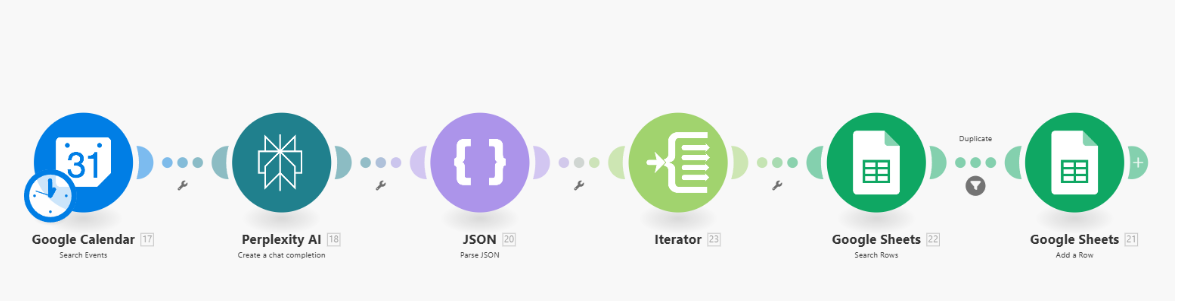
1. Google Calendar: Search Events
Function: retrieves all (or selected by filter) events from Google Calendar.
Typical task: find new, upcoming, or specific events for further processing.
Input: search settings (date, filters, calendar).
Output: array of events from the calendar.
2. Perplexity AI: Create a chat completion
Function: sends event details or description from Google Calendar to AI for parsing.
Typical task: extract structured emails, names, guests, date, etc. from description/summary.
Input: event description or all important fields from the Scheduled event.
Output: structured text or JSON with a list of participants, emails, dates, and more.
3. JSON: Parse JSON
Function: converts the structure of the received text from AI (if it is in JSON format) into a standard array/object that Make can work with.
Typical task: create an array for further splitting.
Input: text in JSON (for example, a list of participants).
Output: array of elements [{name, email}, ...].
4. Iterator (Flow Control)
Function: breaks the array into separate "packages" for further individual processing of each participant.
Typical task: check or write each person/email to Google Sheets one by one.
Input: array of objects from the previous module.
Output: separate objects (name + email) for the next steps.
5. Google Sheets: Search Rows
Function: searches for whether such an email or another unique parameter already exists in Google Sheets.
Typical task: check for duplicates before adding.
Input: email (or another key).
Output: number of found rows (array of found, or “Total number of bundles”).
6. Filter (Duplicate)
Function: passes only those data that have not yet appeared in the table.
Typical task: make a record in Google Sheets only if the data is not already present (duplicates are filtered out).
Condition: Total number of bundles = 0
7. Google Sheets: Add Row
Function: adds a new row with data to Google Sheets.
Typical task: enter a new participant/contact/guest into the table if they have not been added yet.
Input: name, email, date, any additional data from iterator/AI.
Output: new row in the table.
Overall logic of operation:
- Get events →
- Parse description/details through AI →
- Convert to JSON array →
- Split each participant (iterator) →
- Check in the table — whether such an email exists →
- Filter only unique →
- Add only new rows (Add Row)
Function: retrieves all (or selected by filter) events from Google Calendar.
Typical task: find new, upcoming, or specific events for further processing.
Input: search settings (date, filters, calendar).
Output: array of events from the calendar.
2. Perplexity AI: Create a chat completion
Function: sends event details or description from Google Calendar to AI for parsing.
Typical task: extract structured emails, names, guests, date, etc. from description/summary.
Input: event description or all important fields from the Scheduled event.
Output: structured text or JSON with a list of participants, emails, dates, and more.
3. JSON: Parse JSON
Function: converts the structure of the received text from AI (if it is in JSON format) into a standard array/object that Make can work with.
Typical task: create an array for further splitting.
Input: text in JSON (for example, a list of participants).
Output: array of elements [{name, email}, ...].
4. Iterator (Flow Control)
Function: breaks the array into separate "packages" for further individual processing of each participant.
Typical task: check or write each person/email to Google Sheets one by one.
Input: array of objects from the previous module.
Output: separate objects (name + email) for the next steps.
5. Google Sheets: Search Rows
Function: searches for whether such an email or another unique parameter already exists in Google Sheets.
Typical task: check for duplicates before adding.
Input: email (or another key).
Output: number of found rows (array of found, or “Total number of bundles”).
6. Filter (Duplicate)
Function: passes only those data that have not yet appeared in the table.
Typical task: make a record in Google Sheets only if the data is not already present (duplicates are filtered out).
Condition: Total number of bundles = 0
7. Google Sheets: Add Row
Function: adds a new row with data to Google Sheets.
Typical task: enter a new participant/contact/guest into the table if they have not been added yet.
Input: name, email, date, any additional data from iterator/AI.
Output: new row in the table.
Overall logic of operation:
- Get events →
- Parse description/details through AI →
- Convert to JSON array →
- Split each participant (iterator) →
- Check in the table — whether such an email exists →
- Filter only unique →
- Add only new rows (Add Row)