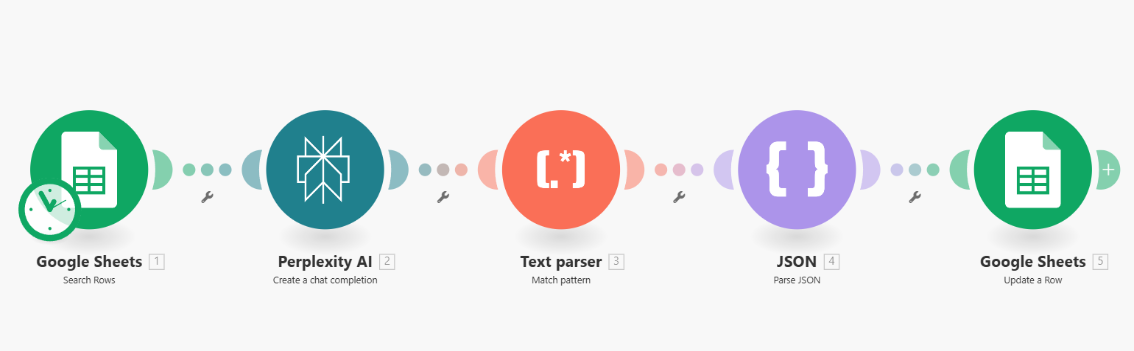
1. Google Sheets: Search Rows
Function: searches for a row (or rows) in Google Sheets that match a given criterion.
Typical task: find data by email, date, or another unique key for further processing.
Input: search condition (e.g., email, date).
Output: found rows from the table for the next module.
2. Perplexity AI: Create a chat completion
Function: sends the received data (e.g., event description or application text) to the AI model for processing.
Typical task: extract structured information from unstructured text, such as e-mail, name, other details.
Input: text from the found row (description, summary, etc).
Output: text response or semi-structured JSON containing extracted values.
3. Text Parser: Match Pattern
Function: parses a specific pattern (regexp, pattern matching) from the text returned by AI.
Typical task: extract required fields from the Perplexity AI response (e.g., highlight email, date, name).
Input: text or array of values from the previous step.
Output: found subarrays/values that match the pattern.
4. JSON: Parse JSON
Function: converts text (or structured piece) from the previous step into a JSON array/object for further automated work.
Typical task: obtain a valid dataset from AI/parser for transfer to the final system.
Input: text in JSON.
Output: structured JSON (in key-value format), ready for writing to the table.
5. Google Sheets: Update a Row
Function: updates the found row (or multiple rows) in Google Sheets based on new content.
Typical task: write/update data during lead enrichment, add parsed or found AI values to the table (e.g., new email, status, name, formatted date).
Input: row identifier for update + new data.
Output: table with updated row.
Overall logic of the scenario:
- Search for the required row in Google Sheets (by email, name, date, or another variable).
- AI processing of the received text/description to structure the required data.
- Parsing the result through a pattern to highlight specific values.
- Converting into valid JSON for automated work.
- Updating information (adding/correcting required fields) in an already existing or found row in the table.
Use cases
- Automatic enrichment of contacts in Google Sheets through AI.
- Extraction of additional data from the "Description" or "Summary" field and transferring it to separate columns.
- Automatic processing of new entries and saving them in a standardized format.
Function: searches for a row (or rows) in Google Sheets that match a given criterion.
Typical task: find data by email, date, or another unique key for further processing.
Input: search condition (e.g., email, date).
Output: found rows from the table for the next module.
2. Perplexity AI: Create a chat completion
Function: sends the received data (e.g., event description or application text) to the AI model for processing.
Typical task: extract structured information from unstructured text, such as e-mail, name, other details.
Input: text from the found row (description, summary, etc).
Output: text response or semi-structured JSON containing extracted values.
3. Text Parser: Match Pattern
Function: parses a specific pattern (regexp, pattern matching) from the text returned by AI.
Typical task: extract required fields from the Perplexity AI response (e.g., highlight email, date, name).
Input: text or array of values from the previous step.
Output: found subarrays/values that match the pattern.
4. JSON: Parse JSON
Function: converts text (or structured piece) from the previous step into a JSON array/object for further automated work.
Typical task: obtain a valid dataset from AI/parser for transfer to the final system.
Input: text in JSON.
Output: structured JSON (in key-value format), ready for writing to the table.
5. Google Sheets: Update a Row
Function: updates the found row (or multiple rows) in Google Sheets based on new content.
Typical task: write/update data during lead enrichment, add parsed or found AI values to the table (e.g., new email, status, name, formatted date).
Input: row identifier for update + new data.
Output: table with updated row.
Overall logic of the scenario:
- Search for the required row in Google Sheets (by email, name, date, or another variable).
- AI processing of the received text/description to structure the required data.
- Parsing the result through a pattern to highlight specific values.
- Converting into valid JSON for automated work.
- Updating information (adding/correcting required fields) in an already existing or found row in the table.
Use cases
- Automatic enrichment of contacts in Google Sheets through AI.
- Extraction of additional data from the "Description" or "Summary" field and transferring it to separate columns.
- Automatic processing of new entries and saving them in a standardized format.