Automation of data collection from Apify using make.com and AI
Enterprise Resource Planning (ERP) 112 USD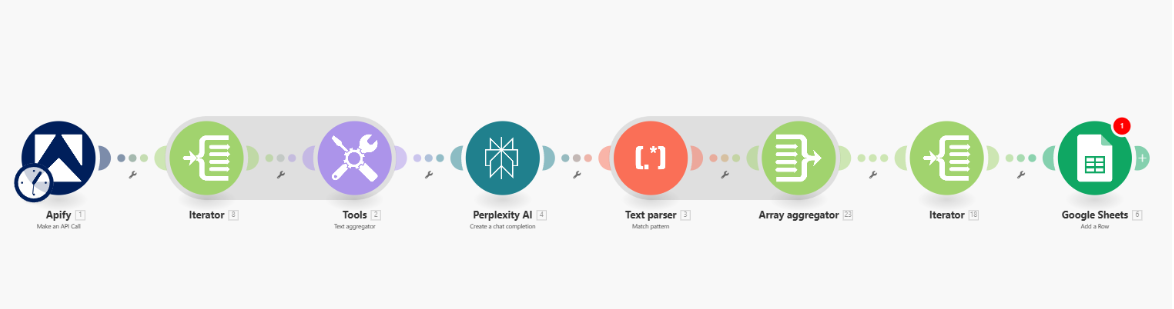
1. Apify: Make an API Call
Function: Requests data from Apify (Scraper, agent, parser, or custom integrator).
Input: API settings and required workload (e.g., list of pages, data, or configs).
Output: Array of data (e.g., json objects with information about leads, pages, contacts).
2. Iterator
Function: Sequentially splits the received array from Apify into separate "packages" — each element of the array becomes a separate loop for further processing.
Input: Array of objects.
Output: One object (array element) per iteration.
3. Tools: Text aggregator
Function: Collects certain text/required fields into one text block, for example, concatenates several elements into one line for sending to AI.
Input: Data from Iterator.
Output: String for AI (e.g., the entire description of a lead/client in one field).
4. Perplexity AI: Create a chat completion
Function: Sends the collected text to Perplexity AI for analysis, extracting structure, or additional enrichment (e.g., for contact recognition, content analysis, summary).
Input: String from the previous block.
Output: Structured block (text/JSON with found key fields).
5. Text parser: Match pattern
Function: Parses the AI response according to the specified pattern (regular expression, template, etc.).
Input: AI response.
Output: Array of found objects that match the pattern.
6. Array aggregator
Function: Collects all received subarrays or individual elements back into a single array (reverse-iterator) for batch adding data to Google Sheets.
Input: Elements received after the parser (there can be many packages).
Output: Updated array for bulk addition.
7. Iterator (again!)
Function: New loop — expands the aggregated array and prepares each individual row for entry into Google Sheets.
Input: Array from Array aggregator.
Output: Separate element per iteration.
8. Google Sheets: Add a Row
Function: Adds the object received in the previous step to the required sheet.
Input: Data of the element (contact, email, date, anything).
Output: New row in Google Sheets.
Why this structure:
This allows for bulk processing from Apify and enrichment through AI for complex unstructured data, resulting in a perfectly prepared structure for Google Sheets. Two chains of Iterator/Aggregator are needed for arrays: first, we parallelize the array into packages-for-AI, then we collect the batch result and expand again for quick addition to the table.
Typical use case:
LinkedIn/email/web scraping → enrich + clean data through AI → parsing and adding a structured list to Google Sheets for further work by sales, marketing, or analytics teams.
Function: Requests data from Apify (Scraper, agent, parser, or custom integrator).
Input: API settings and required workload (e.g., list of pages, data, or configs).
Output: Array of data (e.g., json objects with information about leads, pages, contacts).
2. Iterator
Function: Sequentially splits the received array from Apify into separate "packages" — each element of the array becomes a separate loop for further processing.
Input: Array of objects.
Output: One object (array element) per iteration.
3. Tools: Text aggregator
Function: Collects certain text/required fields into one text block, for example, concatenates several elements into one line for sending to AI.
Input: Data from Iterator.
Output: String for AI (e.g., the entire description of a lead/client in one field).
4. Perplexity AI: Create a chat completion
Function: Sends the collected text to Perplexity AI for analysis, extracting structure, or additional enrichment (e.g., for contact recognition, content analysis, summary).
Input: String from the previous block.
Output: Structured block (text/JSON with found key fields).
5. Text parser: Match pattern
Function: Parses the AI response according to the specified pattern (regular expression, template, etc.).
Input: AI response.
Output: Array of found objects that match the pattern.
6. Array aggregator
Function: Collects all received subarrays or individual elements back into a single array (reverse-iterator) for batch adding data to Google Sheets.
Input: Elements received after the parser (there can be many packages).
Output: Updated array for bulk addition.
7. Iterator (again!)
Function: New loop — expands the aggregated array and prepares each individual row for entry into Google Sheets.
Input: Array from Array aggregator.
Output: Separate element per iteration.
8. Google Sheets: Add a Row
Function: Adds the object received in the previous step to the required sheet.
Input: Data of the element (contact, email, date, anything).
Output: New row in Google Sheets.
Why this structure:
This allows for bulk processing from Apify and enrichment through AI for complex unstructured data, resulting in a perfectly prepared structure for Google Sheets. Two chains of Iterator/Aggregator are needed for arrays: first, we parallelize the array into packages-for-AI, then we collect the batch result and expand again for quick addition to the table.
Typical use case:
LinkedIn/email/web scraping → enrich + clean data through AI → parsing and adding a structured list to Google Sheets for further work by sales, marketing, or analytics teams.