Task
It was necessary to set up a system that automatically tracks new documents in a specific Google Drive folder, analyzes their content using AI, stores the results in Google Sheets, and sends notifications in Telegram. It is important to have a history of document processing in the table and not to duplicate already processed files.
Solution
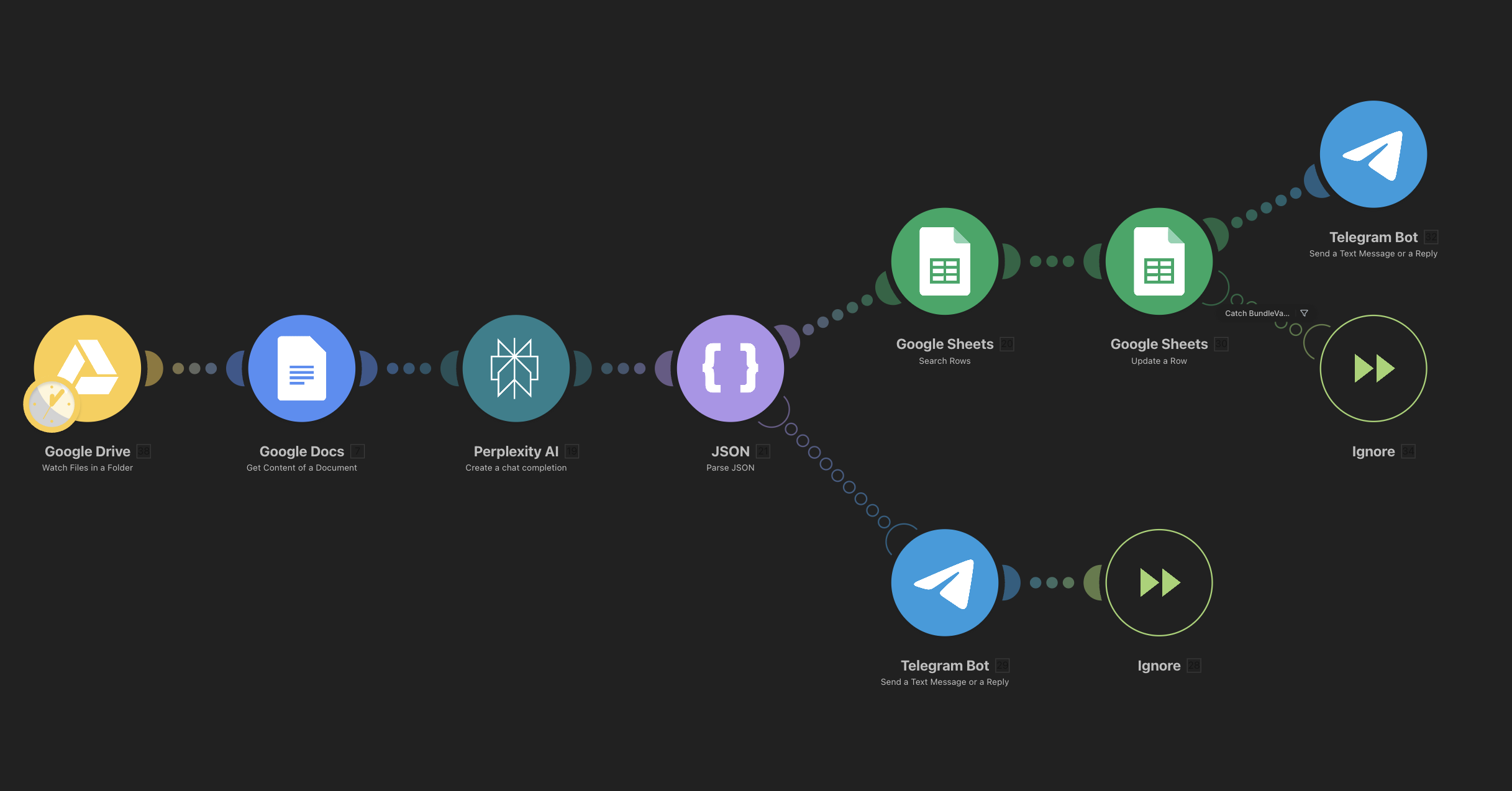
A scenario was created in Make, which starts with the Google Drive module (Watch Files in a Folder) and picks up each new document. Next, the Google Docs module retrieves the text content of the document and sends it to Perplexity AI for analysis/summarization in the required format (for example, JSON structure). The received response is parsed by the JSON module, after which the scenario accesses Google Sheets: first, it searches for the corresponding row, then records or updates the data (analysis results, status, processing date). After updating the table, the scenario sends a message to the Telegram Bot with a brief summary — for example, the document title and main conclusion — and ends through the Ignore module. For specific cases, there is a branch where the AI result is immediately sent to Telegram without being recorded in the table (quick notifications).
Result
All new documents that enter the selected Google Drive folder are automatically analyzed by AI without human involvement. Key information is stored in a structured format in Google Sheets, allowing for quick filtering, searching, and building simple analytics on the documents. The owner receives timely notifications in Telegram about each newly processed document, and the risk of missing an important file or processing it again is practically reduced to zero.
In numbers
- 1 scenario in Make that connects Google Drive, Google Docs, Perplexity AI, Google Sheets, and Telegram Bot.
- 100% of new documents in the target folder are automatically analyzed by AI and entered into Google Sheets.
- Processing each document takes from a few seconds to a minute instead of manual reading and data transfer.
- 0 duplications due to searching and updating existing rows in the table before recording new data.
It was necessary to set up a system that automatically tracks new documents in a specific Google Drive folder, analyzes their content using AI, stores the results in Google Sheets, and sends notifications in Telegram. It is important to have a history of document processing in the table and not to duplicate already processed files.
Solution
A scenario was created in Make, which starts with the Google Drive module (Watch Files in a Folder) and picks up each new document. Next, the Google Docs module retrieves the text content of the document and sends it to Perplexity AI for analysis/summarization in the required format (for example, JSON structure). The received response is parsed by the JSON module, after which the scenario accesses Google Sheets: first, it searches for the corresponding row, then records or updates the data (analysis results, status, processing date). After updating the table, the scenario sends a message to the Telegram Bot with a brief summary — for example, the document title and main conclusion — and ends through the Ignore module. For specific cases, there is a branch where the AI result is immediately sent to Telegram without being recorded in the table (quick notifications).
Result
All new documents that enter the selected Google Drive folder are automatically analyzed by AI without human involvement. Key information is stored in a structured format in Google Sheets, allowing for quick filtering, searching, and building simple analytics on the documents. The owner receives timely notifications in Telegram about each newly processed document, and the risk of missing an important file or processing it again is practically reduced to zero.
In numbers
- 1 scenario in Make that connects Google Drive, Google Docs, Perplexity AI, Google Sheets, and Telegram Bot.
- 100% of new documents in the target folder are automatically analyzed by AI and entered into Google Sheets.
- Processing each document takes from a few seconds to a minute instead of manual reading and data transfer.
- 0 duplications due to searching and updating existing rows in the table before recording new data.