Integration of meetings and transcriptions from Google Meet / Zoom with Google
Enterprise Resource Planning (ERP) 90 USD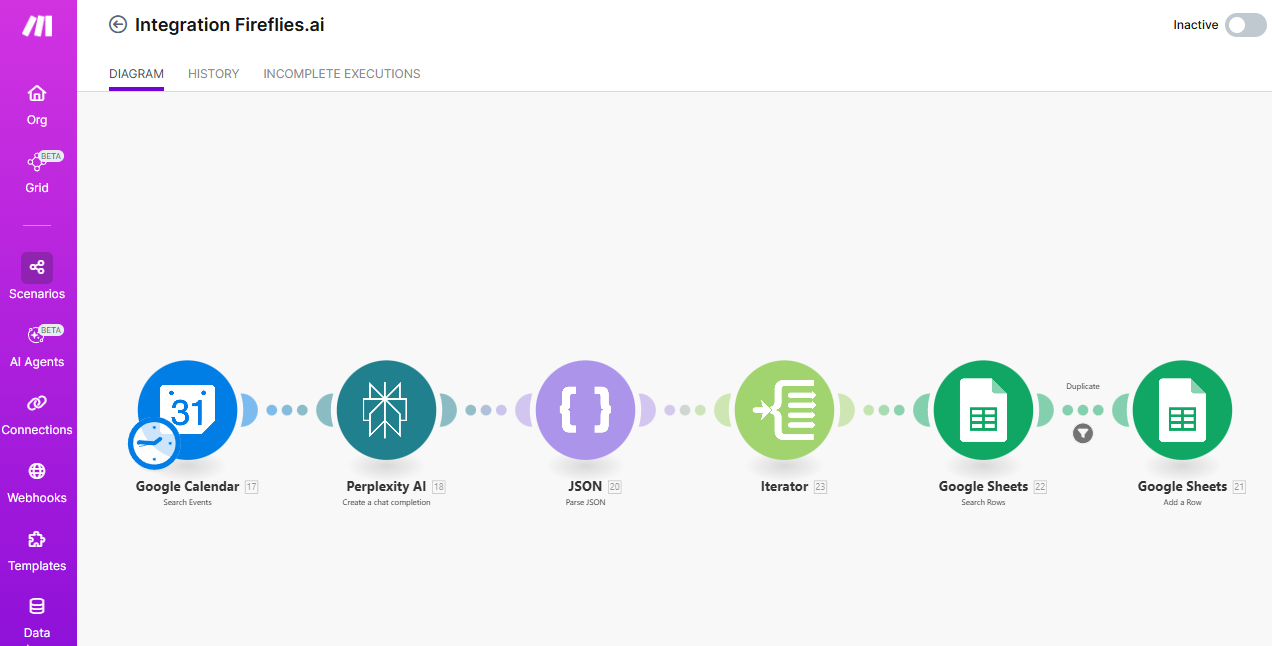
- Integration of Google Meet / Zoom meetings and transcriptions with Google Sheets: automatic accounting, participants, protocols -
1. The Google Calendar module automatically scans your calendar and looks for new events (meetings), specifically from Google Meet or Zoom;
2. Then, a request with event information is sent to Perplexity AI (for analysis or data enhancement, for example, to identify the type of meeting or obtain additional context);
3. The received response is converted by the JSON module from text or API into structured objects;
4. The iterator splits the data array by each meeting participant;
5. Through Google Sheets (Search Rows), it is determined whether this event/participant is already in the table (to avoid duplicates);
6. New unique events and participant data (name, email, time, meeting, transcribe link) are added to the Google Sheet (Google Sheets Add a Row).
The Fireflies.ai service automatically adds a link to the meeting transcription along with its identifier to the same table. This creates a simple and effective system for organizing and storing transcribed online meetings.
Main functionality:
- Event data (Google Meet/Zoom) is collected automatically – no need to copy manually;
- The table contains the names of all participants of each meeting, dates, times, links to videos, and transcriptions;
- Duplicates will be avoided through checks before adding;
* Summary: the entire history of meetings, protocols, and participants is accumulated in Google Sheets, allowing for easy searching, analysis, and use of this data for further analytics or documentation.
This integration is a universal tool for teams that actively work with online meetings and value convenience and complete order in protocols.
1. The Google Calendar module automatically scans your calendar and looks for new events (meetings), specifically from Google Meet or Zoom;
2. Then, a request with event information is sent to Perplexity AI (for analysis or data enhancement, for example, to identify the type of meeting or obtain additional context);
3. The received response is converted by the JSON module from text or API into structured objects;
4. The iterator splits the data array by each meeting participant;
5. Through Google Sheets (Search Rows), it is determined whether this event/participant is already in the table (to avoid duplicates);
6. New unique events and participant data (name, email, time, meeting, transcribe link) are added to the Google Sheet (Google Sheets Add a Row).
The Fireflies.ai service automatically adds a link to the meeting transcription along with its identifier to the same table. This creates a simple and effective system for organizing and storing transcribed online meetings.
Main functionality:
- Event data (Google Meet/Zoom) is collected automatically – no need to copy manually;
- The table contains the names of all participants of each meeting, dates, times, links to videos, and transcriptions;
- Duplicates will be avoided through checks before adding;
* Summary: the entire history of meetings, protocols, and participants is accumulated in Google Sheets, allowing for easy searching, analysis, and use of this data for further analytics or documentation.
This integration is a universal tool for teams that actively work with online meetings and value convenience and complete order in protocols.