The team was running several projects in parallel and kept tasks in different Notion pages/tables.
Problem: The manager found it difficult to see the overall workload across all directions, control deadlines and responsible parties — they had to "run" between projects manually.
Goal: To create a single task dashboard that automatically collects and synchronizes tasks from all projects while maintaining the structure within each project.
Architecture in Notion
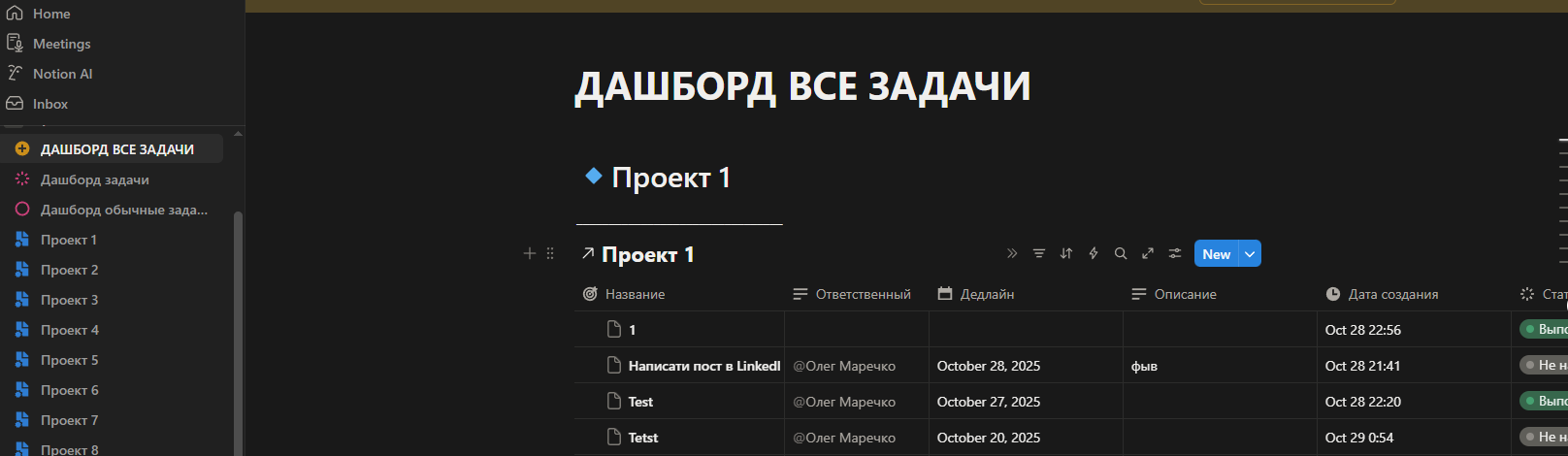
- A central database "Dashboard All Tasks" was created with main fields: task name, project, responsible person, deadline, description, creation date, status, priority, etc. [file:Screenshot_3.jpg]
- Each project (Project 1, Project 2, …) is a separate page with its own view of the same database, filtered by the field "Project = Project 1" and with its own filters/groupings (for example, by status or responsible person).
Thus, there is essentially one "single task table," and all sections "Project 1–8" are different windows into the same data.
Synchronization logic between projects
When a task is created in any project, it automatically goes into the main database, as it is created as a record in the central table (through a linked view).
- The "Project" field acts as a key that determines in which section of the dashboard it is displayed; changing the project automatically moves the task between sections without duplication.
- Updating the status, deadline, or responsible person in any of the views (in "Project 1" or in "Dashboard All Tasks") is instantly reflected everywhere, as it is the same record.
- If necessary, automatic filters and sorting can be added: for example, showing overdue tasks at the top or tasks of a specific manager for the current week.
Single dashboard for the manager
- The main page "Dashboard All Tasks" shows the overall picture across all projects: a list of tasks, responsible persons, and deadlines in one place. [file:Screenshot_3.jpg]
Here, several views can be configured:
- Kanban by status (To Do / In Progress / Done);
- table by deadlines;
- view "My Tasks" — filtered by a specific user.
This gives the manager a quick overview of the team's workload and critical tasks without switching between individual projects.
Result for the client
- One single task management center instead of scattered lists across projects.
- Automatic synchronization: any change to a task is reflected in all views, with no duplication or data discrepancies.
- A clear picture of the projects: easy to see who is busy with what, where there is a risk of deadline breaches, and which tasks are "hanging."
Problem: The manager found it difficult to see the overall workload across all directions, control deadlines and responsible parties — they had to "run" between projects manually.
Goal: To create a single task dashboard that automatically collects and synchronizes tasks from all projects while maintaining the structure within each project.
Architecture in Notion
- A central database "Dashboard All Tasks" was created with main fields: task name, project, responsible person, deadline, description, creation date, status, priority, etc. [file:Screenshot_3.jpg]
- Each project (Project 1, Project 2, …) is a separate page with its own view of the same database, filtered by the field "Project = Project 1" and with its own filters/groupings (for example, by status or responsible person).
Thus, there is essentially one "single task table," and all sections "Project 1–8" are different windows into the same data.
Synchronization logic between projects
When a task is created in any project, it automatically goes into the main database, as it is created as a record in the central table (through a linked view).
- The "Project" field acts as a key that determines in which section of the dashboard it is displayed; changing the project automatically moves the task between sections without duplication.
- Updating the status, deadline, or responsible person in any of the views (in "Project 1" or in "Dashboard All Tasks") is instantly reflected everywhere, as it is the same record.
- If necessary, automatic filters and sorting can be added: for example, showing overdue tasks at the top or tasks of a specific manager for the current week.
Single dashboard for the manager
- The main page "Dashboard All Tasks" shows the overall picture across all projects: a list of tasks, responsible persons, and deadlines in one place. [file:Screenshot_3.jpg]
Here, several views can be configured:
- Kanban by status (To Do / In Progress / Done);
- table by deadlines;
- view "My Tasks" — filtered by a specific user.
This gives the manager a quick overview of the team's workload and critical tasks without switching between individual projects.
Result for the client
- One single task management center instead of scattered lists across projects.
- Automatic synchronization: any change to a task is reflected in all views, with no duplication or data discrepancies.
- A clear picture of the projects: easy to see who is busy with what, where there is a risk of deadline breaches, and which tasks are "hanging."