Development of a plugin for complete customization of Checkout in Woocommerce
Web Programming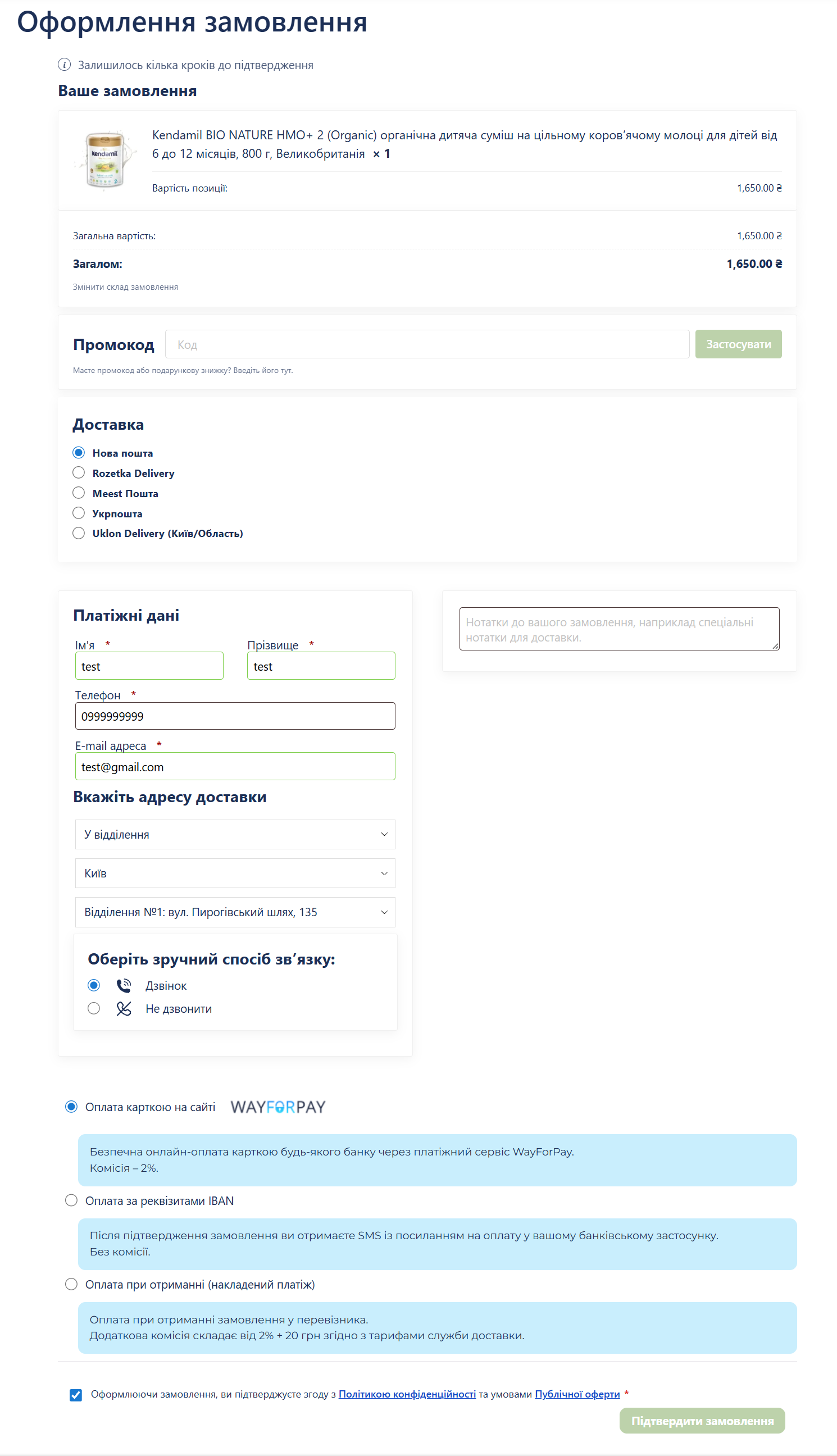
As part of the task, a deep customization of the checkout process was carried out. The main focus was on preserving the reference layout while expanding the functionality of the cart.
1. Processing multi-item orders
Cyclic output: Instead of displaying only one (first) product, a foreach loop was implemented across the entire $cart array. Now all added items are displayed at the top of the Checkout.
Quantity indication: The quantity for each item has been added. Format: × [quantity]. Style: bold image, color #1A2E58 (matching the main text).
Cost calculation: A correct subtotal for each item (considering its quantity) is displayed under each product.
2. Optimization of the Summary block
The block with the total amount and the "Change Composition" button is visually separated from the list of products but retains the overall card style.
Price duplication fixed: The total cost of the cart is now displayed only once at the end of the list.
3. UI fixes and interface "cleaning"
Removal of coupon duplicates: The standard WooCommerce message ("Have a coupon?") is completely hidden. The custom promo code form is now singular and available immediately without unnecessary clicks.
Blocking unnecessary elements: Standard WC tables and headers that overloaded the interface and caused product duplication in the delivery block are hidden via CSS.
Checkbox fix: The positioning method using float: left has been preserved. This ensures that the checkbox will always be to the left of the privacy policy text, not "flying" up on mobile devices.
4. Layout and responsiveness
Preserving the standard: All styles (shadows, 3px rounding, 20px padding) strictly adhere to this standard v3.6.7.
Mobile Friendly: The mobile grid for the promo code block has been fixed. On narrow screens, the header and form are arranged vertically without breaking the container boundaries.
Result: A clean, conversion-oriented checkout that looks like a cohesive part of the website design and works correctly with any number of products.
1. Processing multi-item orders
Cyclic output: Instead of displaying only one (first) product, a foreach loop was implemented across the entire $cart array. Now all added items are displayed at the top of the Checkout.
Quantity indication: The quantity for each item has been added. Format: × [quantity]. Style: bold image, color #1A2E58 (matching the main text).
Cost calculation: A correct subtotal for each item (considering its quantity) is displayed under each product.
2. Optimization of the Summary block
The block with the total amount and the "Change Composition" button is visually separated from the list of products but retains the overall card style.
Price duplication fixed: The total cost of the cart is now displayed only once at the end of the list.
3. UI fixes and interface "cleaning"
Removal of coupon duplicates: The standard WooCommerce message ("Have a coupon?") is completely hidden. The custom promo code form is now singular and available immediately without unnecessary clicks.
Blocking unnecessary elements: Standard WC tables and headers that overloaded the interface and caused product duplication in the delivery block are hidden via CSS.
Checkbox fix: The positioning method using float: left has been preserved. This ensures that the checkbox will always be to the left of the privacy policy text, not "flying" up on mobile devices.
4. Layout and responsiveness
Preserving the standard: All styles (shadows, 3px rounding, 20px padding) strictly adhere to this standard v3.6.7.
Mobile Friendly: The mobile grid for the promo code block has been fixed. On narrow screens, the header and form are arranged vertically without breaking the container boundaries.
Result: A clean, conversion-oriented checkout that looks like a cohesive part of the website design and works correctly with any number of products.