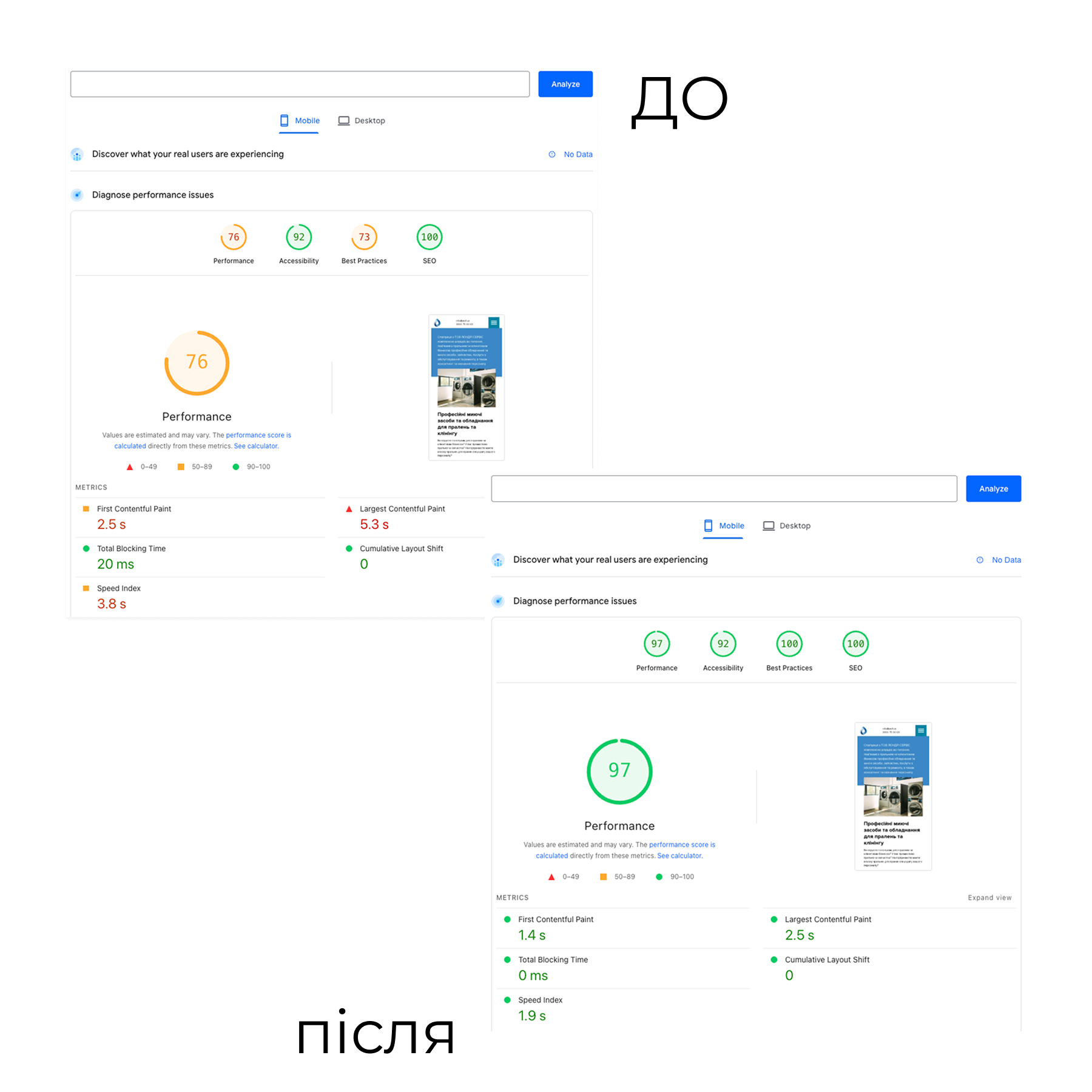
There was:
The corporate website on WordPress was slow on mobile devices:
• low PageSpeed Insights scores (LCP/FCP, “Improve image delivery”, “Render-blocking resources”);
• heavy images without responsive sizes, duplication of the same file as a background-image;
• inefficient caching (browser and server), unnecessary database requests;
• Cloudflare was connected “by default” without configured cache and optimization rules.
What was done:
• Conducted an audit using PageSpeed Insights and Chrome DevTools (LCP, CLS, waterfall, coverage).
• Configured Cloudflare:
• page rules / cache rules for static resources;
• compression and caching of images, HTML, CSS, JS;
• correct operation with WordPress cache (ignore dynamic pages, bypass for admin / cart / search, etc.).
• Redesigned image output in the theme:
• replaced direct URLs with wp_get_attachment_image() with srcset / sizes;
• added separate image sizes for heroes and catalog cards, removed duplication through background-image;
• set up lazy-loading, fetchpriority="high" only for key elements.
• Optimized critical styles and scripts:
• removed some render-blocking resources, deferred loading of secondary CSS/JS;
Result:
• Significant improvement in PageSpeed Insights scores on mobile (LCP and FCP in the “green” zone on key pages).
• Reduced size of loaded images without loss of quality.
• Faster first content display and smoother website performance under load.
The corporate website on WordPress was slow on mobile devices:
• low PageSpeed Insights scores (LCP/FCP, “Improve image delivery”, “Render-blocking resources”);
• heavy images without responsive sizes, duplication of the same file as a background-image;
• inefficient caching (browser and server), unnecessary database requests;
• Cloudflare was connected “by default” without configured cache and optimization rules.
What was done:
• Conducted an audit using PageSpeed Insights and Chrome DevTools (LCP, CLS, waterfall, coverage).
• Configured Cloudflare:
• page rules / cache rules for static resources;
• compression and caching of images, HTML, CSS, JS;
• correct operation with WordPress cache (ignore dynamic pages, bypass for admin / cart / search, etc.).
• Redesigned image output in the theme:
• replaced direct URLs with wp_get_attachment_image() with srcset / sizes;
• added separate image sizes for heroes and catalog cards, removed duplication through background-image;
• set up lazy-loading, fetchpriority="high" only for key elements.
• Optimized critical styles and scripts:
• removed some render-blocking resources, deferred loading of secondary CSS/JS;
Result:
• Significant improvement in PageSpeed Insights scores on mobile (LCP and FCP in the “green” zone on key pages).
• Reduced size of loaded images without loss of quality.
• Faster first content display and smoother website performance under load.