Successful payment = automatic renewal + Telegram notification
Enterprise Resource Planning (ERP)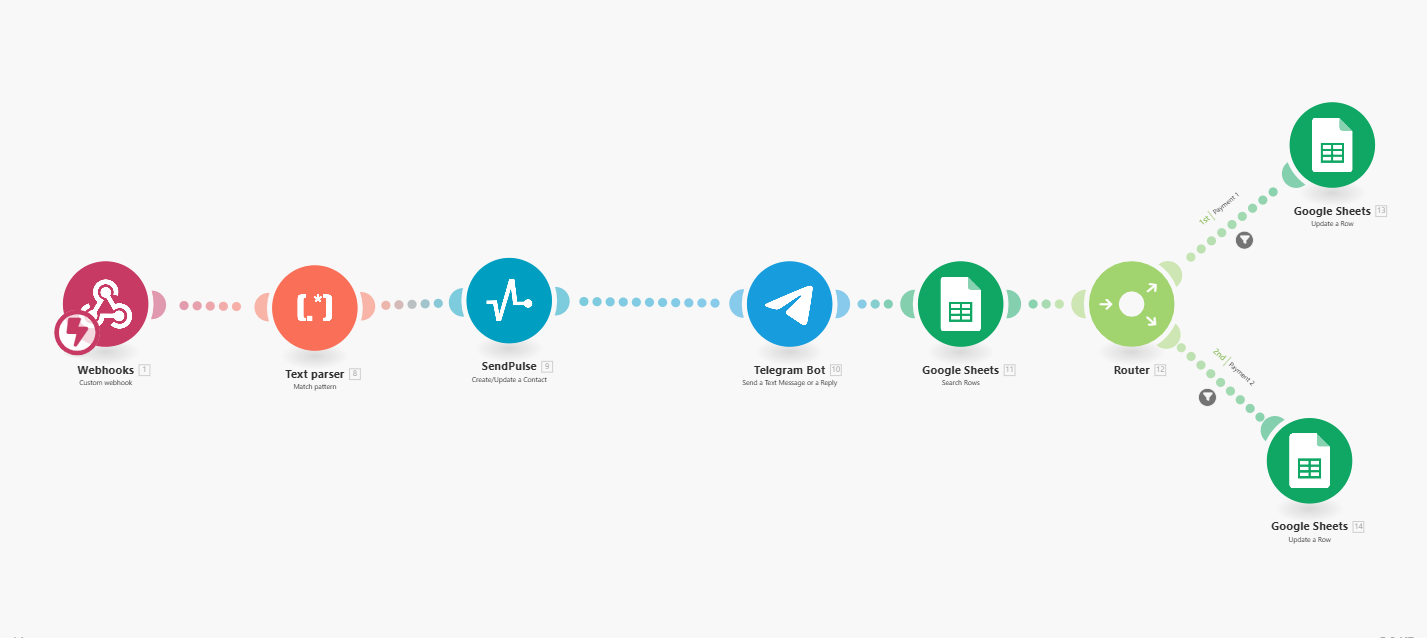
A Make chain that triggers upon successful payment through Mollie.
How automation works:
Webhook receives payment data from Mollie
Text Parser extracts necessary fields (name, email, date, payment ID)
Data is sent to:
SendPulse — updates contact status (for example, unsubscribe from reminder emails)
Telegram Bot — sends a message to the manager: “Student First Name Last Name successfully paid [date]”
Google Sheets — enters the payment date into the appropriate cell
Through Router, data branches into the first or second payment — and the correct column is updated
What this provides to the client:
The manager instantly sees who has paid for the course — directly in Telegram
All data is automatically updated in the sheets, without manual checking
SendPulse stops sending reminders to those who have already paid
How automation works:
Webhook receives payment data from Mollie
Text Parser extracts necessary fields (name, email, date, payment ID)
Data is sent to:
SendPulse — updates contact status (for example, unsubscribe from reminder emails)
Telegram Bot — sends a message to the manager: “Student First Name Last Name successfully paid [date]”
Google Sheets — enters the payment date into the appropriate cell
Through Router, data branches into the first or second payment — and the correct column is updated
What this provides to the client:
The manager instantly sees who has paid for the course — directly in Telegram
All data is automatically updated in the sheets, without manual checking
SendPulse stops sending reminders to those who have already paid