AI Assistant for automating expense accounting and document analysis
Enterprise Resource Planning (ERP) 112 USD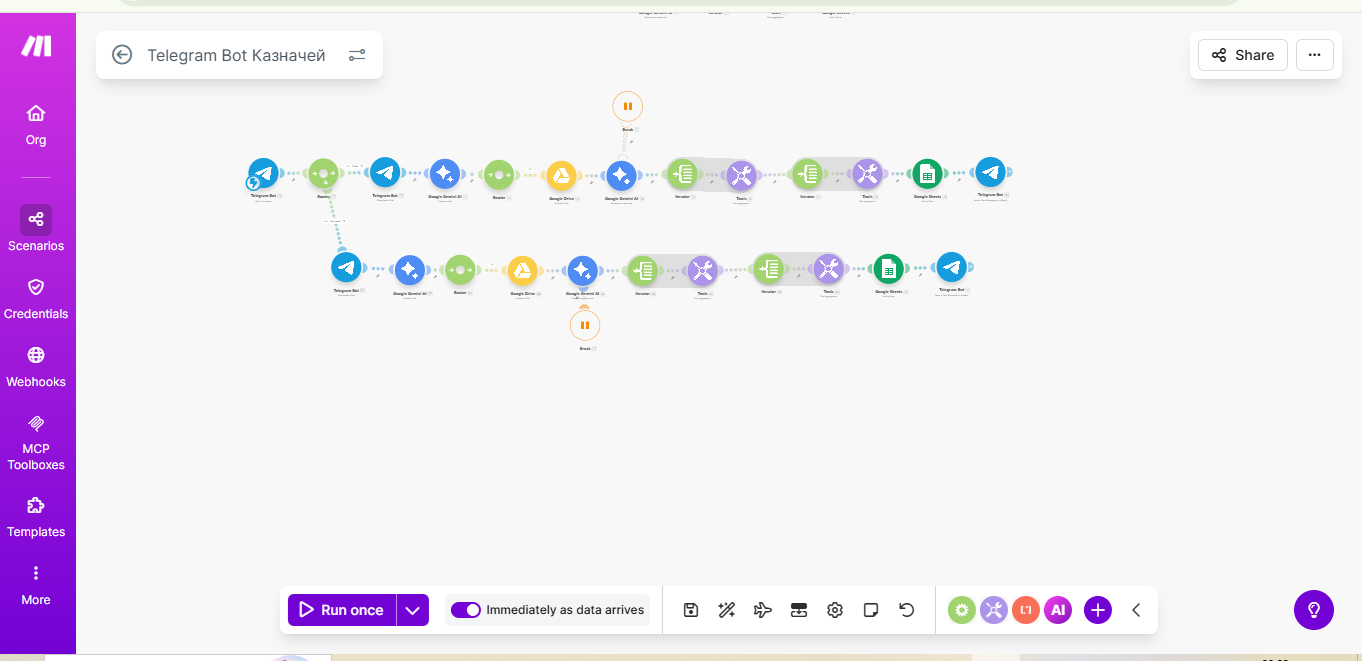
Developed an intelligent system in the format of a Telegram bot based on Make.com and Gemini, which fully automates the process of collecting, recognizing, and systematizing financial documentation. The bot acts as a link between the employee and the accounting/management, eliminating the need for manual data entry.
How does it work?
Data reception: The user sends a photo of a receipt, a PDF invoice, or a DOC report in the chat.
AI Analysis: Thanks to integration with LLM (OpenAI/Gemini/Claude), the bot recognizes text, extracts key amounts, dates, expense categories, and counterparties.
Cloud storage: Files are automatically sorted and stored in appropriate folders (e.g., Google Drive or local storage).
Reporting: Data is instantly added to a structured table (Google Sheets/Excel), which serves as a basis for budget control.
Feedback: The system notifies the user about each stage: "In processing," "Data read successfully," "Expense approved."
Key functionality:
- Multi-format support: Working with photos (OCR), PDFs, and text documents.
- Intelligent classification: AI independently determines the type of expense (business trip, office expenses, logistics, etc.).
- Status system: Transparent control over the document processing status for the sender.
- Centralized reporting: Formation of summary tables with direct links to original sources (scans of documents).
Results and benefits:
- Time savings: The processing speed of a single document has decreased from several minutes to 5-10 seconds.
- Transparency: Direct connection between a line in the report and the physical document with one click.
- Control: The ability for instant expense analysis in real-time for management decision-making.
- Scalability: Data can be easily exported to 1C, ERP systems, or used to generate new financial documents.
#Make.com #make #gemini #OCR #Telegram #node-telegram-bot-api #GoogleSheets #FastReport #reporting #AI-automation #Telegram-bot #AI #1C #Automation
How does it work?
Data reception: The user sends a photo of a receipt, a PDF invoice, or a DOC report in the chat.
AI Analysis: Thanks to integration with LLM (OpenAI/Gemini/Claude), the bot recognizes text, extracts key amounts, dates, expense categories, and counterparties.
Cloud storage: Files are automatically sorted and stored in appropriate folders (e.g., Google Drive or local storage).
Reporting: Data is instantly added to a structured table (Google Sheets/Excel), which serves as a basis for budget control.
Feedback: The system notifies the user about each stage: "In processing," "Data read successfully," "Expense approved."
Key functionality:
- Multi-format support: Working with photos (OCR), PDFs, and text documents.
- Intelligent classification: AI independently determines the type of expense (business trip, office expenses, logistics, etc.).
- Status system: Transparent control over the document processing status for the sender.
- Centralized reporting: Formation of summary tables with direct links to original sources (scans of documents).
Results and benefits:
- Time savings: The processing speed of a single document has decreased from several minutes to 5-10 seconds.
- Transparency: Direct connection between a line in the report and the physical document with one click.
- Control: The ability for instant expense analysis in real-time for management decision-making.
- Scalability: Data can be easily exported to 1C, ERP systems, or used to generate new financial documents.
#Make.com #make #gemini #OCR #Telegram #node-telegram-bot-api #GoogleSheets #FastReport #reporting #AI-automation #Telegram-bot #AI #1C #Automation