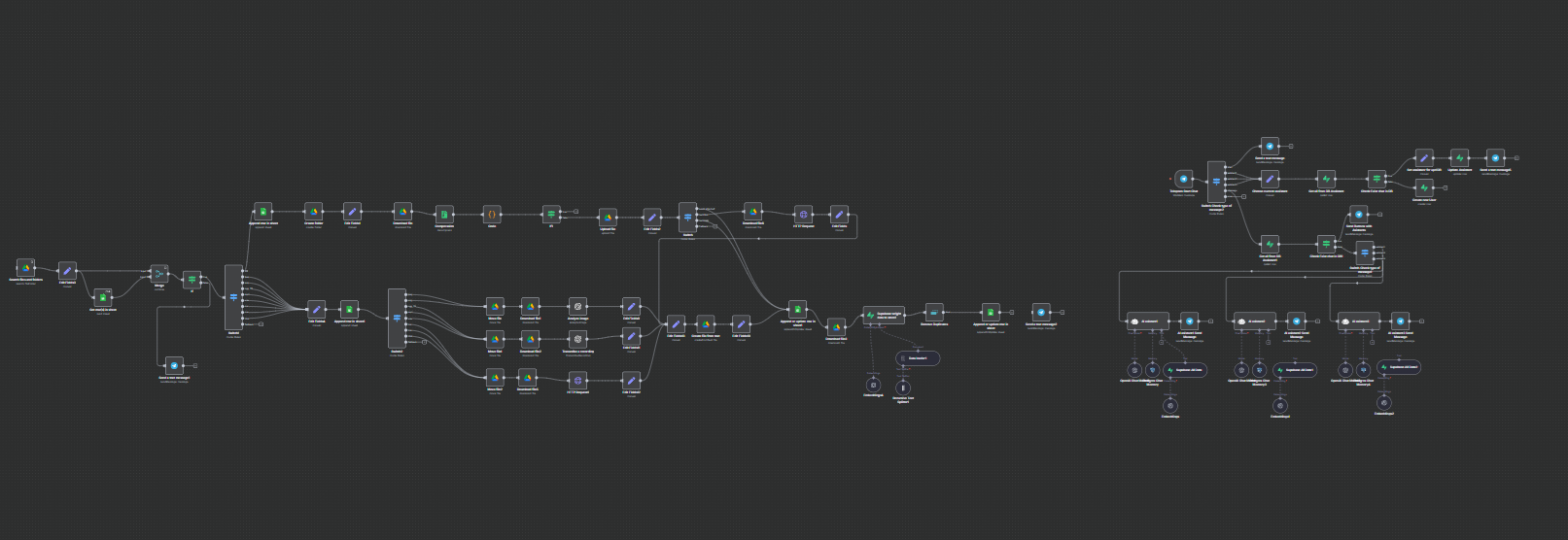
Project: Automated Content Collection System and Knowledge Base Creation Based on AI
Main Functions and Technical Implementation
1. Input Data Pipeline and Filtering:
A trigger regularly scans the specified folder on Google Drive for new files.
A reliable deduplication mechanism checks the "registry" in Google Sheets to ensure that files are processed only once. New files are immediately logged with a status of pending.
2. Modular Processing Architecture ("Router"):
The central node Switch acts as a router, directing files to different processing branches based on their MIME type. This architecture is easily scalable, allowing new file types to be added with minimal changes.
Branch for ZIP archives:
Archives are unpacked, and their contents are redirected to the beginning of the workflow for individual processing. The original archive is immediately logged and moved to avoid reprocessing.
Branch for documents (.doc, .docx, .html):
Files are sent to a specially created microservice on Node.js for parsing. The service uses specialized libraries (docx-parser, textract, node-html-parser) to extract plain text.
Branch for images (.jpeg, .png):
Images are uploaded and sent to the OpenAI Vision API (gpt-4o) with a detailed prompt for performing optical character recognition (OCR) and describing visual elements, returning structured text.
Branch for audio (.mp3, .wav, .ogg):
Audio files are sent to the OpenAI Whisper API for accurate speech-to-text transcription.
3. Standardization and Storage of Content:
The output of each processing branch (extracted text) is standardized into a single format.
A new text file containing the extracted content is created and stored on Google Drive for archiving.
Next, the text is passed to the LangChain-based pipeline:
Text Splitting: Large documents are split into smaller, partially overlapping chunks to meet the context window limitations of models for embeddings.
Embedding Creation: Each part of the text is converted into a numerical vector using OpenAI's embedding models.
Storage in Vector Database: Embeddings and associated metadata (original file ID, name, source link) are stored in the Supabase database using the pgvector extension.
4. State Management and Notifications:
After successful processing and storage in the vector database, the corresponding record in the Google Sheets registry is updated to a status of completed.
The original output file is moved from the input folder to the "Processed" archive directory on Google Drive.
Real-time notifications containing details of the processed file and a link to the original are sent to a designated Telegram chat.
5. Integration with AI Assistant (User Component):
The system includes a multi-agent Telegram bot where users can choose different "assistants."
Each assistant is configured with a unique system prompt and can be connected to its own dedicated vector database or knowledge source.
Chat history for each user and assistant is stored in a Postgres database, ensuring contextual, continuous conversations.
Technologies Used
Orchestration: n8n (self-hosted)
Data Sources and Storage: Google Drive, Google Sheets
Vector Database: Supabase (with Postgres and pgvector)
Artificial Intelligence and Embeddings: OpenAI (GPT-4o for Vision, Whisper for Audio, models for Text Embedding), LangChain.js (within n8n)
Custom Parsing: Node.js, Express.js, docx-parser, textract, node-html-parser
User Interface: Telegram Bot API
Main Functions and Technical Implementation
1. Input Data Pipeline and Filtering:
A trigger regularly scans the specified folder on Google Drive for new files.
A reliable deduplication mechanism checks the "registry" in Google Sheets to ensure that files are processed only once. New files are immediately logged with a status of pending.
2. Modular Processing Architecture ("Router"):
The central node Switch acts as a router, directing files to different processing branches based on their MIME type. This architecture is easily scalable, allowing new file types to be added with minimal changes.
Branch for ZIP archives:
Archives are unpacked, and their contents are redirected to the beginning of the workflow for individual processing. The original archive is immediately logged and moved to avoid reprocessing.
Branch for documents (.doc, .docx, .html):
Files are sent to a specially created microservice on Node.js for parsing. The service uses specialized libraries (docx-parser, textract, node-html-parser) to extract plain text.
Branch for images (.jpeg, .png):
Images are uploaded and sent to the OpenAI Vision API (gpt-4o) with a detailed prompt for performing optical character recognition (OCR) and describing visual elements, returning structured text.
Branch for audio (.mp3, .wav, .ogg):
Audio files are sent to the OpenAI Whisper API for accurate speech-to-text transcription.
3. Standardization and Storage of Content:
The output of each processing branch (extracted text) is standardized into a single format.
A new text file containing the extracted content is created and stored on Google Drive for archiving.
Next, the text is passed to the LangChain-based pipeline:
Text Splitting: Large documents are split into smaller, partially overlapping chunks to meet the context window limitations of models for embeddings.
Embedding Creation: Each part of the text is converted into a numerical vector using OpenAI's embedding models.
Storage in Vector Database: Embeddings and associated metadata (original file ID, name, source link) are stored in the Supabase database using the pgvector extension.
4. State Management and Notifications:
After successful processing and storage in the vector database, the corresponding record in the Google Sheets registry is updated to a status of completed.
The original output file is moved from the input folder to the "Processed" archive directory on Google Drive.
Real-time notifications containing details of the processed file and a link to the original are sent to a designated Telegram chat.
5. Integration with AI Assistant (User Component):
The system includes a multi-agent Telegram bot where users can choose different "assistants."
Each assistant is configured with a unique system prompt and can be connected to its own dedicated vector database or knowledge source.
Chat history for each user and assistant is stored in a Postgres database, ensuring contextual, continuous conversations.
Technologies Used
Orchestration: n8n (self-hosted)
Data Sources and Storage: Google Drive, Google Sheets
Vector Database: Supabase (with Postgres and pgvector)
Artificial Intelligence and Embeddings: OpenAI (GPT-4o for Vision, Whisper for Audio, models for Text Embedding), LangChain.js (within n8n)
Custom Parsing: Node.js, Express.js, docx-parser, textract, node-html-parser
User Interface: Telegram Bot API