Glasses for the cat
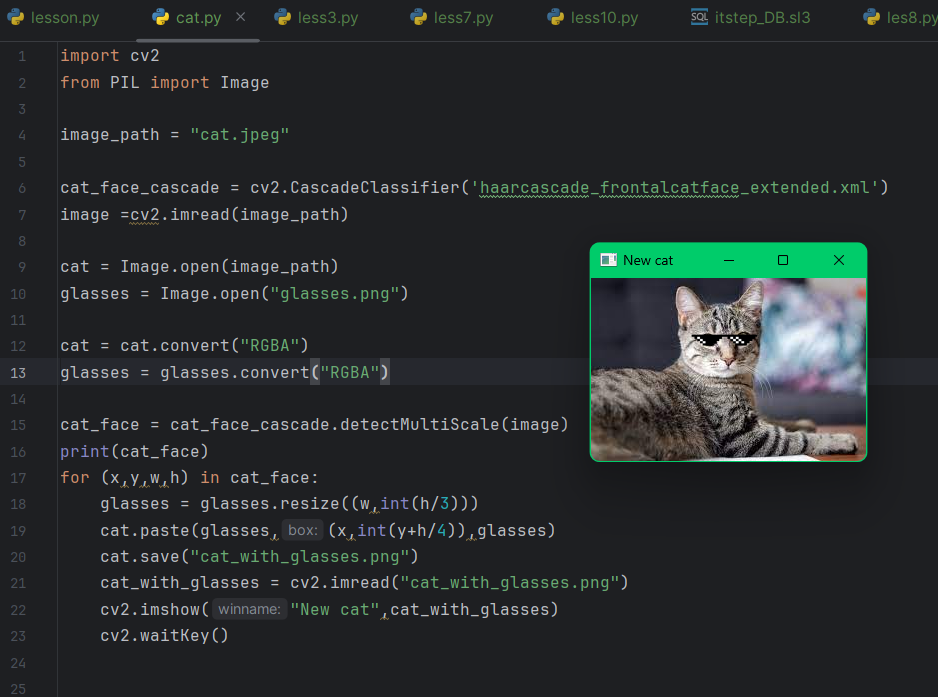
This Python script uses the OpenCV and PIL libraries to add glasses to a cat's face image.
What the script does:
Imports libraries:
cv2 — for working with images and face detection.
PIL.Image — for working with images supporting alpha channel.
Loads images:
Background image of a cat (cat.jpeg).
Glasses image with transparency (glasses.png).
Loads the cat face cascade classifier:
Uses the XML file haarcascade_frontalcatface_extended.xml for recognizing cat faces.
Converts images to RGBA format:
This is necessary to preserve transparency in the glasses image.
Detects faces in the image using detectMultiScale:
The function returns the coordinates (x, y, width, height) of each detected face.
For each detected face:
Resizes the glasses to match the face width.
Calculates the position to place the glasses.
Overlays the glasses on the cat image considering transparency.
Saves and displays the result:
The image with glasses is saved as cat_with_glasses.png.
Then it is displayed in a separate window titled "New cat".
Example usage:
This code can be used to create filters and process images, for example, to generate humorous pictures or for educational purposes related to computer vision.
What the script does:
Imports libraries:
cv2 — for working with images and face detection.
PIL.Image — for working with images supporting alpha channel.
Loads images:
Background image of a cat (cat.jpeg).
Glasses image with transparency (glasses.png).
Loads the cat face cascade classifier:
Uses the XML file haarcascade_frontalcatface_extended.xml for recognizing cat faces.
Converts images to RGBA format:
This is necessary to preserve transparency in the glasses image.
Detects faces in the image using detectMultiScale:
The function returns the coordinates (x, y, width, height) of each detected face.
For each detected face:
Resizes the glasses to match the face width.
Calculates the position to place the glasses.
Overlays the glasses on the cat image considering transparency.
Saves and displays the result:
The image with glasses is saved as cat_with_glasses.png.
Then it is displayed in a separate window titled "New cat".
Example usage:
This code can be used to create filters and process images, for example, to generate humorous pictures or for educational purposes related to computer vision.

 Sofija
  Available for hire