Client and Task
An online business in the pharmaceutical/health niche that is launching active traffic to a landing page and wants to:
- structure work with leads in KeyCRM;
- connect the website and telephony;
- provide managers with a clear system and training materials.
Goal: to set up a complete cycle of "advertising - application - call - sale - repeat sales" in KeyCRM, with automations and training for the team.
1. CRM Architecture: funnels, roles, access
Initially, we structured the sales process:
- identified funnels: "Warm funnel," "Cold," "Repeat sales" with clear statuses (new lead, presentation, handling objections, in progress, success, refusal, etc.);
- set up roles (owner, administrator, manager) and access rights, removing the ability to export the database (cards, orders, customers) from managers.
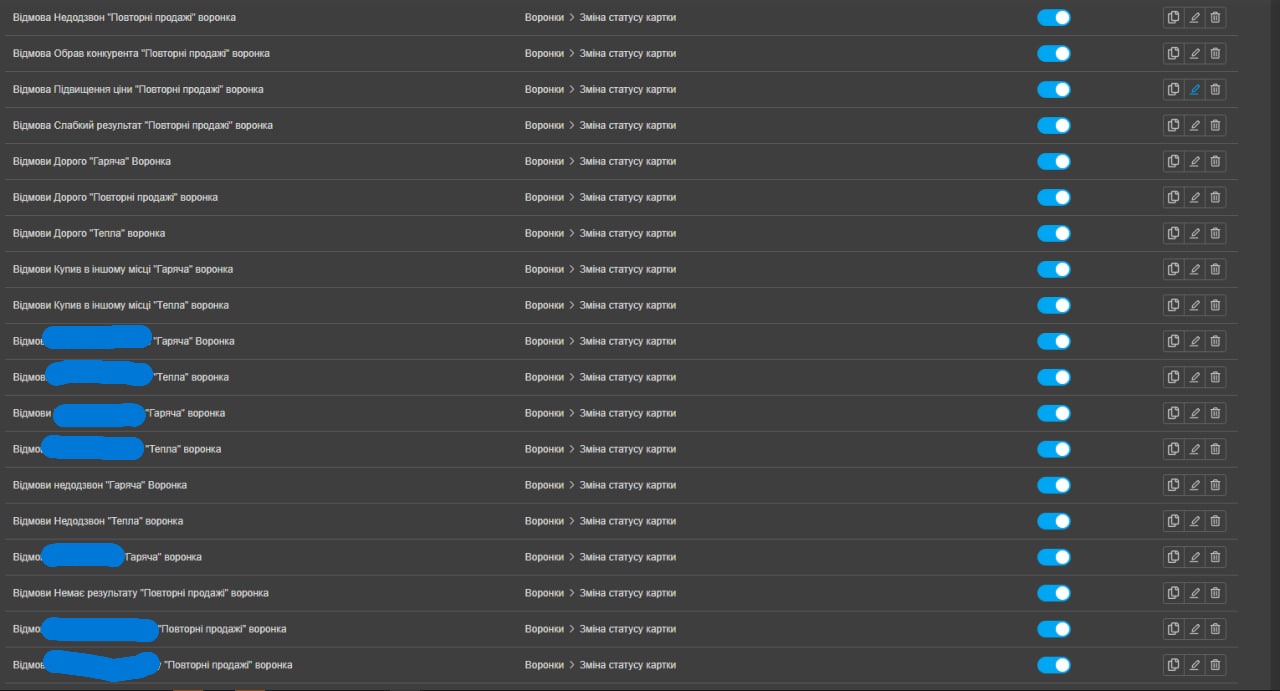
2. Built-in Automations in KeyCRM
To reduce manual routine and not lose leads, automations tied to status changes of cards were set up, rather than just time:
- when moving to the status "Presentation to Manager," a task "Check if the client received the information" is automatically created after 30 minutes;
- if a card is in the status "Handling objections" for 3 days - a task "Agree on a great offer for the client" is created;
- if a card has been in the status "In Progress" for 5 days - a reminder is sent to the manager.
3. Integration of the Website and Forms with KeyCRM
There were several scenarios for the website:
- if the website is on WordPress with forms on Elementor/another plugin: integration through ApiX Drive was proposed as a ready connector between forms and KeyCRM;
- a route was set up: form - ApiX/webhook - KeyCRM with the transfer of main fields, UTM tags, and source.
As an alternative, a variant through Make was discussed (cheaper, but with potentially less stability, which the client was warned about).
For the future, the client was offered to move the website to Weblium with full integration of Weblium - KeyCRM:
- designing the structure and forms;
- integration with CRM through scripts/connectors;
4. Connection and Integration of Unitalk Telephony
For the call center operation and call tracking, Unitalk was connected:
- the client arranged the connection and provided admin access to the cabinet;
- based on the Unitalk knowledge base, the following was set up:
- adding managers (full name, email);
- Unitalk Web Dialer extension in Chrome, so calls go directly from the browser and KeyCRM cards;
- call-tracking / ClickToCall script on the website to link calls and web activity with CRM.
- the integration of Unitalk - KeyCRM was performed according to the official instructions: calls and recordings are automatically attached to clients and deals.
5. UTM Tags and Source Analytics
Together with the client, a tracking scheme for sources was set up and discussed:
- advertising campaigns pass UTM tags in links (source, campaign, ad group, creative);
- when submitting a form or making a call, these parameters automatically go to KeyCRM;
- the manager and owner were shown where to view UTM in CRM and how to build filters by sources/campaigns.
- In case of UTM failures, it is recommended to contact CRM/telephony support, as this is a level of standard integration, not custom scenarios.
6. Team Training and Knowledge Base
To ensure that CRM operates not only "at launch" but also in daily work, several training formats were offered to the client; the full package was chosen.
It included:
- 5-8 short videos up to 7 minutes with voiceover:
- overview of KeyCRM and main blocks;
- working with leads and client cards;
- detailed logic of funnels and statuses;
- tasks and reminders;
- working with telephony;
- processing applications from the website and basic analytics;
- detailed Google Doc/Notion:
- glossary of terms (lead, card, client, payment, automation, etc.);
- description of statuses and checklists of actions for managers at each stage;
- list of all automations and explanations of what exactly happens;
- instructions on roles and access rights;
- a separate block on telephony: logging in, calls from CRM/browser, listening to recordings;
bonus: a selection of training materials on KeyCRM, sales, and scripts.
An online business in the pharmaceutical/health niche that is launching active traffic to a landing page and wants to:
- structure work with leads in KeyCRM;
- connect the website and telephony;
- provide managers with a clear system and training materials.
Goal: to set up a complete cycle of "advertising - application - call - sale - repeat sales" in KeyCRM, with automations and training for the team.
1. CRM Architecture: funnels, roles, access
Initially, we structured the sales process:
- identified funnels: "Warm funnel," "Cold," "Repeat sales" with clear statuses (new lead, presentation, handling objections, in progress, success, refusal, etc.);
- set up roles (owner, administrator, manager) and access rights, removing the ability to export the database (cards, orders, customers) from managers.
2. Built-in Automations in KeyCRM
To reduce manual routine and not lose leads, automations tied to status changes of cards were set up, rather than just time:
- when moving to the status "Presentation to Manager," a task "Check if the client received the information" is automatically created after 30 minutes;
- if a card is in the status "Handling objections" for 3 days - a task "Agree on a great offer for the client" is created;
- if a card has been in the status "In Progress" for 5 days - a reminder is sent to the manager.
3. Integration of the Website and Forms with KeyCRM
There were several scenarios for the website:
- if the website is on WordPress with forms on Elementor/another plugin: integration through ApiX Drive was proposed as a ready connector between forms and KeyCRM;
- a route was set up: form - ApiX/webhook - KeyCRM with the transfer of main fields, UTM tags, and source.
As an alternative, a variant through Make was discussed (cheaper, but with potentially less stability, which the client was warned about).
For the future, the client was offered to move the website to Weblium with full integration of Weblium - KeyCRM:
- designing the structure and forms;
- integration with CRM through scripts/connectors;
4. Connection and Integration of Unitalk Telephony
For the call center operation and call tracking, Unitalk was connected:
- the client arranged the connection and provided admin access to the cabinet;
- based on the Unitalk knowledge base, the following was set up:
- adding managers (full name, email);
- Unitalk Web Dialer extension in Chrome, so calls go directly from the browser and KeyCRM cards;
- call-tracking / ClickToCall script on the website to link calls and web activity with CRM.
- the integration of Unitalk - KeyCRM was performed according to the official instructions: calls and recordings are automatically attached to clients and deals.
5. UTM Tags and Source Analytics
Together with the client, a tracking scheme for sources was set up and discussed:
- advertising campaigns pass UTM tags in links (source, campaign, ad group, creative);
- when submitting a form or making a call, these parameters automatically go to KeyCRM;
- the manager and owner were shown where to view UTM in CRM and how to build filters by sources/campaigns.
- In case of UTM failures, it is recommended to contact CRM/telephony support, as this is a level of standard integration, not custom scenarios.
6. Team Training and Knowledge Base
To ensure that CRM operates not only "at launch" but also in daily work, several training formats were offered to the client; the full package was chosen.
It included:
- 5-8 short videos up to 7 minutes with voiceover:
- overview of KeyCRM and main blocks;
- working with leads and client cards;
- detailed logic of funnels and statuses;
- tasks and reminders;
- working with telephony;
- processing applications from the website and basic analytics;
- detailed Google Doc/Notion:
- glossary of terms (lead, card, client, payment, automation, etc.);
- description of statuses and checklists of actions for managers at each stage;
- list of all automations and explanations of what exactly happens;
- instructions on roles and access rights;
- a separate block on telephony: logging in, calls from CRM/browser, listening to recordings;
bonus: a selection of training materials on KeyCRM, sales, and scripts.