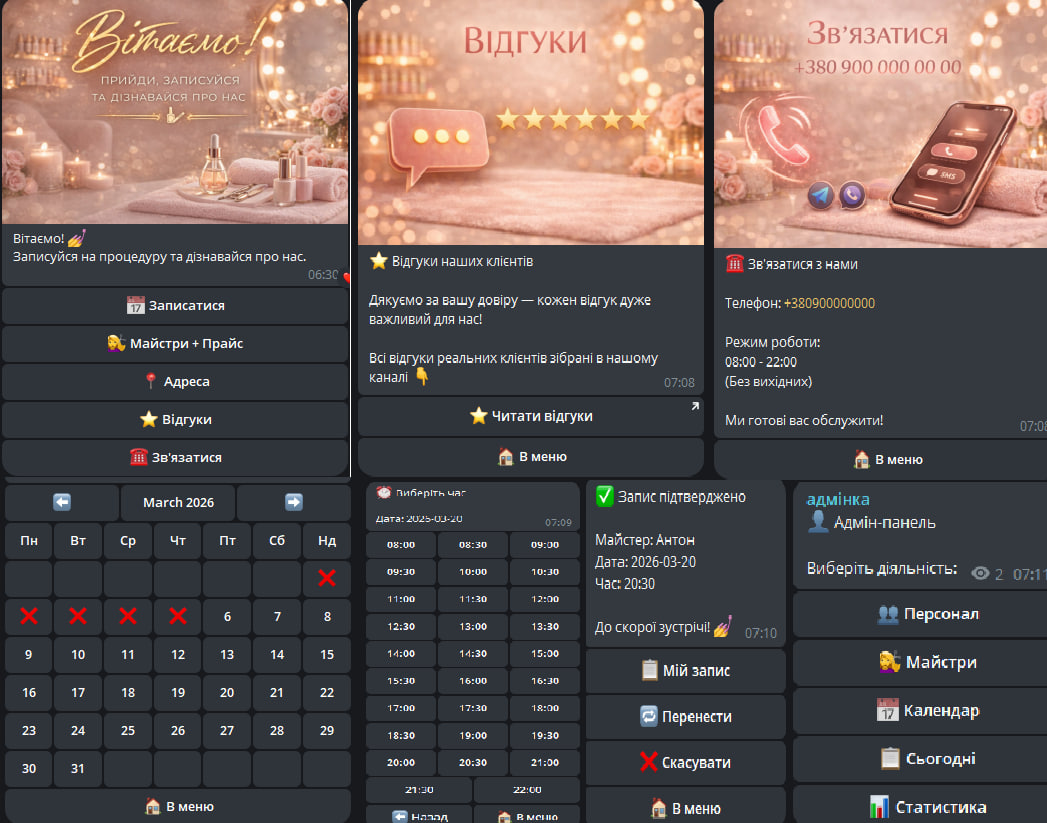
For clients
Appointment for the procedure
The client goes through a simple appointment process:
Selection of the master
Selection of the date (interactive calendar with month switching)
Selection of the time
Confirmation of the appointment
Entering the phone number
Comment (optional)
After this, an application is created, which awaits confirmation from the salon.
Managing the appointment
If the client already has an appointment, the bot shows its status and offers:
Reschedule the appointment
Cancel the appointment
Rescheduling automatically cancels the old appointment and starts a new booking process.
When canceled, the bot sends a request in the staff chat, which makes the decision.
Masters and prices
The "Masters + Prices" section shows information about each master:
Photo of the master
Specialization (manicure, pedicure, design, etc.)
Work experience
Prices for services
Button to book with the master
Salon information
The bot also contains informational sections:
Address
Photo or map of the location
Salon address
Phone number
Working hours
Reviews
Link to the channel or page with client reviews
Contact
Contact details for quick communication
Messages and reminders
The bot automatically sends the client messages:
Reminder about the upcoming procedure one day or a few hours in advance
Confirmation of successful booking or rescheduling
Informational messages about promotions or new salon services
Rating after the procedure
After the appointment is completed, the bot automatically sends the client a request for a rating.
The client can:
rate from 1 to 5
leave a text review or skip
Additional features
Filter by master specialization (for example: only pedicure, only design)
Search for available times on a specified date
Ability to rebook with a favorite master with one click
Administrative part
Salon staff receives in chat:
New appointment requests
Requests for cancellation or rescheduling of appointments
Ability to confirm or decline the appointment
Statistics on attendance and client ratings
Appointment for the procedure
The client goes through a simple appointment process:
Selection of the master
Selection of the date (interactive calendar with month switching)
Selection of the time
Confirmation of the appointment
Entering the phone number
Comment (optional)
After this, an application is created, which awaits confirmation from the salon.
Managing the appointment
If the client already has an appointment, the bot shows its status and offers:
Reschedule the appointment
Cancel the appointment
Rescheduling automatically cancels the old appointment and starts a new booking process.
When canceled, the bot sends a request in the staff chat, which makes the decision.
Masters and prices
The "Masters + Prices" section shows information about each master:
Photo of the master
Specialization (manicure, pedicure, design, etc.)
Work experience
Prices for services
Button to book with the master
Salon information
The bot also contains informational sections:
Address
Photo or map of the location
Salon address
Phone number
Working hours
Reviews
Link to the channel or page with client reviews
Contact
Contact details for quick communication
Messages and reminders
The bot automatically sends the client messages:
Reminder about the upcoming procedure one day or a few hours in advance
Confirmation of successful booking or rescheduling
Informational messages about promotions or new salon services
Rating after the procedure
After the appointment is completed, the bot automatically sends the client a request for a rating.
The client can:
rate from 1 to 5
leave a text review or skip
Additional features
Filter by master specialization (for example: only pedicure, only design)
Search for available times on a specified date
Ability to rebook with a favorite master with one click
Administrative part
Salon staff receives in chat:
New appointment requests
Requests for cancellation or rescheduling of appointments
Ability to confirm or decline the appointment
Statistics on attendance and client ratings