1. Goals and objectives of the chatbot
The main goal of the chatbot is to automate the process of scheduling procedures, providing necessary information about preparation for rehabilitation, as well as improving service quality through feedback collection.
Main tasks:
Scheduling procedures
Providing information about documents and a list of rehabilitation services
Improving service level
Collecting feedback
2. Functionalities of the chatbot
Scheduling for rehabilitation
The chatbot allows patients to schedule procedures.
Information about procedures
Provides users with a complete list of rehabilitation procedures, as well as instructions for preparing certain documents.
Collecting feedback and evaluating the center's performance
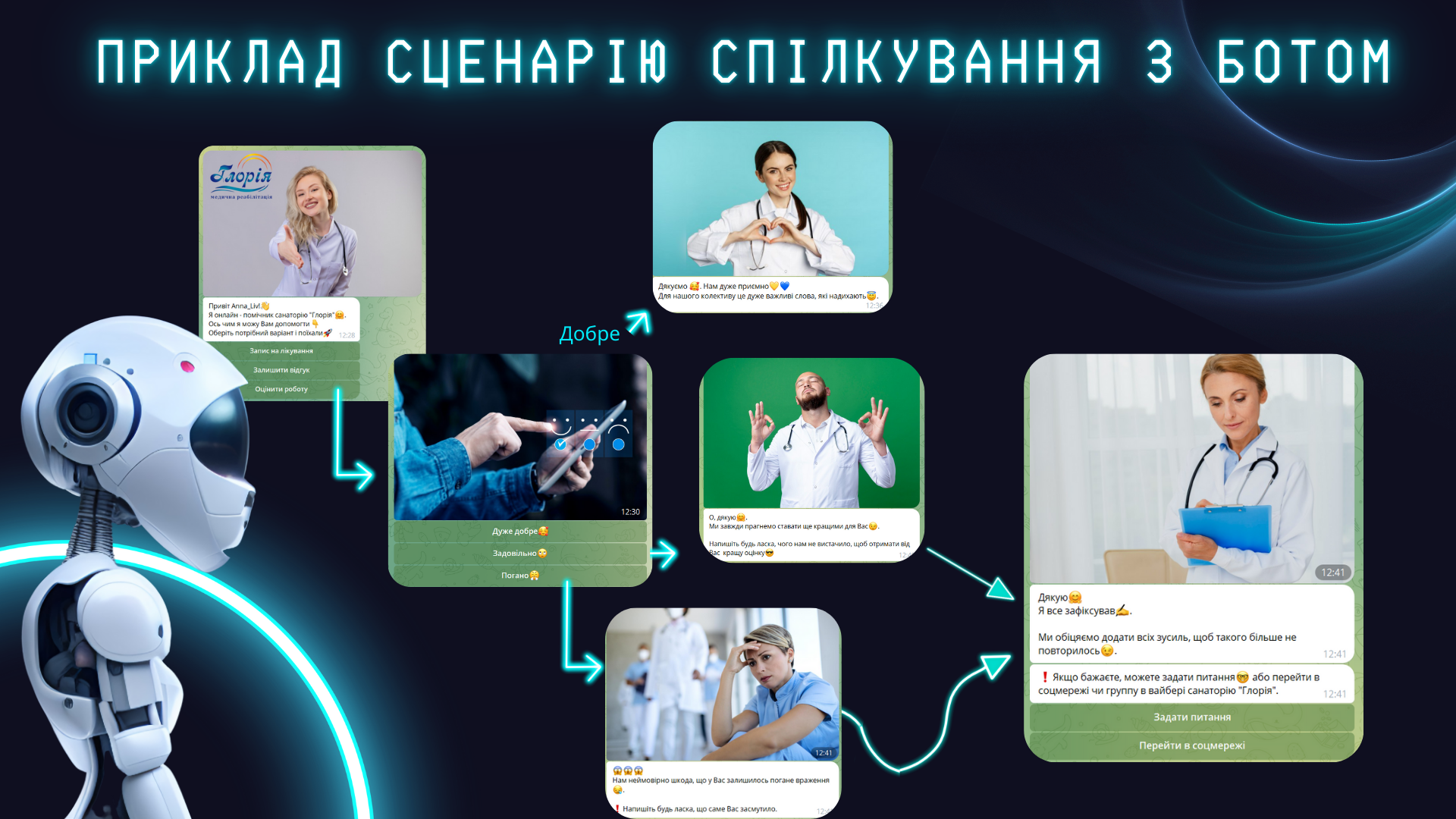
Patients can leave feedback or suggestions for service improvement. A quick evaluation of the center's performance is also available at three levels:
Good
Satisfactory
Poor
Automatic data storage in Google Sheets.
All information about appointments, evaluations, and feedback is automatically stored in Google Sheets for further analysis.
3. Design and integration
User-friendly interface – simple and understandable for any user
Support for all major platforms – the bot works in Viber, Telegram, Facebook Messenger
Steps for interacting with the bot:
The patient follows the link and joins the bot
The bot offers a menu with service options
The user receives the necessary information or schedules procedures
The bot collects contacts after the visit
4. Development technologies
Platform: the bot is created using the Smart Sender service
Integration: Viber, Telegram, Facebook Messenger
Data accounting: integration with Google Sheets for information storage
This chatbot significantly speeds up the registration process for rehabilitation and improves communication with patients, increasing their satisfaction level.
The main goal of the chatbot is to automate the process of scheduling procedures, providing necessary information about preparation for rehabilitation, as well as improving service quality through feedback collection.
Main tasks:
Scheduling procedures
Providing information about documents and a list of rehabilitation services
Improving service level
Collecting feedback
2. Functionalities of the chatbot
Scheduling for rehabilitation
The chatbot allows patients to schedule procedures.
Information about procedures
Provides users with a complete list of rehabilitation procedures, as well as instructions for preparing certain documents.
Collecting feedback and evaluating the center's performance
Patients can leave feedback or suggestions for service improvement. A quick evaluation of the center's performance is also available at three levels:
Good
Satisfactory
Poor
Automatic data storage in Google Sheets.
All information about appointments, evaluations, and feedback is automatically stored in Google Sheets for further analysis.
3. Design and integration
User-friendly interface – simple and understandable for any user
Support for all major platforms – the bot works in Viber, Telegram, Facebook Messenger
Steps for interacting with the bot:
The patient follows the link and joins the bot
The bot offers a menu with service options
The user receives the necessary information or schedules procedures
The bot collects contacts after the visit
4. Development technologies
Platform: the bot is created using the Smart Sender service
Integration: Viber, Telegram, Facebook Messenger
Data accounting: integration with Google Sheets for information storage
This chatbot significantly speeds up the registration process for rehabilitation and improves communication with patients, increasing their satisfaction level.