Make (Integromat) – Automated Invoice Generation with Zoho
Goal:
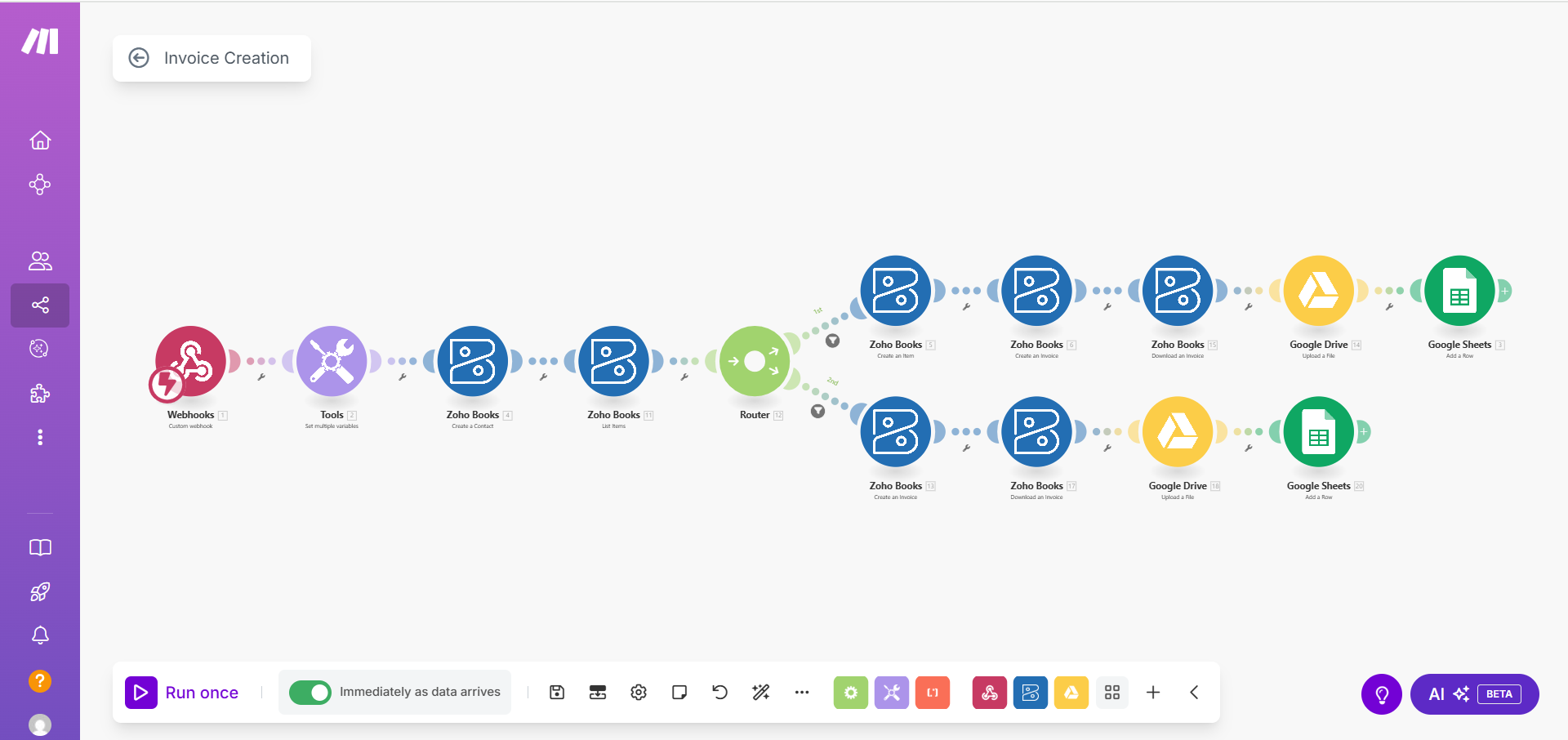
Create a fully automated process for generating and managing invoices using Zoho Invoice, Google Drive, and Google Sheets, eliminating manual operations and ensuring fast, error-free invoice creation.
Process:
1. Trigger: Receiving a webhook with invoice data.
2. Client Creation: A new contact is automatically created in Zoho Invoice.
3. Item/Service Check: If the item doesn’t exist, the system creates it; if it does, the existing one is used.
4. Invoice Generation: An invoice is created in Zoho Invoice and automatically exported as a PDF.
5. Upload to Drive: The PDF invoice is uploaded to the appropriate folder in Google Drive.
6. Logging: Key invoice data is added to Google Sheets for tracking and reporting.
Who this solution is for:
Online businesses, accountants, finance teams, and service companies that need fast, accurate invoicing and streamlined record-keeping without manual document preparation.
What problem it solves:
It automates invoice creation and minimizes manual routine tasks such as creating clients, adding products, generating PDFs, and maintaining spreadsheets. It reduces errors and significantly speeds up financial workflows.
Result:
A fully automated invoice-generation pipeline — from receiving data to generating a PDF, saving it to Google Drive, and logging it in Google Sheets. The process runs quickly, reliably, and without the need for human involvement.
#Automation #Make.com #ZohoInvoice #GoogleDrive #GoogleSheets
Create a fully automated process for generating and managing invoices using Zoho Invoice, Google Drive, and Google Sheets, eliminating manual operations and ensuring fast, error-free invoice creation.
Process:
1. Trigger: Receiving a webhook with invoice data.
2. Client Creation: A new contact is automatically created in Zoho Invoice.
3. Item/Service Check: If the item doesn’t exist, the system creates it; if it does, the existing one is used.
4. Invoice Generation: An invoice is created in Zoho Invoice and automatically exported as a PDF.
5. Upload to Drive: The PDF invoice is uploaded to the appropriate folder in Google Drive.
6. Logging: Key invoice data is added to Google Sheets for tracking and reporting.
Who this solution is for:
Online businesses, accountants, finance teams, and service companies that need fast, accurate invoicing and streamlined record-keeping without manual document preparation.
What problem it solves:
It automates invoice creation and minimizes manual routine tasks such as creating clients, adding products, generating PDFs, and maintaining spreadsheets. It reduces errors and significantly speeds up financial workflows.
Result:
A fully automated invoice-generation pipeline — from receiving data to generating a PDF, saving it to Google Drive, and logging it in Google Sheets. The process runs quickly, reliably, and without the need for human involvement.
#Automation #Make.com #ZohoInvoice #GoogleDrive #GoogleSheets

 Kharkiv
  Available for hire
 Offer work