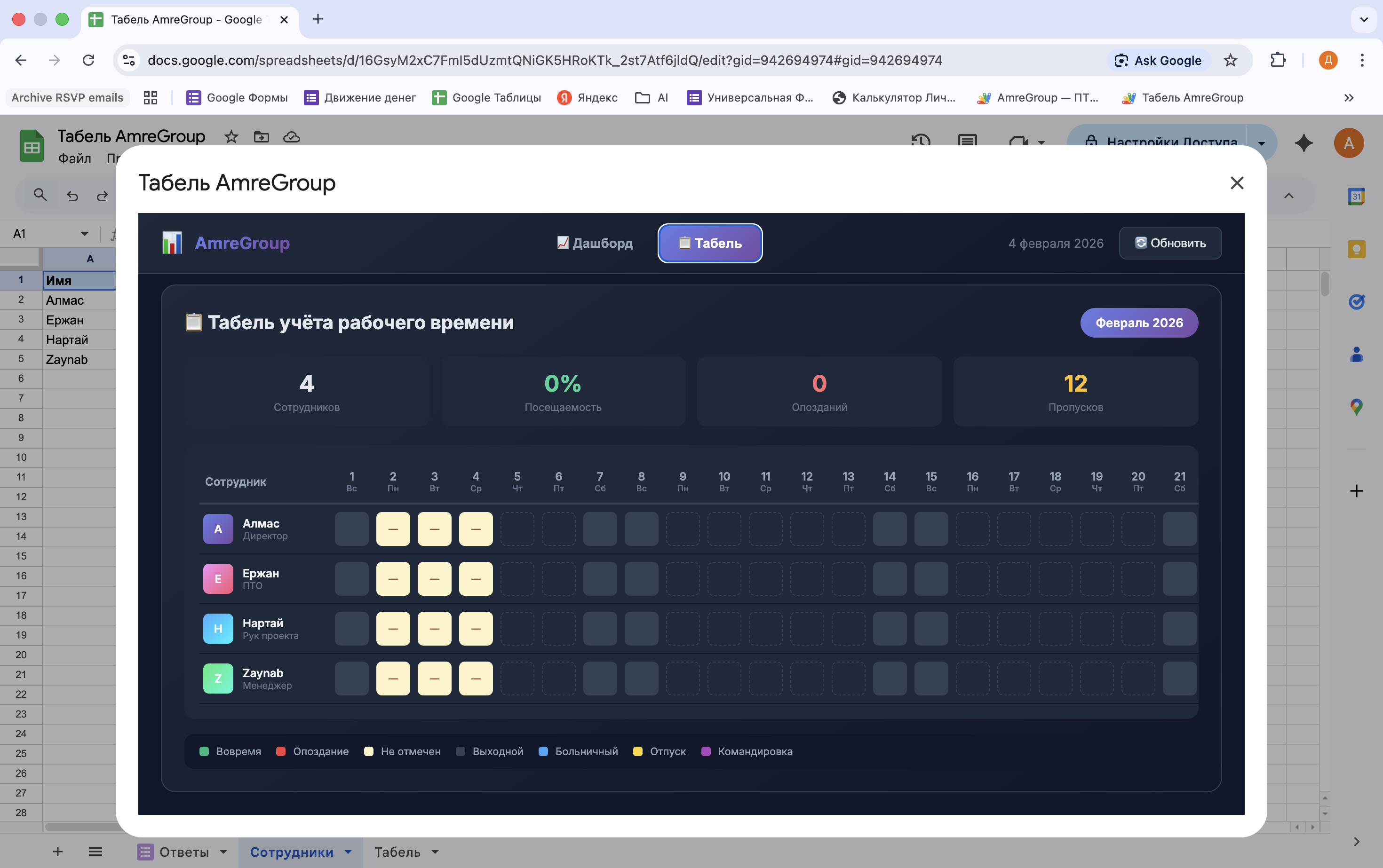
Development and implementation of a time tracking system for a distributed team. The solution allowed for a complete abandonment of paper logs and provided the manager with instant control over discipline at the sites.
What has been implemented (Action):
Check-in interface: Employees record their arrival through Google Forms. The data is instantly processed by a script.
Intelligent Backend (Apps Script): The system automatically checks the timestamp against the individual schedule of the employee (takes into account different shifts and personal schedules).
Instant control via Telegram: The bot immediately sends a message to the manager: who arrived, the exact time, and status (on time or late).
Morning "Report": Automatic dispatch at 9:10 with a summary: who is present, who has not checked in yet, and the total number of late arrivals for the morning.
Auto-generation of the timesheet: The system automatically creates a sheet for the new month, colors the cells, and pulls data from the form responses.
Absence tracking: Functionality has been added for marking sick leaves, vacations, and business trips through a custom menu in the sheet itself.
Technical stack:
Google Apps Script (JavaScript): Processing logic, triggers, and calculations.
Telegram Bot API: Integration for notifications and reports.
Google Sheets: Used as a database and interface for accounting.
Result (Value):
Transparency: The manager sees the real picture of attendance in real time, without being on site.
Discipline: Automatic recording of late arrivals increased executive discipline by 25% in the first month.
Time savings: Collecting and compiling the timesheet for accounting now happens automatically, saving up to 10 working hours for the manager per month.
What to attach as photos/files:
Screenshot from Telegram: Take a screenshot where the bot writes: LATE | Nartai | 09:15. This is the most illustrative part.
Screenshot of the "Timesheet": Show the sheet where the cells are colored in different colors (green, red, blue for sick leaves).
Screenshot of the code: Take a nice screenshot of the function sendMorningReport or onFormSubmit. This will confirm your qualifications as a developer.
What has been implemented (Action):
Check-in interface: Employees record their arrival through Google Forms. The data is instantly processed by a script.
Intelligent Backend (Apps Script): The system automatically checks the timestamp against the individual schedule of the employee (takes into account different shifts and personal schedules).
Instant control via Telegram: The bot immediately sends a message to the manager: who arrived, the exact time, and status (on time or late).
Morning "Report": Automatic dispatch at 9:10 with a summary: who is present, who has not checked in yet, and the total number of late arrivals for the morning.
Auto-generation of the timesheet: The system automatically creates a sheet for the new month, colors the cells, and pulls data from the form responses.
Absence tracking: Functionality has been added for marking sick leaves, vacations, and business trips through a custom menu in the sheet itself.
Technical stack:
Google Apps Script (JavaScript): Processing logic, triggers, and calculations.
Telegram Bot API: Integration for notifications and reports.
Google Sheets: Used as a database and interface for accounting.
Result (Value):
Transparency: The manager sees the real picture of attendance in real time, without being on site.
Discipline: Automatic recording of late arrivals increased executive discipline by 25% in the first month.
Time savings: Collecting and compiling the timesheet for accounting now happens automatically, saving up to 10 working hours for the manager per month.
What to attach as photos/files:
Screenshot from Telegram: Take a screenshot where the bot writes: LATE | Nartai | 09:15. This is the most illustrative part.
Screenshot of the "Timesheet": Show the sheet where the cells are colored in different colors (green, red, blue for sick leaves).
Screenshot of the code: Take a nice screenshot of the function sendMorningReport or onFormSubmit. This will confirm your qualifications as a developer.