3D Modeling
3481-
Bedroom 01
3D Modeling
Bedroom
-
Retoucher Olena Sinotova
3D Modeling
example of visualization, wardrobe in the interior. In Photoshop
-
33 USD 3D Model of a watch
3D Modeling
a clock like a clock what else is there to say
-
4 USD M4A4 Automatic
3D Modeling
M4A4 automatic from shooter games
-
3D modeling product
3D Modeling
-
-
3D Model product VFX animation
3D Modeling
-
-
Design of a children's room
3D Modeling
#interiordesigner #visualization
-
3D Branding
3D Modeling
Development of 3D visualizations for business and logo
#logo #3d #3dmodels #3dvizualization #visualisation #візуалізація #брендинг
-
Visualization of the wardrobe
3D Modeling
Visualization of the wardrobe
-
22 USD 3D model of the MINI Cooper 3 Door car
3D Modeling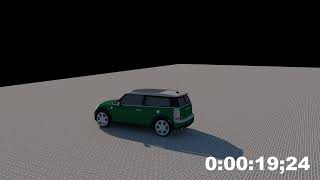
To create a 3D model of the MINI Cooper 3 Porte, a step-by-step approach is required, which includes the following main steps:
1. Gathering references and preparation
Gathering data: Photos, drawings, technical specifications of the MINI Cooper 3 Porte.
… Defining scale: Using real dimensions of the car for accuracy.
Analyzing shapes: Studying unique design elements such as characteristic body lines, headlight shapes, grille, and other details.
2. Creating the framework (Blocking)
Creating the basic shape: Using primitives (cubes, cylinders) to form the overall geometry.
Breaking into parts: Modeling individual elements such as the body, doors, hood, windows, wheels.
3. Detailing
Body: Drawing details of the body, including curves and aerodynamic elements.
Interior: Modeling the cabin considering seats, dashboard, steering wheel, and other elements.
Wheels and tires: Creating detailed rims and tire textures.
4. Texturing and materials
UV mapping: Preparing the model for texture application.
Materials: Applying various materials for realistic representation of metal, glass, plastic, and leather.
Textures: Using textures to create realistic surfaces (body paint, interior elements).
5. Lighting and rendering
Setting up lights: Adding studio or natural lighting to highlight shapes and materials.
Rendering: Final rendering of the model with high settings to achieve a photorealistic image.
6. Post-processing
Image editing: Color correction, contrast adjustment, adding effects in image processing software (e.g., Photoshop).
This process requires the use of professional 3D modeling software such as Blender, Maya, 3ds Max, or Cinema 4D, and texturing in programs like Substance Painter.
-
Visualization of the wardrobe
3D Modeling
Visualization of the wardrobe
-
100 USD Electrical equipment
3D Modeling
Modeling and visualization of electrical equipment


-
97AI & Machine Learning
-
5AR & VR Development
-
235Bot Development
-
63C & C++
-
84C#
-
265Content Management Systems
-
95Cryptocurrency & Blockchain
-
177Data Parsing
-
70Databases & SQL
-
121Desktop Apps
-
44Embedded Systems & Microcontrollers
-
150Gaming Apps
-
3232HTML & CSS
-
27Java
-
293Javascript and Typescript
-
485PHP
-
224Python
-
82Testing & QA
-
2452Web Programming

-
34813D Modeling
-
362AI Art
-
2280Artwork
-
7250Banners
-
2051Business Card Design
-
56Clothing design
-
2022Corporate Style
-
211Exhibition Booth Design
-
572Icons & Pixel Graphics
-
11654Illustrations & Drawings
-
399Industrial Design
-
644Infographics
-
967Interface Design (UI/UX)
-
6051Interior Design
-
13680Logo Design
-
887Mobile Apps Design
-
1535Outdoor Advertising
-
4147Packaging and label design
-
1006Presentations
-
9166Print Design
-
2088Social Media Page Design
-
43Type & Font Design
-
4029Vector Graphics
-
6VR & AR Design
-
10520Web Design

-
10AI Consulting
-
1225Content Management
-
38Customer Support
-
20Cybersecurity & Data Protection
-
56Data Processing
-
75Enterprise Resource Planning (ERP)
-
101Information Gathering
-
667Online Stores & E-commerce
-
12Payment Systems Integration
-
93Tuition
-
5000Website Development
-
168Website Maintenance


-
12App Store Optimization (ASO)
-
978Contextual Advertising
-
250Email Marketing
-
221Lead Generation & Sales
-
38Link Building
-
52Marketing Research
-
1Public Relations (PR)
-
1192Search Engine Optimization (SEO)
-
34Search Engine Reputation Management (SERM)
-
651Social Media Advertising
-
838Social Media Marketing (SMM)
-
6Teaser Advertisements
-
344Website SEO Audit


